PRD 700
Settings
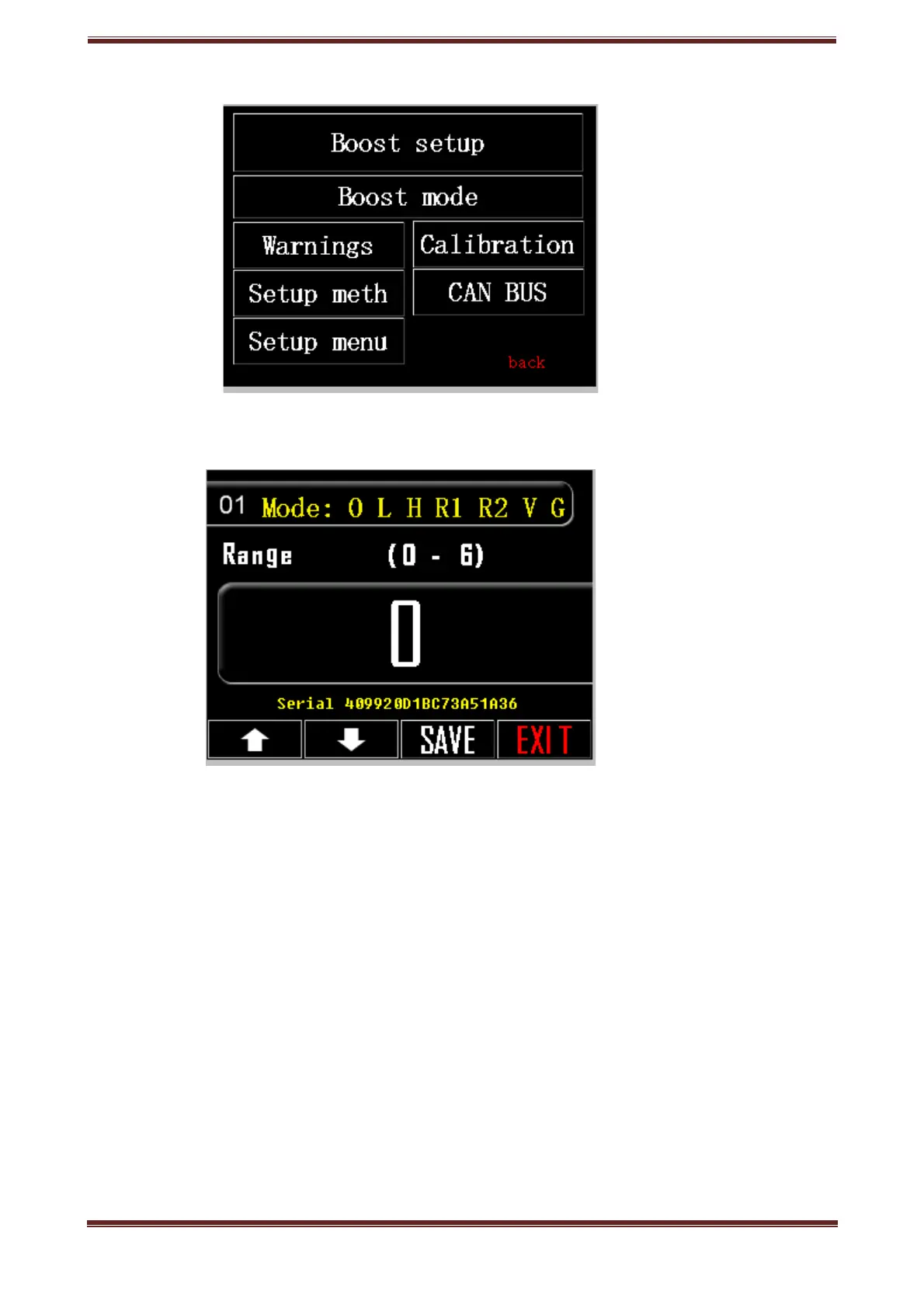
1. Mode 0:OFF 1:L0W 2:HI 3:RPM1 4:RPM2 5:VSS 6: GEAR
1. Press setting key, up and right on the screen (tool icon)
2. Choose option 01.
3. Press the box with the listed number and the number keypad will pop up.
3.1. If you want the boost controller not to work ("mechanical" pressure)
set duty cycle, press 0.
3.2. If you prefer your boost controller to work based on pre-regulated LOW
set duty cycle, press 1.
3.3. If you prefer your boost controller to work based on pre-regulated HIGH
set duty cycle, press 2.
3.4. If you prefer your boost controller to work based on pre-regulated
RPM1 duty cycle table, press 3.
3.5. If you prefer your boost controller to work based on pre-regulated
RPM2 duty cycle table, press 4.
3.6. If you prefer your boost controller to work based on pre-regulated VSS
duty cycle table, press 5.
3.7. If you prefer your boost controller to work based on pre-regulated
GEAR duty cycle table, press 5.
Prd.com.gr - PRD 700 Manual page 6



 To Next Page