20
2.6 Connections and Interfaces
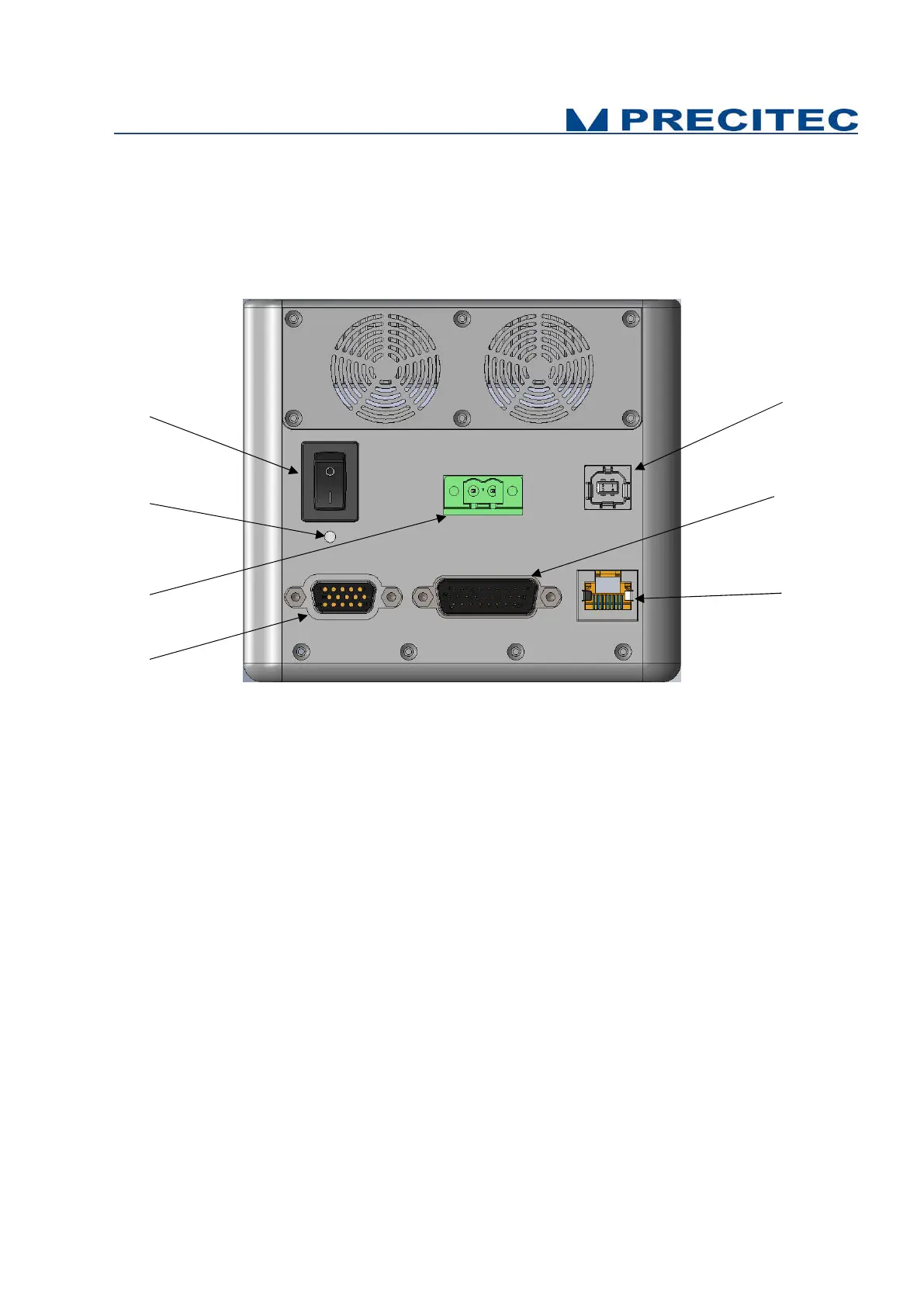
All of the connection ports for the sensor unit are located at the rear of the system (see Fig 2-9):
1. ON / OFF Switch button,
2. Power supply jack
3. Serial interface RS232, USB port,
4. Ethernet interface, RJ45 port
5. Encoder-Input, Sub-D26 male connector
6.
Trigger Input/Output + RS422, Sub-D15 female
connector
7. Status LED
Fig. 2-9: CHRocodile CLS rear panel: Connections
2.6.1 ON / OFF Switch button
The CHRocodile CLS has a Power switch ON / OFF button.
2.6.2 Power supply jack
The CHRocodile CLS has two pluggable screw terminal for power supply with 24V
DC
+/-10%.
Connect the set of power cable supply associated to the Power Supply Adapter (100-240VAC to
24V
DC
+/-10%) delivered with the CHRocodile CLS unit.


 To Next Page