Getting Started 17
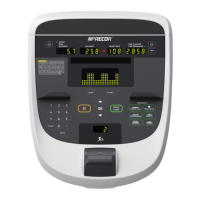
Number Part Name Details
Options - All equipment
except AMT
• Press to enter Goals,
Language, Weight, Age,
and Target Heart Rate
information, More Options
• Press More Metrics to
view additional metric
information for all
equipment except the
AMT
Metrics:
• Percent Complete
• Time in Zone
• Segment Time Remaining
• Average Speed
• Pace - Treadmill only
• Calories per Minute
• Calories per Hour
• WATTS
• METS
• Target HR
• Average HR
• Elevations - Treadmill and
climber only
• Stride Length - AMT only
• Show All
Metrics key- AMT only Use to view Metric information
on AMT
Back Returns user to the previous
screen
Pause Use to momentarily stop
machine during a workout
OK and Up/Down
arrows
Used to navigate options and
settings
Speed or Intensity
Indicator
AMT, bike, treadmill, EFX
(single), and EFX (dual)
Incline or Resistance
Indicator
Treadmill, EFX (dual), and
climber


 To Next Page