MAX-PRO Operator Manual
Original Printed in English
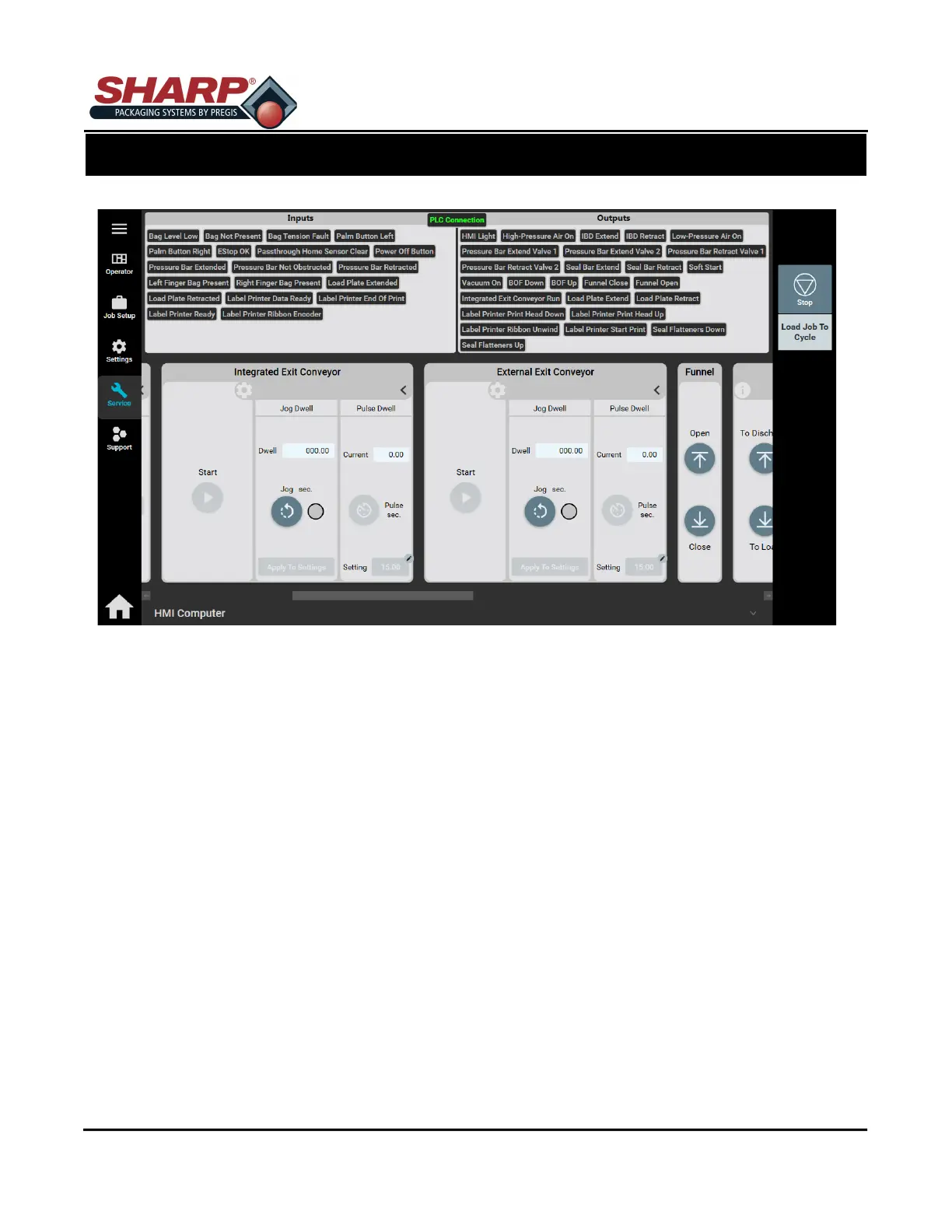
SERVICE SCREEN - INTEGRATED/EXTERNAL EXIT CONVEYOR.
Start: Pressing this button will turn the Conveyor ON. Press button again to stop.
JOG DWELL
Dwell: Time that conveyor will run.
Jog Sec.: Press and hold to run exit conveyor until released. This will changed the Dwell.
Apply To Settings: Time that jog was pressed can be set to job dwell setting. Job saves automatically,
but is not loaded.
PULSE DWELL
Current: Press to run conveyor at job setting.
Pulse Sec: Press to run conveyor at job setting.
Setting: Time for conveyor to run when Pulse Sec. is pushed. Changing this setting will save to job, but
not load the job.
SCREEN NAVIGATION
SECTION 2 - CONTROLS
2-17



 To Next Page