12
Premium V12 Voice model enters STEP 4 and STEP 5 for speaking
volume setting and language setting mode; for Premium V12 model
please go to STEP 6 directly.
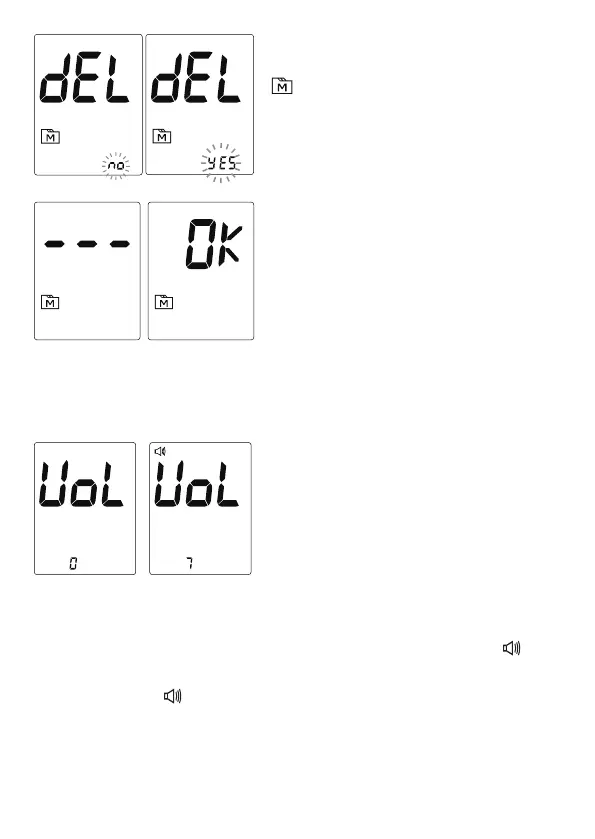
Volume 0 indicates that the speaking function is turned off,and “ ”will
not display during testing. Volume 1 to 7 indicates speaking volume from
low to high, and “ ”willbedisplayedthroughoutthetesting.
4. Setting the speaking volume (For
Premium V12 Voice only)
Thereareseven(7)speakingvolume
options to choose from. Press M Button
until the desired speaking volume
appears. To confirm your selection, press
SET Button.
3. Deleting the memory
With“yes/no”flashingand“dEL”and
“ ”symbolonthedisplay,pressM
Button to switch decision.
If you would not delete the memory, press
SETButtonwhenflashing“no”ondisplay.
Whenflashing“yes”ondisplay,pressSET
Button to delete all internal records.
LCDwilldisplay“---“and“OK”afterall
records are deleted, press SET Button to
continue the settings.



 To Next Page