13
5. Choosing a Language (For Premium
V12 Voice only)
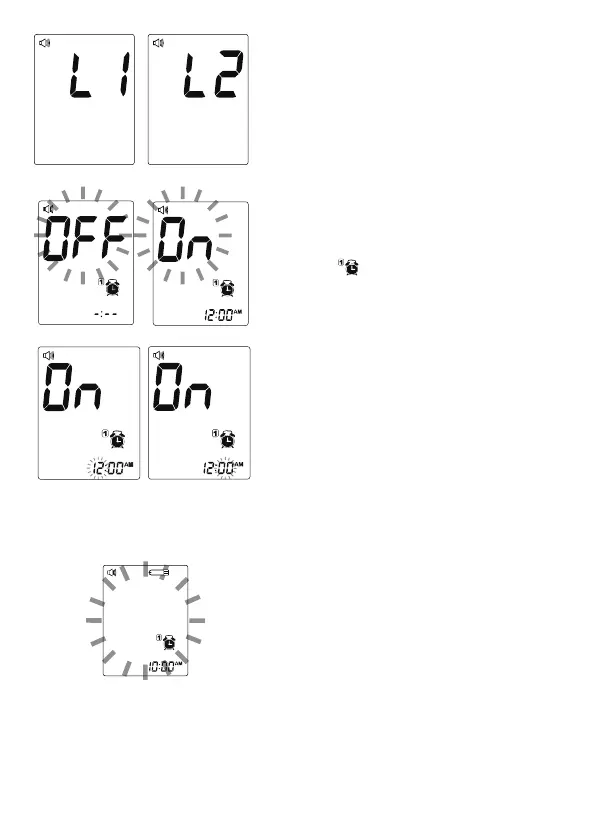
PresstheMButtontoselectL1/L2.
The default language for the meter is
L1,whichisEnglish.Toconfirmyour
selection, press SET Button.
6. Setting the Reminder Alarm
You may set up any or all of the reminder
alarms(1-4).Themeterdisplays“On”or
“OFF”and , press M Button to switch
“On”or“OFF”.PressSETButtontoset
the first reminder alarm.
Press M Button to increase hour, then
press SET Button to set the hour.
Press M Button to increase minute, then
press SET Button to set the minute and
confirm.
Go to the next alarm setting.
At the time of your alarm, the meter will
beep and automatically turn on. You can
press M Button to silence the alarm or
insert a test strip to begin testing.
If you want to turn off an alarm, find the alarm number by pressing SET
Buttoninthesettingmode,pressMButtontochangefrom“On’to“OFF”.
If you do not press M Button, the meter will beep for 2 minutes then
switch off automatically. If you do not want to test at this time, press M
Button to switch off the meter.
Congratulations! You have completed all settings!



 To Next Page