11
PROGRAMMING
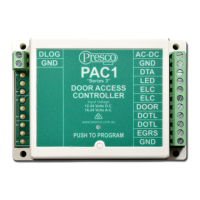
The most common method of programming is using a Presco
keypad connected to DTA.
Alternatively, a PEL1 or PIM connected to DLOG can be
used.
To enable programming with a keypad the PAC1 must first
be put into program mode. This is accomplished by pressing
the program button located in the bottom centre of the PAC1
below the “PUSH TO PROGRAM” text. When the program
mode is entered the LED above the program button in the
PAC1 will light up. Pressing the program button again will
take the PAC1 out of program mode.
The PAC1 will remain in program mode for a period of 5
minutes after the button has been pressed. Each time the
keypad is used to successfully enter information the 5 minute
timeout period is restarted.
The PAC1 can be forced to exit program mode from the
keypad by simply entering .
When the PAC1 is in program mode the green or blue LED
on an attached PSK16, PSC16, PTKR, VR43 or VR62
keypad will flash at a rate of once per second (provided it has
been wired as shown in the wiring diagrams on pages 7 & 8).
Programming of installation options via a keypad use the
following sequence:-
“2 digit memory number” “memory value”
KEYPAD RESPONSES
• warble (ringing) = successful programming operation
finished.
• long beep = unsuccessful operation.



 To Next Page