21
5 Connecting to a Computer
5.1 Installation for Windows
StudioLive
™
ARc Series
Owner’s Manual
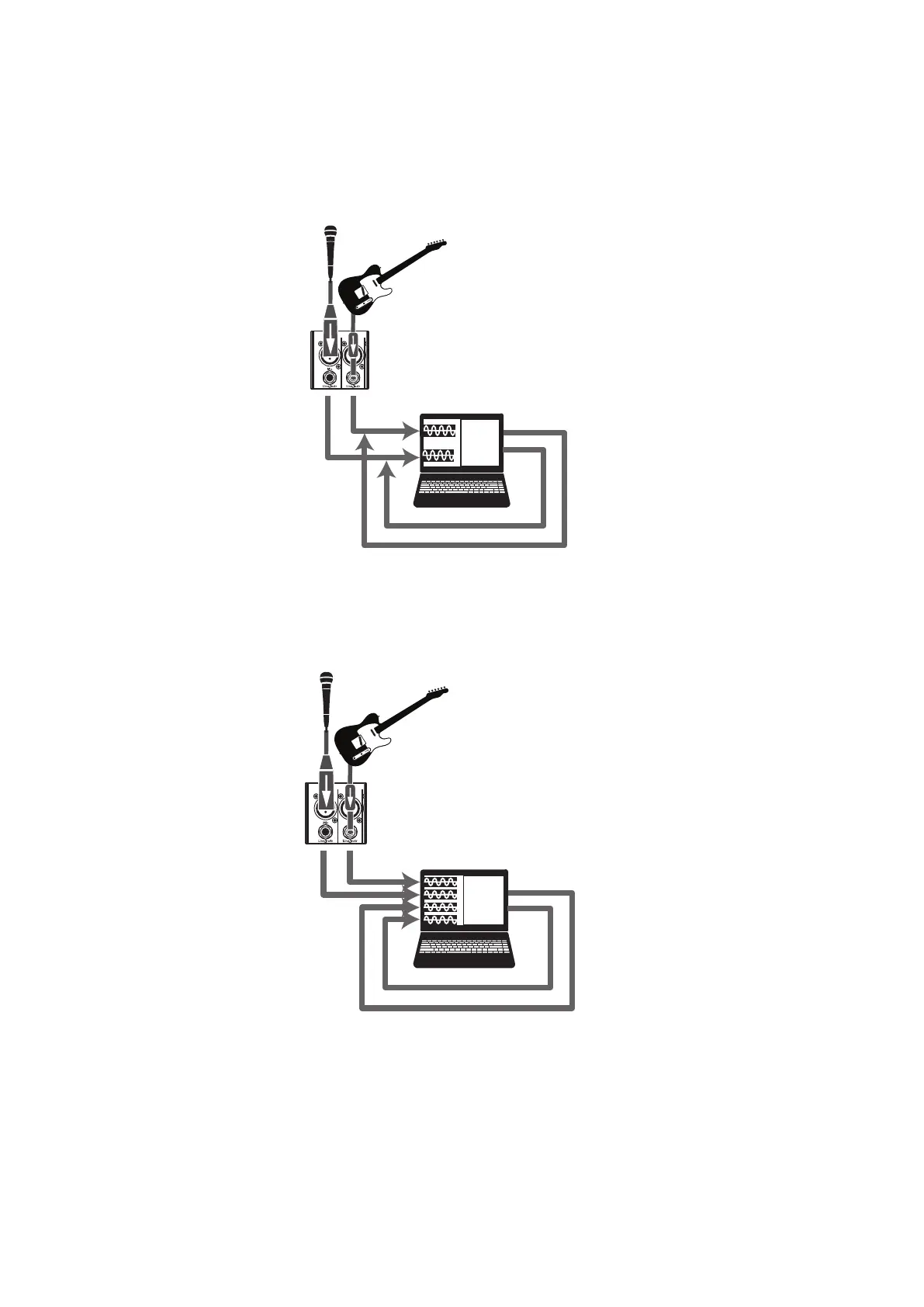
From Universal Control, you can enable or disable Loopback and pick
the streams on which the loopback audio will be recorded.
When Loopback is enabled and “Merge Loopback with 1/2” is selected,
the audio from another application will be recorded with the audio source
connected to analog inputs 1 and 2 on your StudioLive ARc-series mixer.
Media Player
Web Browser
Etc.
When Loopback is enabled and “Dedicated Loopback Inputs” is
selected, the audio from another application will be recorded on the
last pair of driver inputs (AR8c: 9/10, AR12c: 15/16, AR16c: 19/20).
Media Player
Web Browser
Etc.
Power User Tip: When using either option, you will need to select Outputs 1 and
2 in the audio application your want to record. Make sure to select Outputs 3 and
4 in the audio application in which your recording to avoid a feedback loop.










 To Next Page