57
7 Studio One Artist Quick Start
7.3 Creating a New Song
StudioLive
™
ARc Series
Owner’s Manual
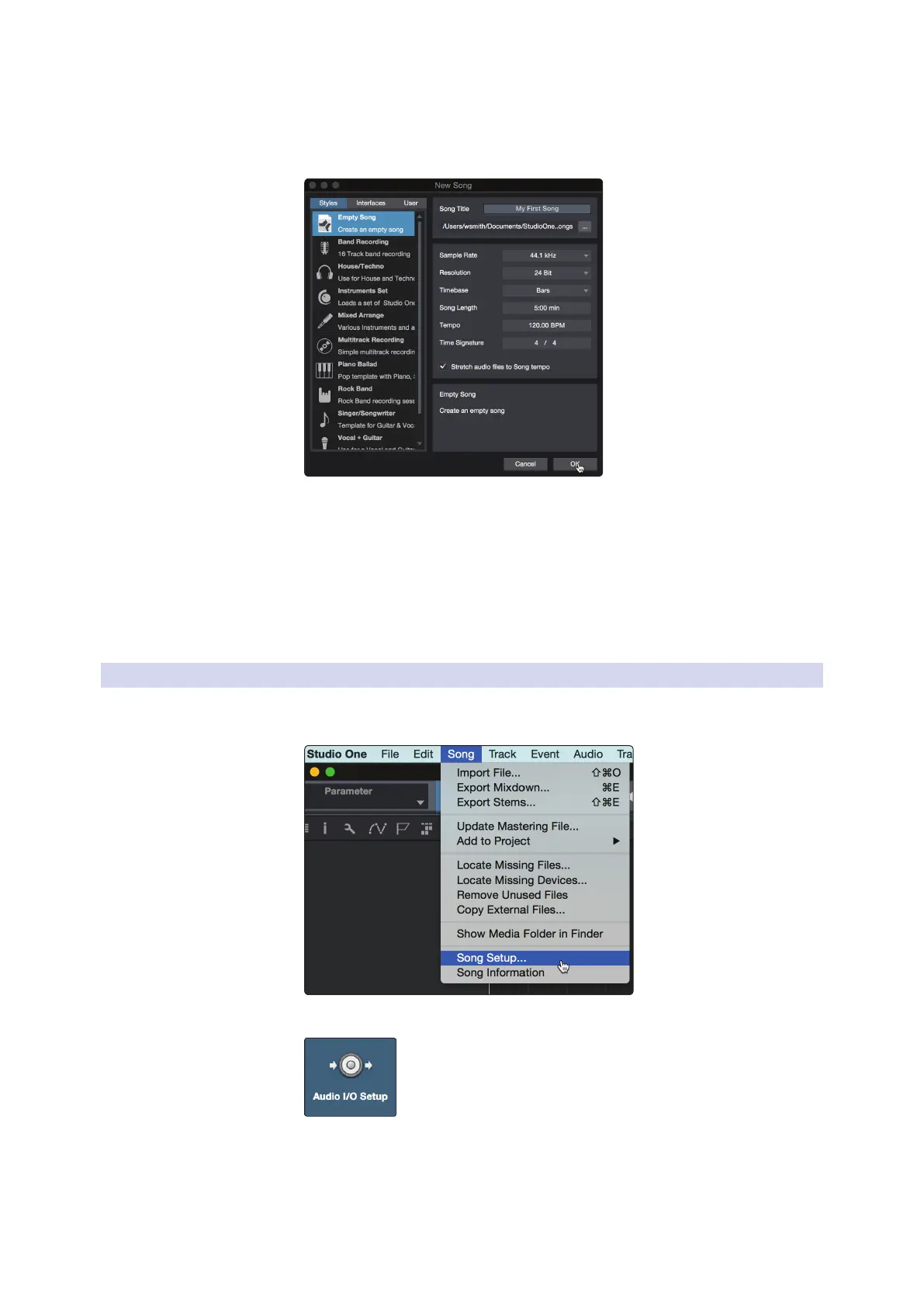
2. In the New Song window, name your Song and choose the directory in which
you’d like it saved. From the Interfaces tab, you can select custom templates for
your StudioLive ARc-series mixer that will set all configuration and I/O settings
for you. The rest of section will describe creating a Song from an empty session.
3. Select Empty Song from the Templates list. At this point, you should give
your Song a name and select your preferred sample rate and bit depth for
recording and playback. You can also set the length of your Song and the
type of time format you would like the timeline to follow (notation bars,
seconds, samples, or frames). Click the OK button when you are finished.
Power User Tip: If you plan to import loops into your Song, make
sure that the Stretch Audio Files to Song Tempo option is selected.
This will automatically import loops at the correct BPM.
7.3.1 Conguring Your I/O
1. Click on Song | Song Setup to set your sample rate and
resolution and configure your audio I/O.
2. Click on the Audio I/O Setup tab.










 To Next Page