28
6 Capture 2
6.1 Installation Instructions
StudioLive
™
ARc Series
Owner’s Manual
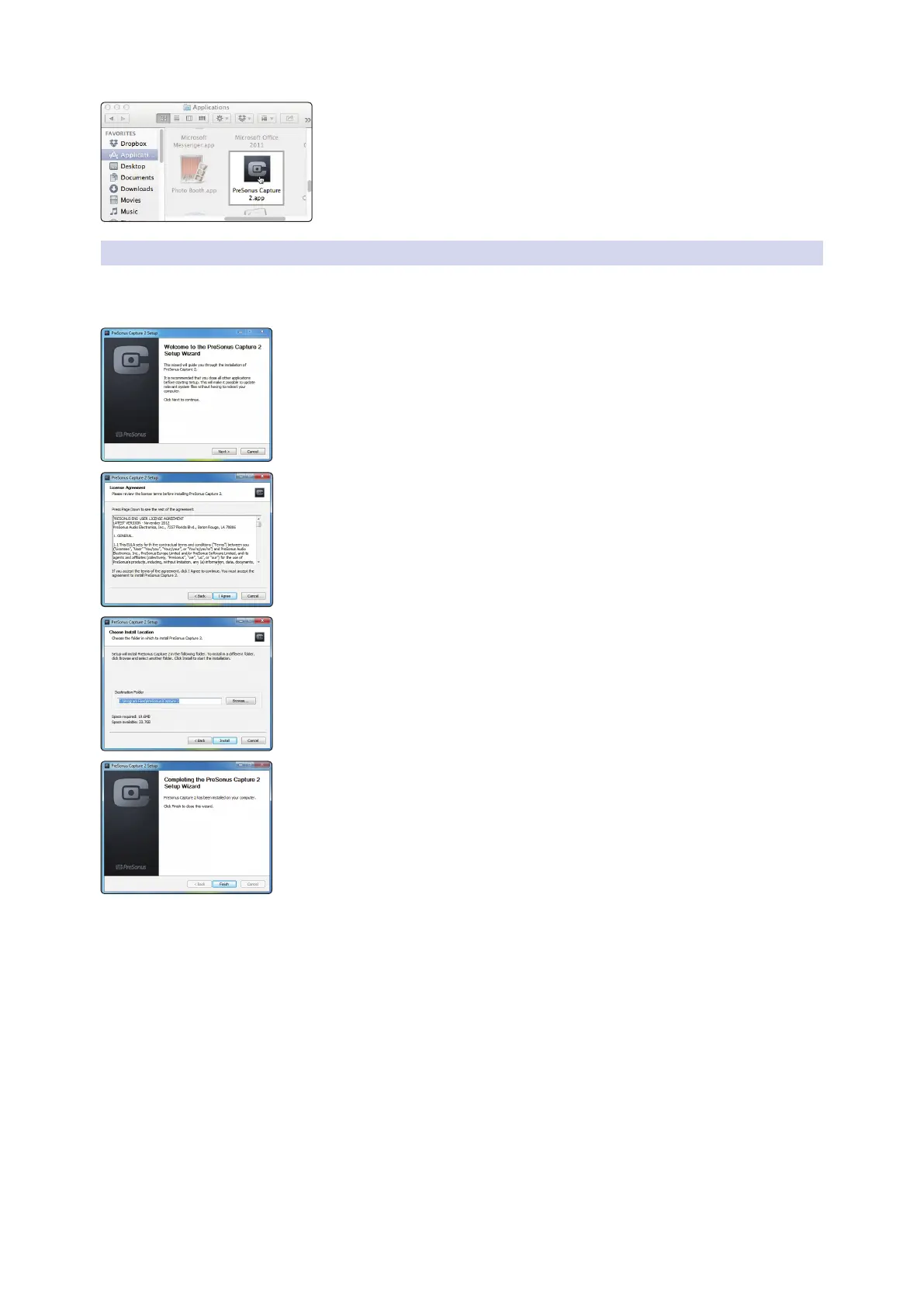
3. Once Capture has been copied to your hard drive, it is ready to use. Simply
open your Application folder and double-click on the Capture 2 icon.
6.1.2 Windows
The Windows installer for Capture 2 was designed with easy-to-follow
onscreen instructions to make the installation process quick and simple.
1. When you launch the Capture.exe file, a Welcome Screen will launch. If you haven’t
already done so, close all other open applications before clicking “Next.”
2. Before Capture 2 can be installed on your computer, you must first agree to the
licensing terms. Click “I agree.”
3. By default, Capture 2 will install in the Program Files folder on your computer. It is
highly recommended that you do not change this default location. Click “Install.”
4. Once Capture 2 has been successfully installed on your computer, you can click
“Finish” to exit the install wizard. You’re ready to start recording!










 To Next Page