EN • 6
ENGLISHFRANCAISNEDERLANDSESpAñoLITALIANoDEuTSCH
664Y3300
(Hot water temperature)
- Press “” once: the screen indicates “”.
- Press “”: the first digit is 1 and the last two digits
indicate the current hot water temperature setting.
- To change this temperature, press “+” or “-” keys until the
temperature indicated by the last two digits is the desired
temperature.
- Press “” to save the setting.
- Press “” twice to return to normal operating mode
[Stand-by).
(hot water)
- Press “” once: the screen displays “”.
- Press “” twice: the first digit is 2 and the last two digits
indicate the current setting: 00 = disabled; 01 = enabled.
- To change this parameter, press the “+” or “-” keys until you
reach the desired value:
00 = disabled; 01 = enabled.
- Press “” to save the setting.
- Press “” twice to return to normal operating mode
[Standby).
(central heating)
- Press “” once: the screen displays “”.
- Press “” three times: the first digit is and the last
two digits indicate the current setting: 00 = disabled;
01 = enabled.
- To change this parameter, press the “+” or “-” keys until you
reach the desired value:
00 = disabled; 01 = enabled.
- Press “” to save the setting.
- Press “” twice to return to normal operating mode
[Standby).
(the maximum temperature for the heating circuit)
- Press “” once: the screen displays “”.
- Press “” four times: the first digit is and the last two
digits indicate the current temperature setting for the central
heating.
- To change this temperature, press the “+” or “-” keys until the
temperature indicated by the last two digits is the desired
temperature.
- Press “” to save the setting.
- Press “” twice to return to normal operating mode
[Standby).
The temperature setting of the appliance and the safety
functions of its various parts are constantly monitored by a
regulator controlled by the microprocessor (MCBA). If a fault
occurs, the MCBA turns the unit off and indicates an error
code: the display flashes and the first character is an “”
followed by the code of the fault (see list of faults)
To reset the unit:
- Press “” on the screen.
- If the fault code appears again, contact your installer.
uSER GuIDE
INSTRUCTIONS FOR USE
Your system must be inspected and serviced once a year by an
approved installer.
During operation, the burner starts automatically as soon as the
temperature of the boiler drops below the set point and turns
off as soon as the boiler reaches that temperature.
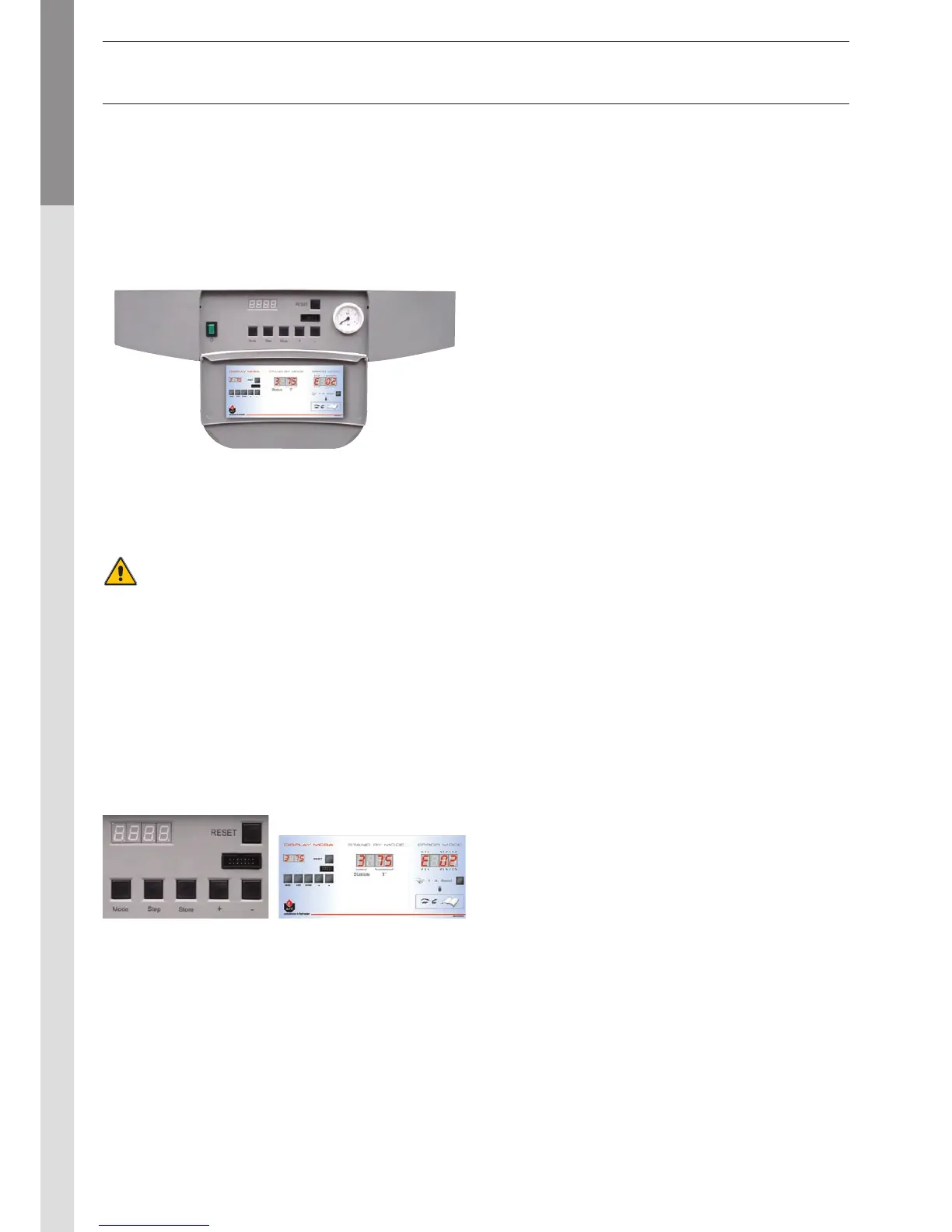
The heating system must be pressurised (see in the
“commissioning” section how to determine the service pressure).
The pressure is indicated on the gauge on the right-hand side
of the display.
The heating circuit pressure must be at least 1 bar and
must be checked regularly by the user. If the pressure drops
below 0.5 bar, the built-in water pressure switch blocks the
appliance until the system’s pressure goes back to over 0.8 bar.
The installer may also fit the system with a separate valve.
Make sure that the appliance is always turned off when filling
the system. To do so, flip the on/off switch located to the left
of the control panel.
(see control panel)
For more information, please ask your installer when the
system is delivered.
SETTING THE PARAMETERS


 To Next Page