SECTION 3 - ERROR CODE DIAGNOSTICS
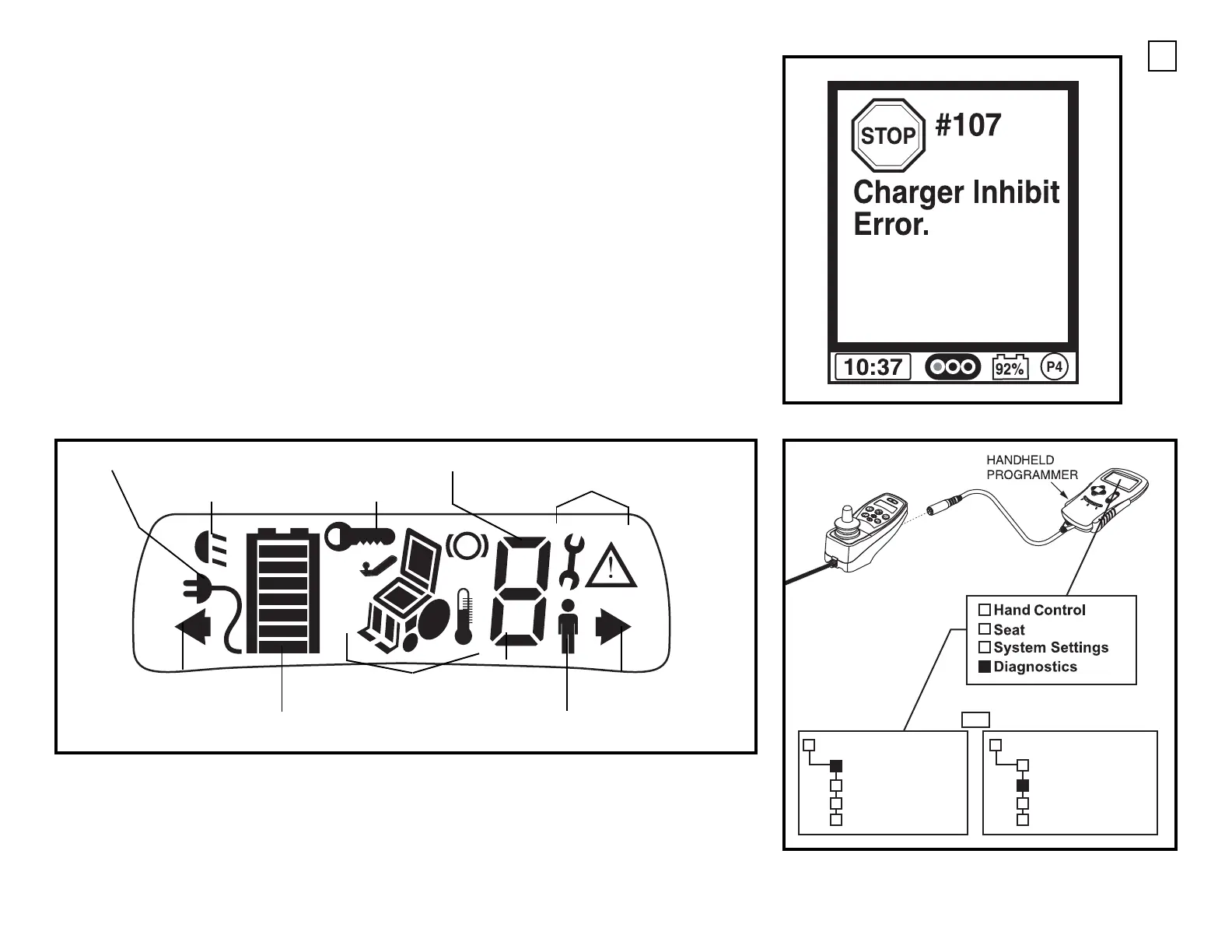
When there is an error or warning, the power chair icon will no longer be displayed. Q-Logic error codes
are displayed on the LCD joystick (or Enhanced Display) by number. These error codes will usually
indicate the system or component failure and a location.
See figure E
.
The NE or NE+ joystick has an LCD screen.
See figure F
. The charging and lights indicators are lit
steadily when the corresponding function is active. When these indicators are flashing, they indicate the
location of a problem. When encountering warning or error indicators on the LCD screen, more
information can be found by connecting a Curtis Handheld Programmer and checking errors in the
Diagnostics section of the programmer. If the error is happening as you check with the programmer, then
the information can be found under Actual Faults in the Diagnostics section of the programmer.
See
figure G
. If the error occurred previously but is not currently displayed, then the information can be
found under Fault History in the Diagnostics section of the programmer.
See figure G
. For any warning
or error indicator
not noted in this technical troubleshooting guide, contact Quantum Technical Service
for further troubleshooting.
Figure E. Error Code Display (Q-Logic)
Figure F. LCD Screen (NE or NE+)
LIGHTS INDICATOR
CHARGING INDICATOR
LEFT TURN
INDICATOR
BATTERY
CONDITION METER
ACTUATOR AND CONTROLLER
ERROR INDICATORS
DRIVE PROFILE/SPEED INDICATOR
RIGHT TURN
INDICATOR
ERROR AND WARNING INDICATORS
LOCK OUT
ATTENDANT
CONTROL
DIAGNOSTICS
- Actual Faults
- Fault History
- Monitor
- Information
NE+ JOYSTICK SHOWN
DIAGNOSTICS
- Actual Faults
- Fault History
- Monitor
- Information
OR
Figure G. Actual Faults or Fault History Controller
Programming
10




 To Next Page