8
SECTION 2 - POWER CHAIR WILL NOT
DRIVE DUE TO SYSTEM LOCK
NE or NE+ Electronics
Symptoms:
The Q6 Edge powers on but the NE or NE+ joystick allows no other
function.
The NE joystick displays a key icon on the LCD screen, or the NE+
joystick displays a key icon to the right of the battery gauge.
The batteries are fully charged.
All electrical components are properly connected.
Diagnosis:
The power chair is in System Lock mode.
NOTE: System Lock must be enabled (ON) in order to lock out the NE or
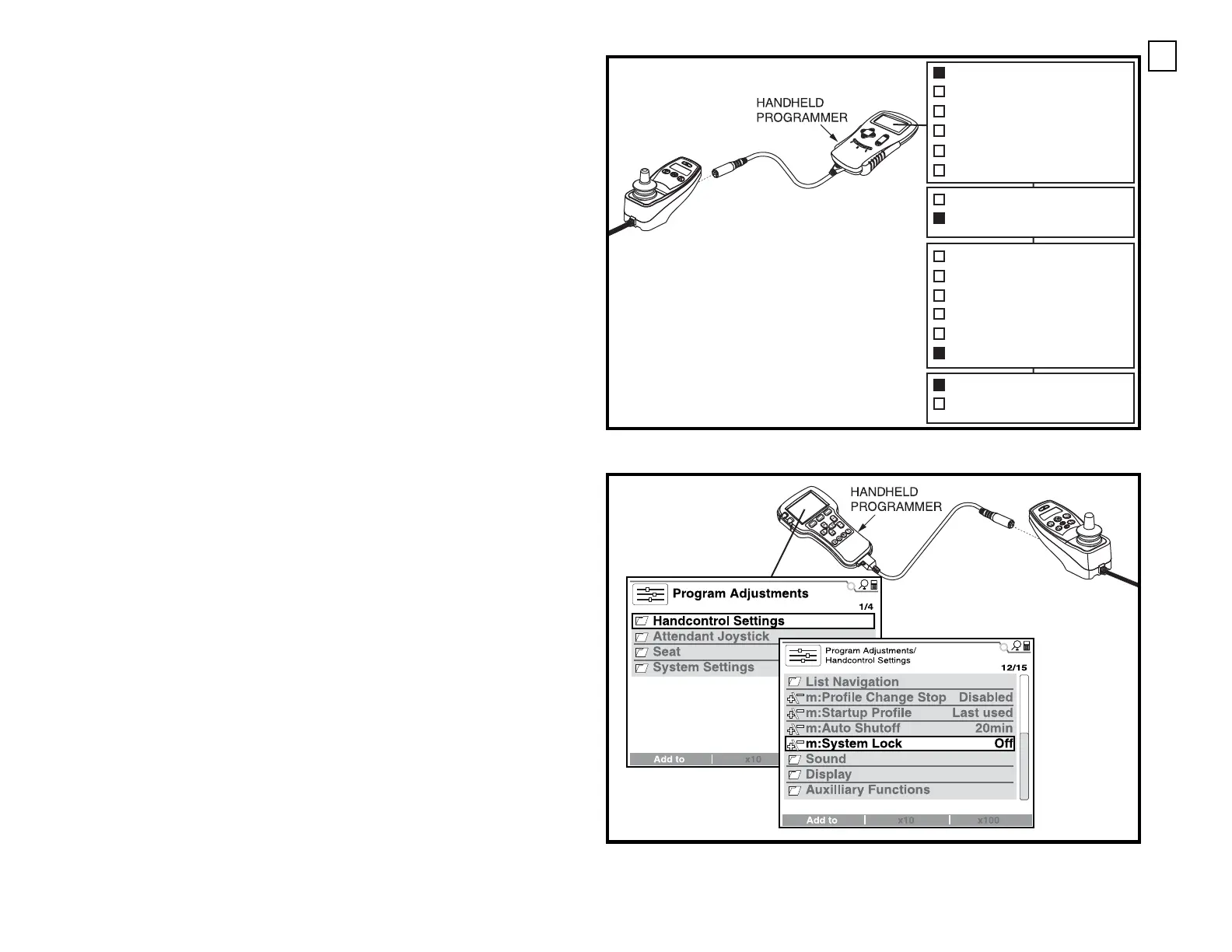
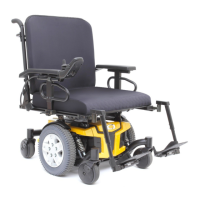
NE+ joystick. Refer to the programming text. See figure A, B, or C.
Solution:
Use the following procedure to release the NE or NE+ joystick from System
Lock mode:
1. Turn on the power to the NE or NE+ joystick.
2. Deflect the joystick to the full forward position until a beep is heard.
3. Deflect the joystick to the full rearward position until a beep is heard.
4. Release the joystick. The LCD screen returns to normal.
To lock out the NE joystick:
1. Press and hold the power button until the system shuts off. The system
is now locked.
To lock out the NE+ joystick:
1. Press and hold both profile keys until the system shuts off. The system
is now locked.
NOTE: If the controller is a 2012 model or later, the handheld program-
mer’s menus may contain different or additional parameters than those
shown in these figures.
Figure A. System Lock Programming (NE)
Figure B. System Lock Programming (NE+ or Q-Logic, 2012 and beyond)
NE JOYSTICK SHOWN
Program
Monitor
Faults
Functions
Controller
System S
Hand Con
System S
General D
Timing
Motors &
Battery
It
NE JOYSTICK SHOWN
Program
Monitor
Faults
Functions
Controller Informa
System Settings
Hand Control
System Settings
General Drive
Timing
Motors & Wheels
Battery
NE JOYSTICK SHOWN
Program
Monitor
Faults
Functions
Controller Information
System Settings
Hand Control
System Settings
General Drive
Timing
Motors & Wheels
Battery
Inputs
Miscellaneous
System Lock
Profile Change Stop




 To Next Page