If there is an anorganic deposit on the pH sensor then remove it as follows:
1. Make a homogeneous acid dilution of:
• approximately 1 part drinking water and 1 part concentrated nitric acid (38% (by weight))
or
• 4 parts drinking water and 1 part concentrated phosphoric acid (59% (by weight)).
Add the acid to the water; never add water to acid.
2. Immerse the glass membrane of the pH sensor in the acid solution for 5 minutes (no longer!).
3. Rinse the pH sensor with drinking water, and rinse the glass membrane with distilled water.
Next, calibrate the pH measurement.
4. Dispose of the acid dilution in accordance with the locally applicable regulations.
Fitting the pH sensor
pH sensors ordered from Priva are supplied separately and still need to be connected to the unit.
To do this, perform the following steps.
If you use pH sensors that were not ordered from Priva, these pH sensors must comply with the
same specifications as the Priva pH sensors. See Technische specificaties - pH-sensor.
The pH sensors are a sensitive component of the unit. While a pH sensor is not in use, it
must be stored in accordance with the supplier's instructions. See the manual for the pH
sensor.
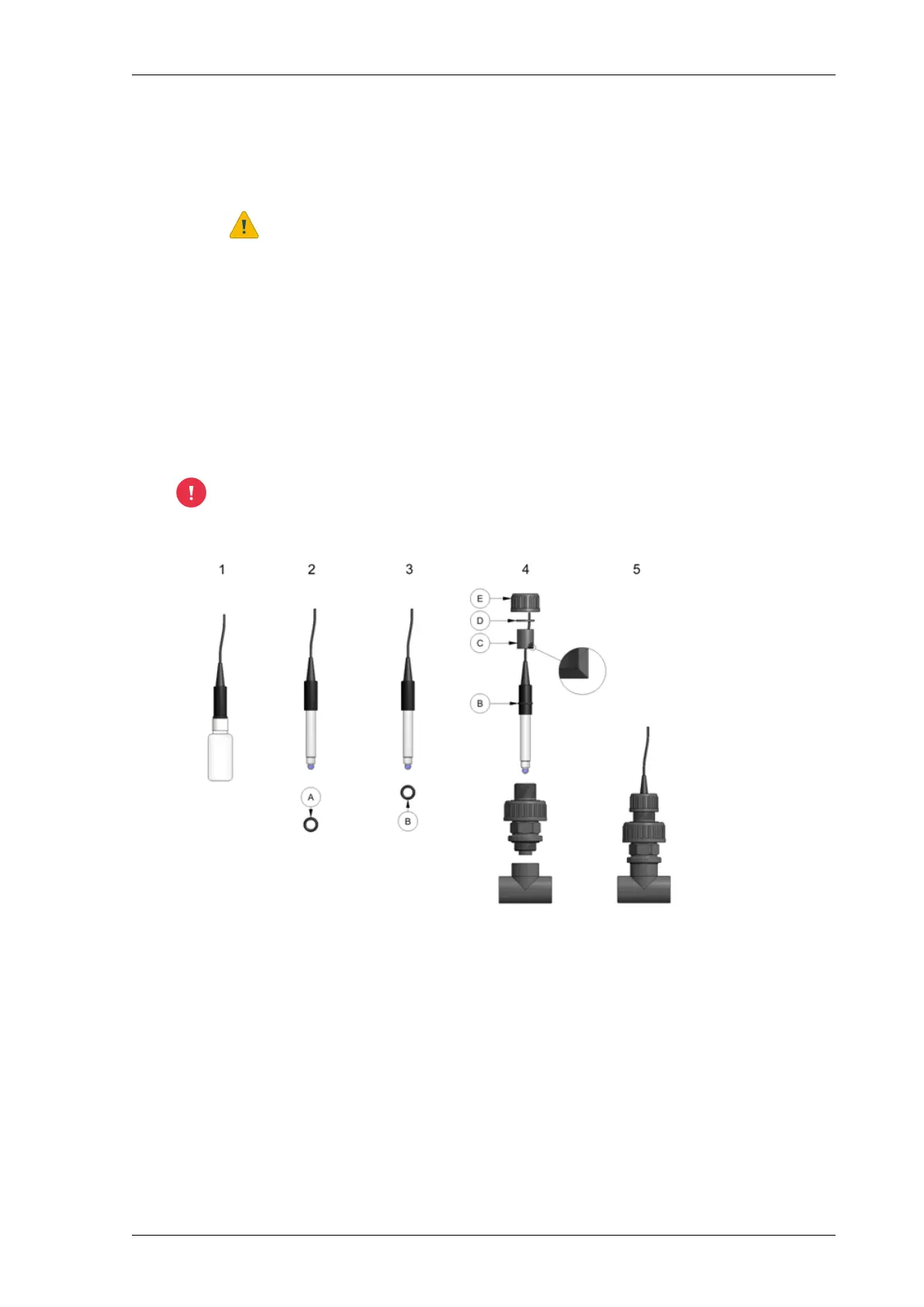
Fitting the pH sensor
1. Remove the pH sensor from the packaging containing storage liquid.
2. Remove the ring (A, if present) from the pH sensor.
3. Slide the O-ring (B) of the holder over the pH sensor.
4. Assemble the parts C, D and E in the order shown in the figure. For C, ensure that the bevel is
on the underside.
Pour water into the holder if it is still dry, so that the pH sensor does not dry out.
5. Screw the pH sensor onto the pH sensor holder.
Calibrating the pH sensor
Calibration is described in the software manual of the relevant process computer (Connext or
Compass) and depends on the software version used. See chapter Procedures > Maintaining, checking
and calibrating.
29NutriJet - user - 00.002
Maintenance and repair



 To Next Page