8
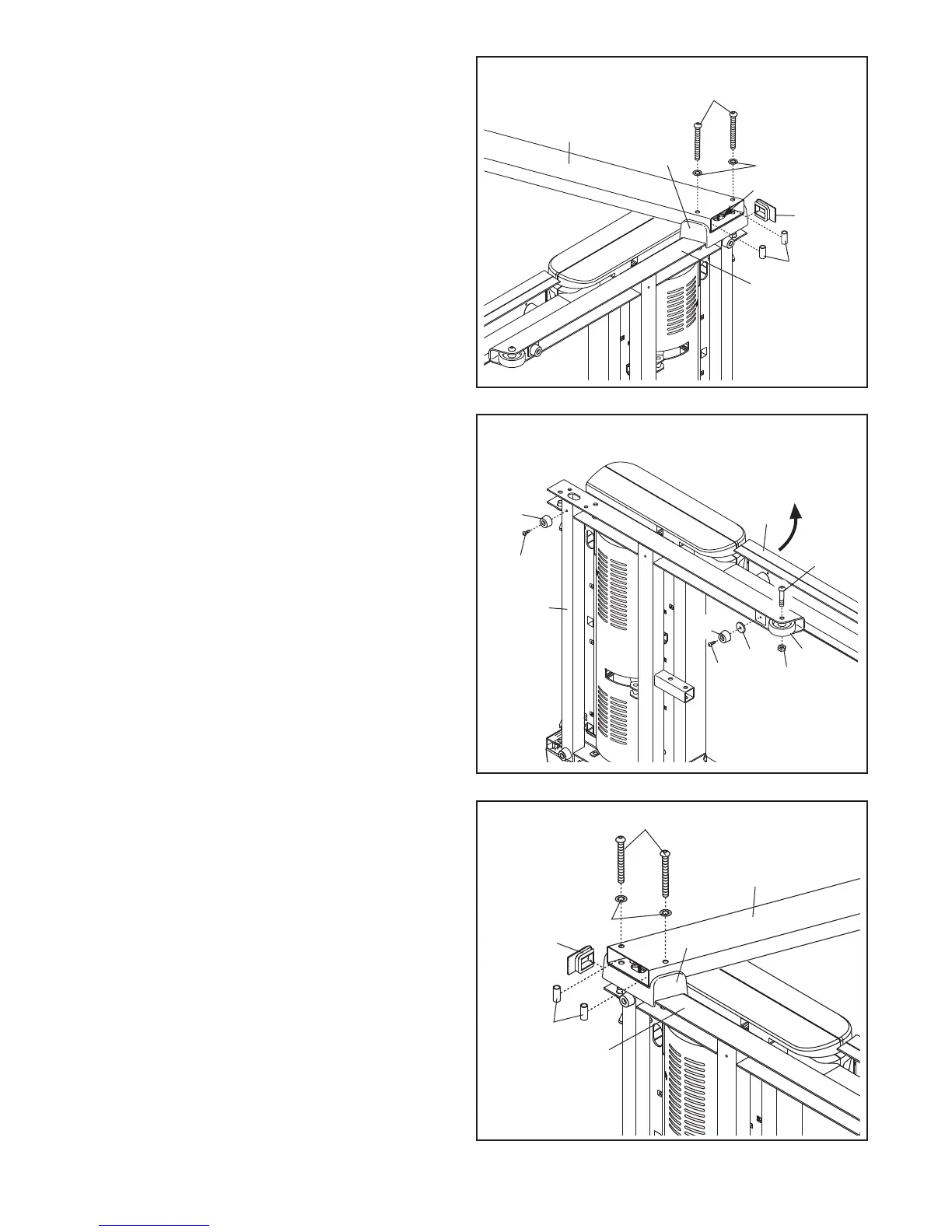
6. Set the Left Upright Spacer (76) on the Base
(83). With the help of a second person, hold a
Bolt Spacer (80) inside the lower end of the Left
Upright (74). Insert a 3/8" x 4 1/2" Bolt (6) with a
3/8" Star Washer (9) into the Left Upright and
the Bolt Spacer. Repeat this step with a sec
-
ond Bolt Spacer (80), 3/8" x 4 1/2" Bolt (6),
and 3/8" Star Washer (9). Set the Left Upright
in the Left Upright Spacer.
Partially tighten the 3/8" x 4 1/2" Bolts (6); do
not fully tighten the Bolts yet.
Press a Base Endcap (77) into the Base (83).
With the help of a second person, tip the tread-
mill so that the Base (83) is flat on the floor.
76
74
6
83
77
6
5. With the help of a second person, carefully tip
the treadmill onto its right side. Partially fold the
Frame (56) so that the treadmill is more stable;
do not fully fold the Frame yet.
Attach a Base Pad (81) to the Base (83) in the
location shown with a #8 x 1" Tek Screw (2) and
a Base Pad Spacer (13). Then, attach another
Base Pad (81) with only a #8 x 1" Tek Screw (2).
Attach a Wheel (84) with a 3/8" x 2" Shoulder
Bolt (111) and a 3/8" Nut (8). Do not over-
tighten the Nut; the Wheel must turn freely.
5
83
84
56
8
81
2
111
2
4. Set the Right Upright Spacer (79) on the Base
(
83).
B
e careful not to pinch the Upright Wire
(38).
With the help of a second person, hold a
Bolt Spacer (80) inside the lower end of the
Right Upright (78). Insert a 3/8" x 4 1/2" Bolt (6)
w
ith a 3/8" Star Washer (9) into the Right
Upright and the Bolt Spacer.
Repeat this step
with a second Bolt Spacer (80), 3/8" x 4 1/2"
Bolt (6), and 3/8" Star Washer (9). Set the
Right Upright in the Right Upright Spacer.
Partially tighten the 3/8" x 4 1/2" Bolts (6); do
not fully tighten the Bolts yet.
Press a Base Endcap (77) into the Base (83).
79
78
77
6
4
38
9
9
83
80
13
80
81





 To Next Page