9
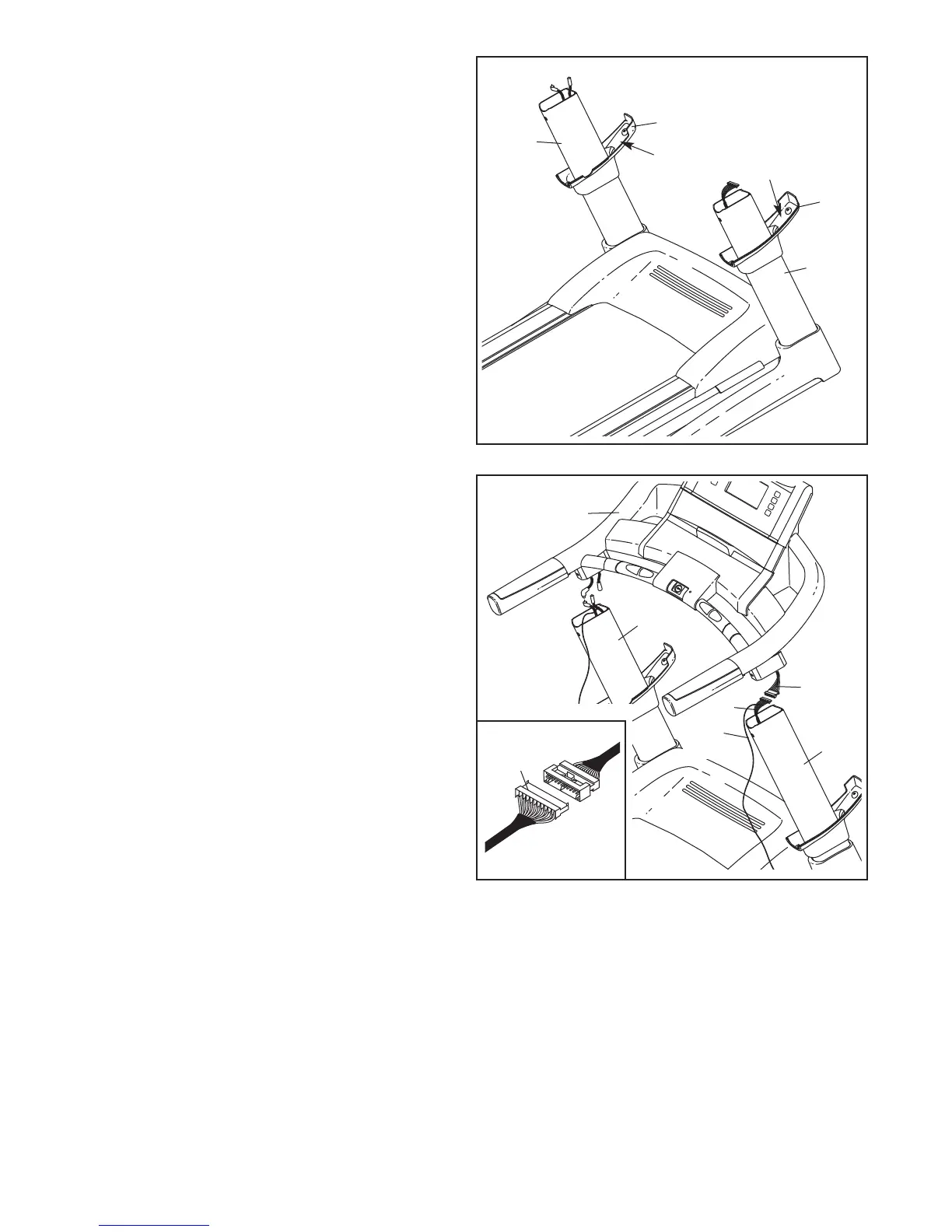
4. Identify the Right Upright Sleeve (96) and the
Left Upright Sleeve (95); the Upright Sleeves
are labeled. Slide the Right Upright Sleeve onto
t
he Right Upright (74) and the Left Upright
Sleeve onto the Left Upright (73).
95
“Right”
“Left”
96
4
74
73
5. With the help of a second person, hold the con-
sole assembly near the Uprights (73, 74).
Connect the Upright Wire Harness (75) to the
Console Wire Harness (71). See the inset draw-
ing. The connectors should slide together
easily and snap into place. If they do not, turn
one connector and try again. IF THE CONNEC-
TORS ARE NOT CONNECTED PROPERLY,
THE CONSOLE MAY BE DAMAGED WHEN
THE POWER IS TURNED ON. Remove the wire
tie from the Upright Wire Harness. Insert the con-
nectors down into Right Upright (74).
71
Console
Assembly
5
75
74
75
73
Wire
Tie





 To Next Page