6
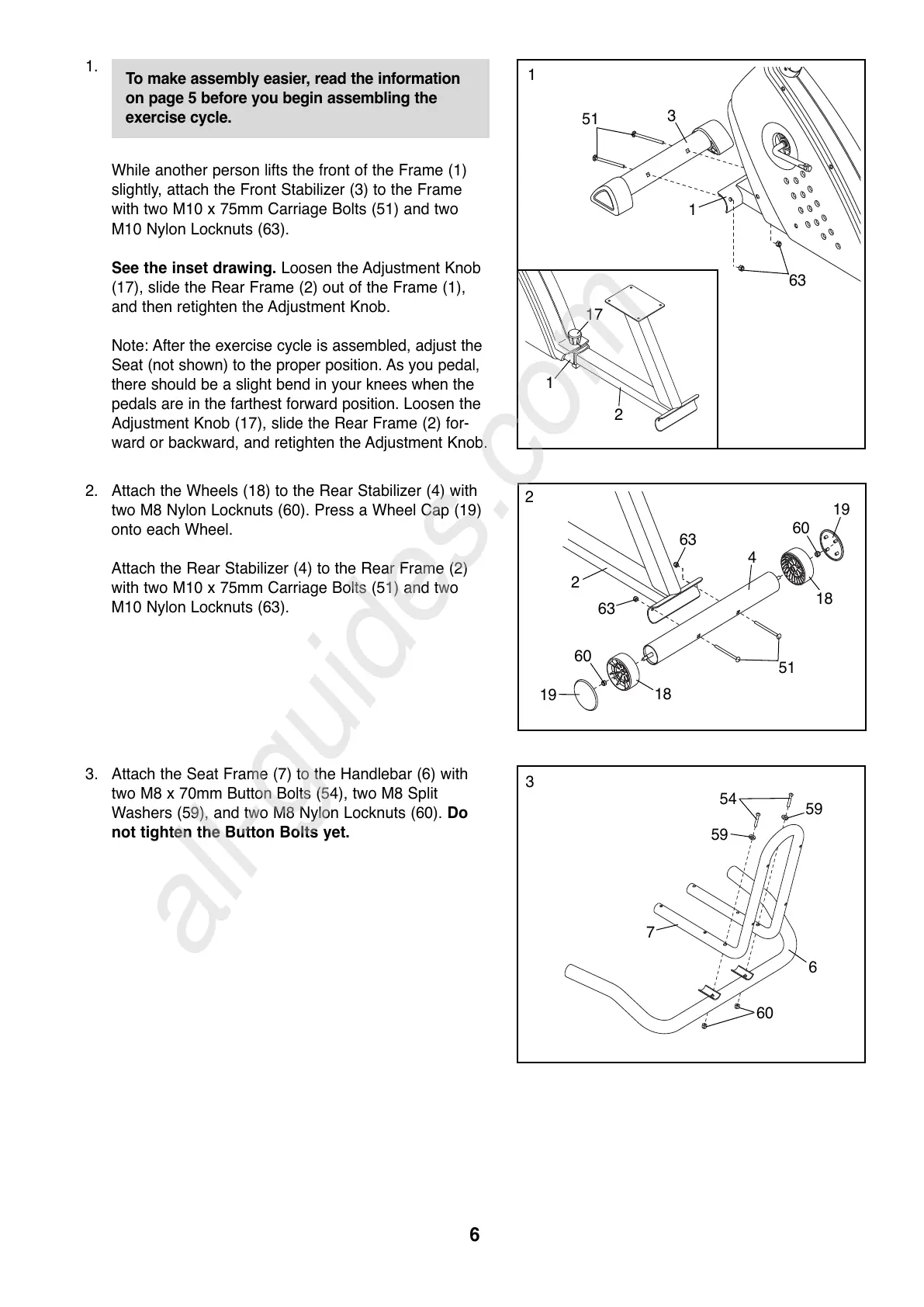
3. Attach the Seat Frame (7) to the Handlebar (6) with
two M8 x 70mm Button Bolts (54), two M8 Split
Washers (59), and two M8 Nylon Locknuts (60). Do
not tighten the Button Bolts yet.
7
6
60
54
59
59
1.
While another person lifts the front of the Frame (1)
slightly, attach the Front Stabilizer (3) to the Frame
with two M10 x 75mm Carriage Bolts (51) and two
M10 Nylon Locknuts (63).
See the inset drawing. Loosen the Adjustment Knob
(17), slide the Rear Frame (2) out of the Frame (1),
and then retighten the Adjustment Knob.
Note: After the exercise cycle is assembled, adjust the
Seat (not shown) to the proper position. As you pedal,
there should be a slight bend in your knees when the
pedals are in the farthest forward position. Loosen the
Adjustment Knob (17), slide the Rear Frame (2) for-
ward or backward, and retighten the Adjustment Knob.
3
63
51
1
1
2. Attach the Wheels (18) to the Rear Stabilizer (4) with
two M8 Nylon Locknuts (60). Press a Wheel Cap (19)
onto each Wheel.
Attach the Rear Stabilizer (4) to the Rear Frame (2)
with two M10 x 75mm Carriage Bolts (51) and two
M10 Nylon Locknuts (63).
51
18
4
19
60
18
19
2
63
63
60
2
3
17
2
1
To make assembly easier, read the information
o
n page 5 before you begin assembling the
exercise cycle.




 To Next Page