6. 6
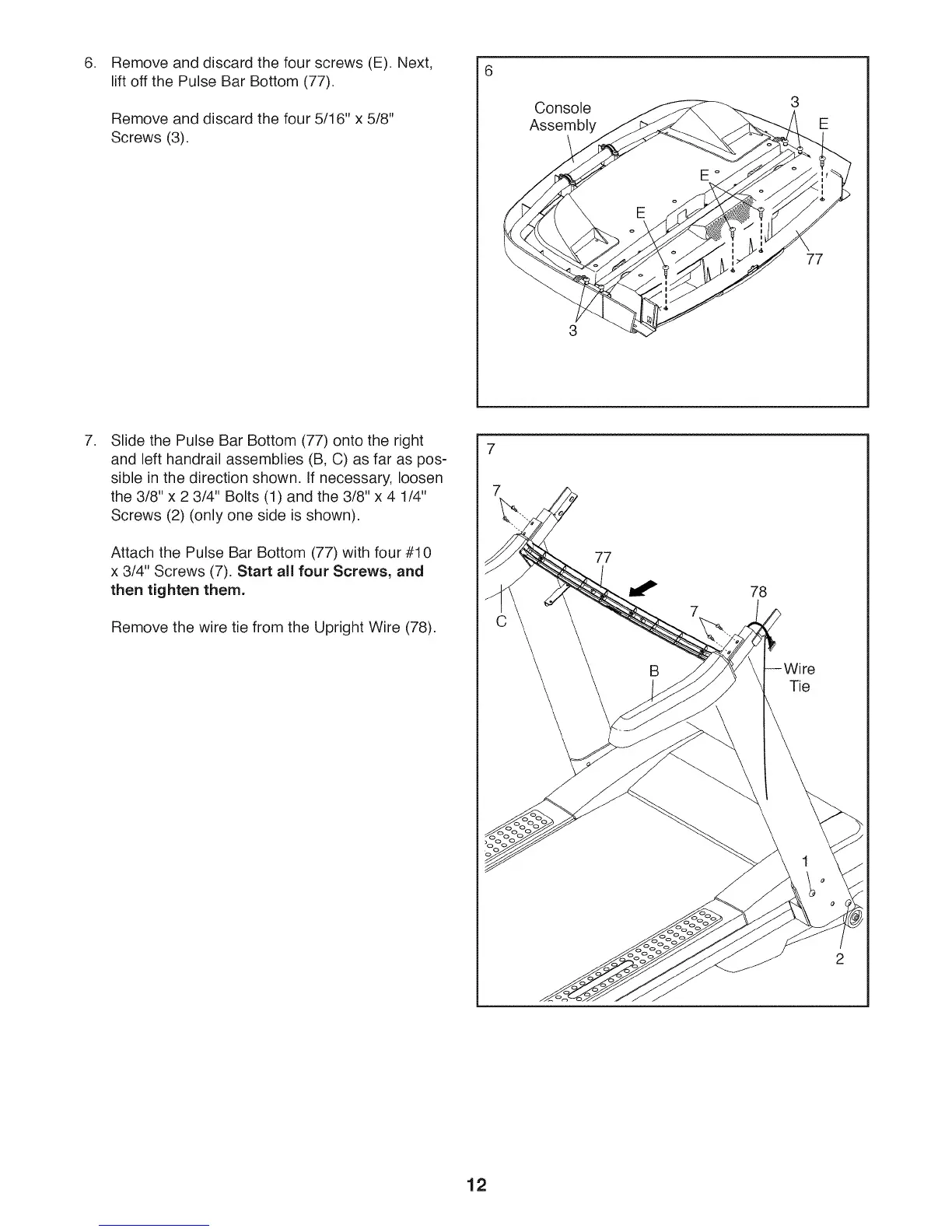
Remove and discard the four screws (E). Next,
lift off the Pulse Bar Bottom (77).
Remove and discard the four 5/16" x 5/8"
Screws (3).
Console
Assembly
3
77
.
Slide the Pulse Bar Bottom (77) onto the right
and left handrail assemblies (B, C) as far as pos-
sible in the direction shown. If necessary, loosen
the 3/8" x 2 3/4" Bolts (1) and the 3/8" x 4 1/4"
Screws (2) (only one side is shown).
Attach the Pulse Bar Bottom (77) with four #10
x 3/4" Screws (7). Start all four Screws, and
then tighten them.
Remove the wire tie from the Upright Wire (78).
7
7
77
78
Tie
2
12





 To Next Page