14
27
63
39
96
13
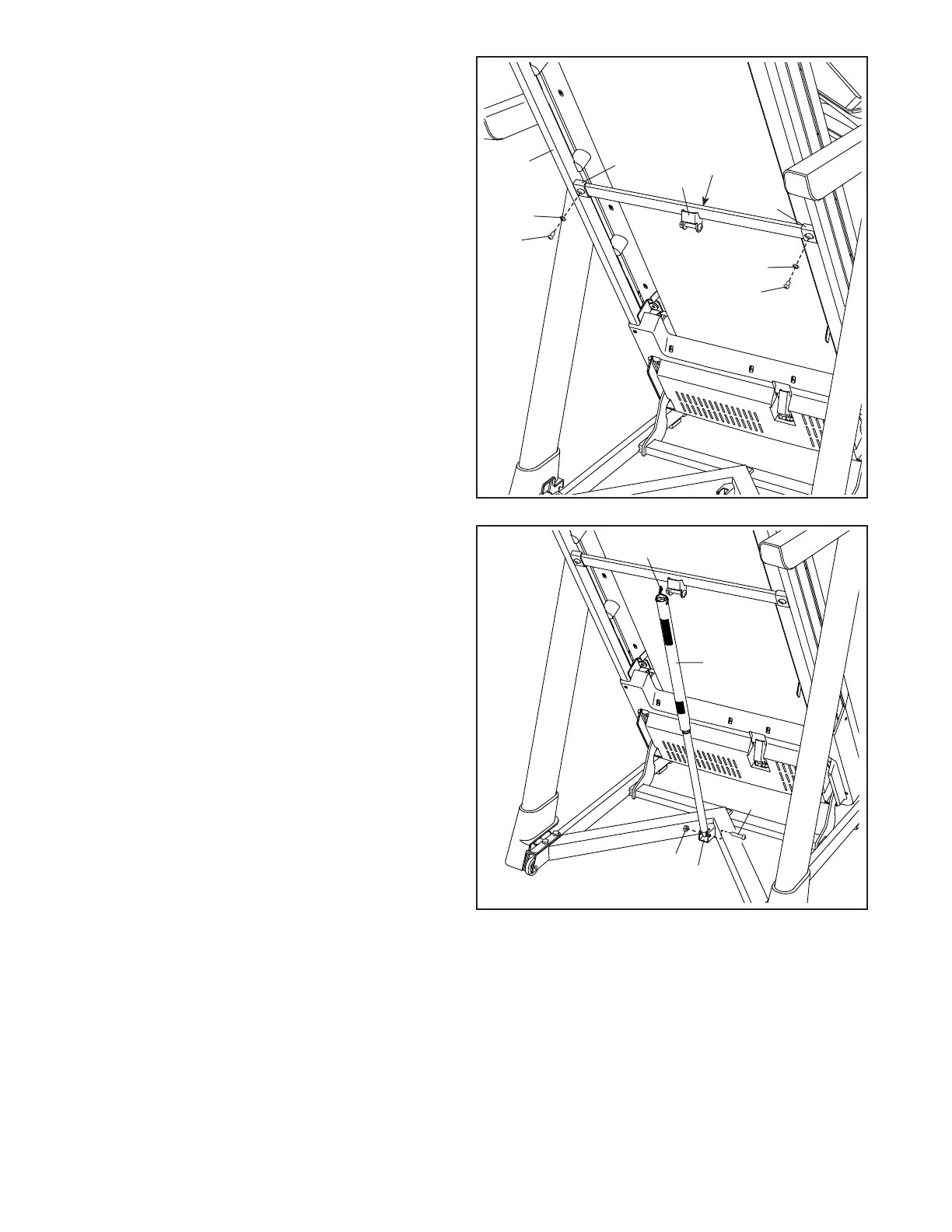
13. Remove the 5/16" Nut (39) and the 5/16" x 1 3/4"
Bolt (27) from the bracket on the Base (96).
Next, orient the Storage Latch (63) as shown.
Attach the lower end of the Storage Latch
(63) to the bracket on the Base (96) with the
5/16" x 1 3/4" Bolt (27) and the 5/16" Nut (39) as
shown.
Then, raise the Storage Latch (63) to a vertical
position, and remove the tie (I).
I
12
12. Note: If the treadmill is assembled on a
smooth surface, it may roll forward in this
step.
Remove the two 5/16" x 3/4" Screws (21) from
the Latch Crossbar (59).
Next, raise the Frame (64) to the upright posi-
tion. Have a second person hold the Frame
until step 14 is completed.
Orient the Latch Crossbar (59) as shown. Make
sure that the “This side toward belt” sticker
(G) is facing the treadmill. Attach the Latch
Crossbar to the brackets (H) on the Frame (64)
with the two 5/16" x 3/4" Screws (21) that you
just removed and two 5/16" Star Washers (10).
64
59
G
H
H
21
21
10
10






 To Next Page