27
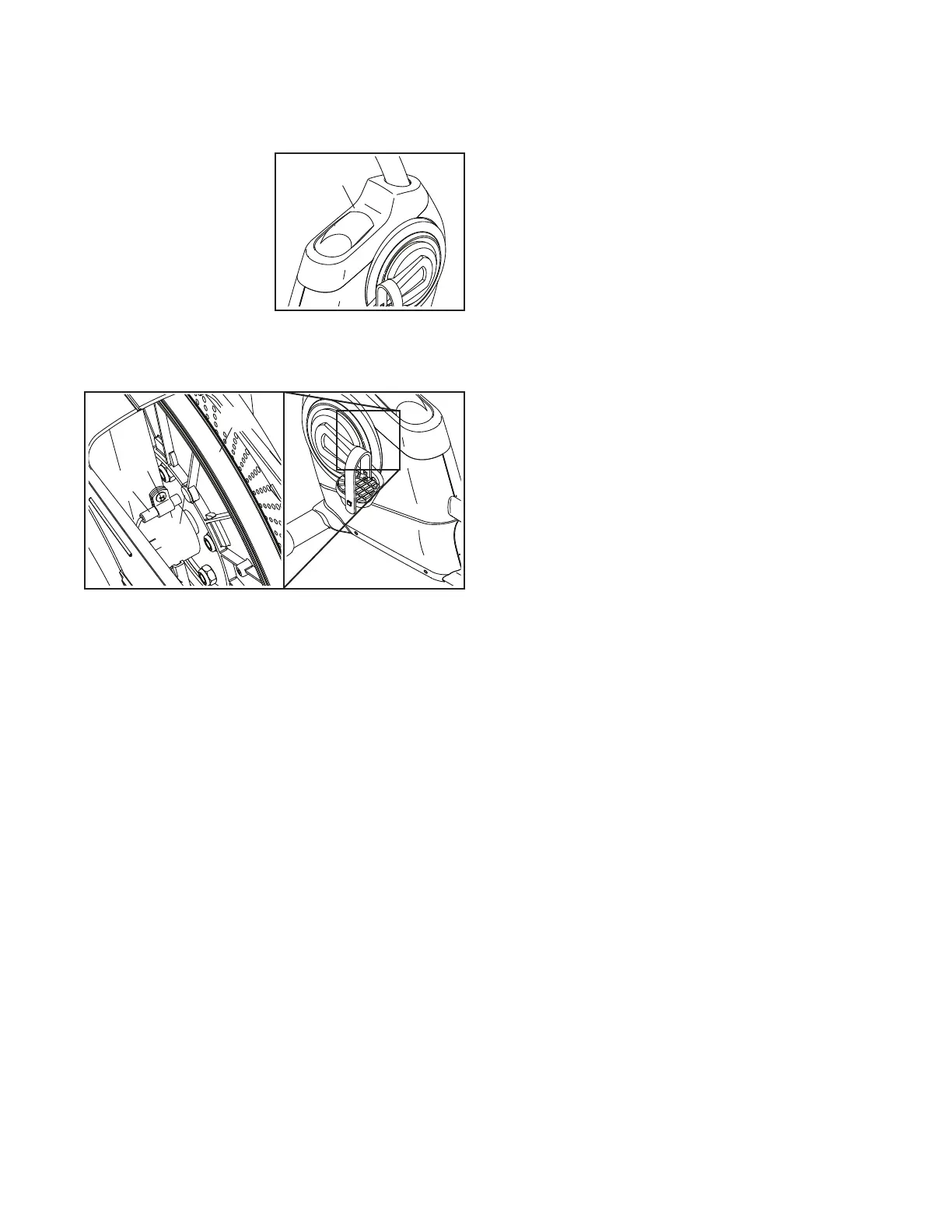
HOW TO ADJUST THE REED SWITCH
If the console does not display correct feedback, the
reed switch should be adjusted.
To adjust the reed
switch, first unplug the
power adapter. Next,
use a standard screw-
driver to release the
tabs on the Accessory
Tray (5). Then, lift the
Accessory Tray away
from the frame.
Next, locate the Reed Switch (18). Loosen, but do not
remove, the M4 x 12mm Washer Head Screw (65).
Next, rotate the Pulley (75) until a Magnet (67) is
aligned with the Reed Switch (18). Slide the Reed
Switch slightly toward or away from the Magnet. Then,
retighten the M4 x 12mm Washer Head Screw (65).
Plug in the power adapter and rotate the Pulley (75)
for a moment. Repeat these actions until the console
displays correct feedback.
When the reed switch is correctly adjusted, reattach
the accessory tray and plug in the power adapter.
5
65
18
67
75






 To Next Page