15
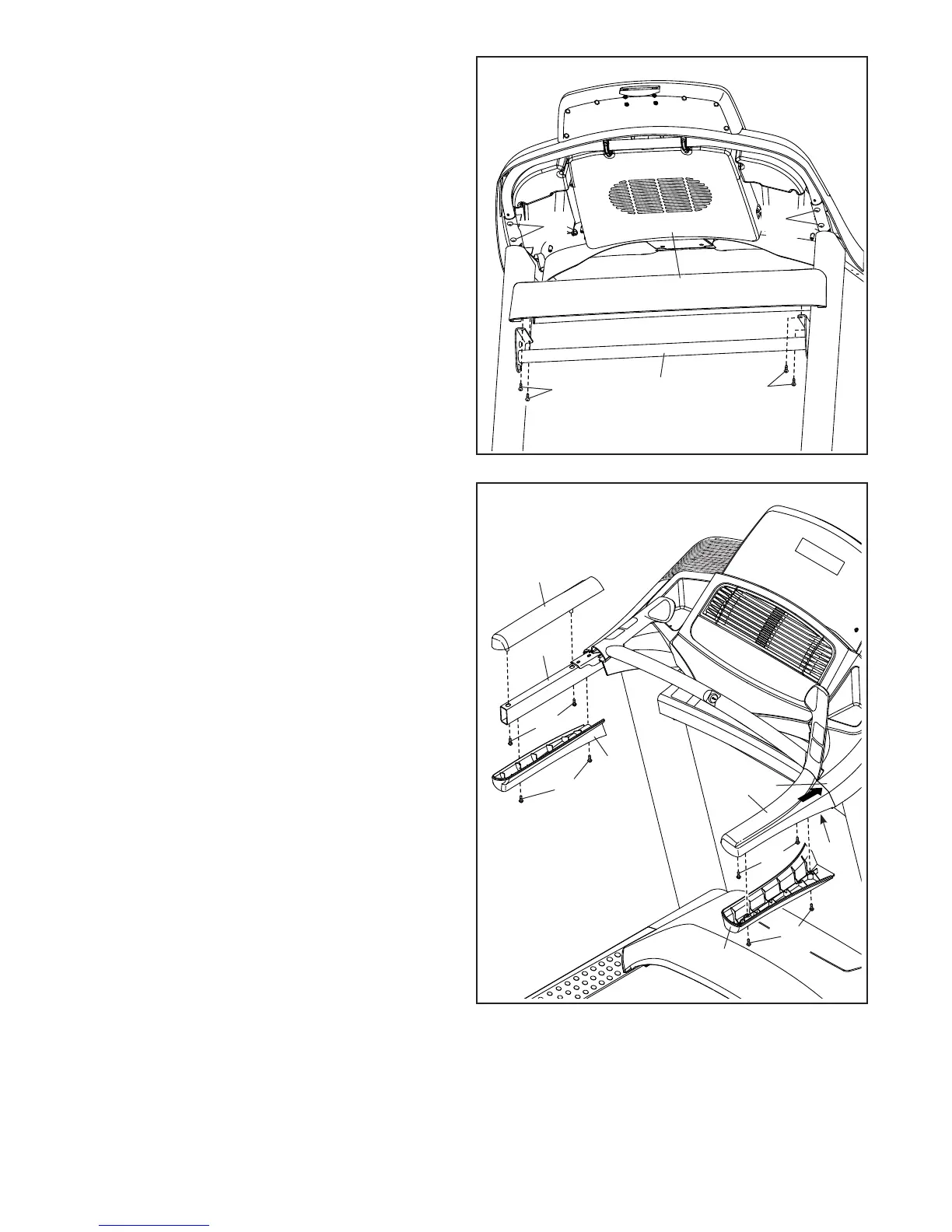
14. Attach the Tray (74) to the Upright Crossbar
(58) with four #8 x 3/4" Screws (2); start all four
Screws, and then tighten them.
Then, tighten the four 1/4" x 1/2" Screws (4).
14
2
58
2
74
15
92
F
86
23
79
86
85
23
23
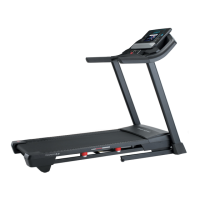
15. Identify the Right Handrail Cover (92). Set the
Right Handrail Cover on the right Handrail (86).
Start two #8 x 3/4" Truss Head Screws (23) into
the bottom of the Handrail Cover; do not fully
tighten the Truss Head Screws.
Next, slide the Right Handrail Cover (92) for-
ward until it rests against the console assembly
(F). Then, tighten the two #8 x 3/4" Truss Head
Screws (23); do not overtighten the Truss
Head Screws.
Then, attach the Right Bottom Handrail Cover
(84) with two 8 x 3/4" Truss Head Screws (23).
Attach the Left Handrail Cover (79) and the
Left Bottom Handrail Cover (85) in the same
way.
84
23
4
4





 To Next Page