©2022 Pro-Vision Solutions, LLC. Page 22 of 56
Digital HD Camera Installation
The DVR unit supports one (1) digital HD camera.
Digital HD Camera Cables/Connections:
The digital HD camera can be connected via a single 10 ft. or 20 ft. cable included with the camera kit or using a specific
combination of multiple cables (see below).
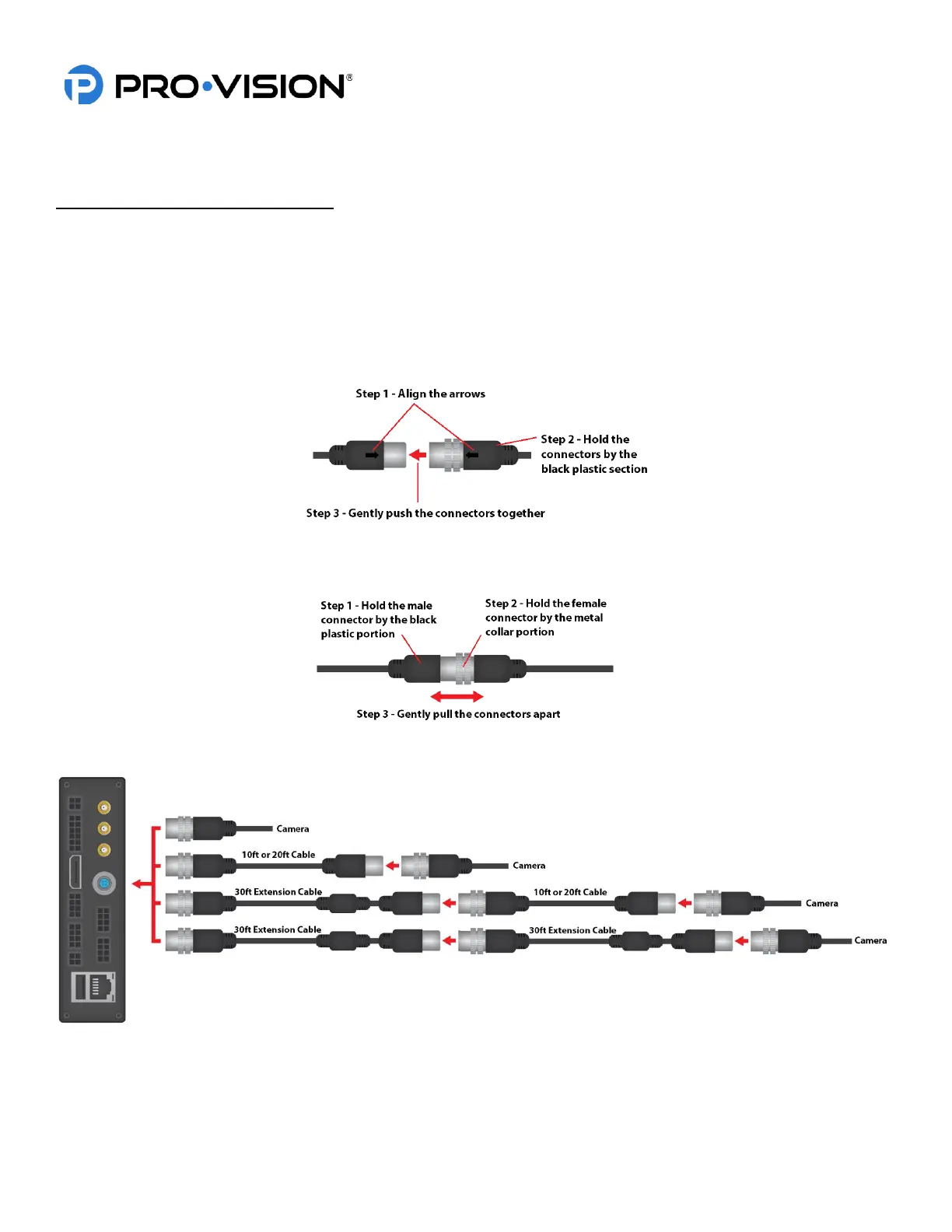
To connect a camera or cable, align the arrow on the connector with the notch on the plug on the DVR unit (arrow should
be visible when looking at the DVR unit from the top) and then gently press the connector in holding on to the black part of
the connector until a click is heard. The HD cameras and cables use a sliding quick release collar on the female
connectors, holding this connector by the sliding metal collar will make it difficult for the release mechanism to engage
when connecting the camera or cable.
To disconnect a camera or cable, simply grab the female connector by the metal collar and pull it backwards to disengage
the locking mechanism and allow the connectors to separate.
The Digital HD camera can be connected to the DVR using the cable configurations shown below:
IMPORTANT! If using a 30 ft. Extension Cable (Part # PX-1843) it must be connected directly to the DVR Unit or to
another 30 ft. Extension Cable in the proper order as shown above. Connecting two 10 ft. / 20 ft. Cable
together or between the 30 ft. Extension Cable and the DVR will provide intermittent or no camera signal.



 To Next Page