©2022 Pro-Vision Solutions, LLC. Page 38 of 56
Advanced DVR Settings
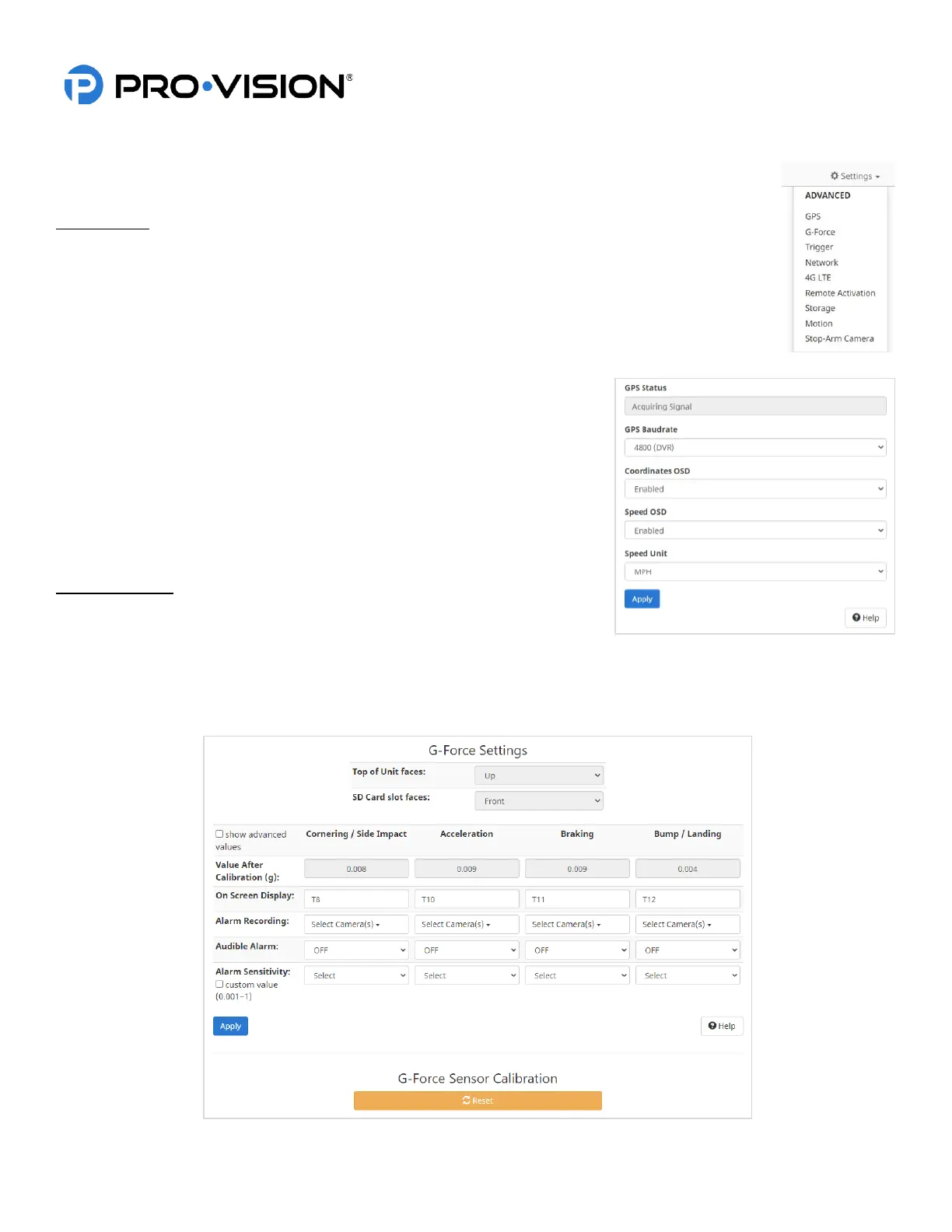
Advanced DVR settings are adjusting by clicking on the settings button in the upper right corner of the
web page and then selecting the category from the drop-down menu.
GPS Settings
GPS Status:
Status of the GPS Signal, if the GPS is not connected or signal has not yet been acquired it will be
displayed in this box.
GPS Baudrate:
Baud rate of GPS antenna communication, for the PD-1902 it is 4800. This should only be changed if
specified by a PRO-VISION technician.
Coordinates OSD:
Disabled this if it is not desired to show the location coordinates on the
video.
Speed OSD:
Disabled this if it is not desired to show the speed on the video.
Speed Unit:
The units used in the on-screen display for the current vehicle speed. (MPH
or KPH).
G-Force Settings
The DVR unit has a built-in G-Force sensor that can be used as a trigger to
activate alarm recording. The sensor must be calibrated after the system is
installed. To calibrate, ensure the DVR is mounted and the vehicle is parked on a level surface and then follow the
onscreen prompts on the G-force page to complete the calibration.
After calibration, various settings can be configured to trigger Alarm recording and set sensitivity.



 To Next Page