©2022 Pro-Vision Solutions, LLC. Page 40 of 56
Network Settings
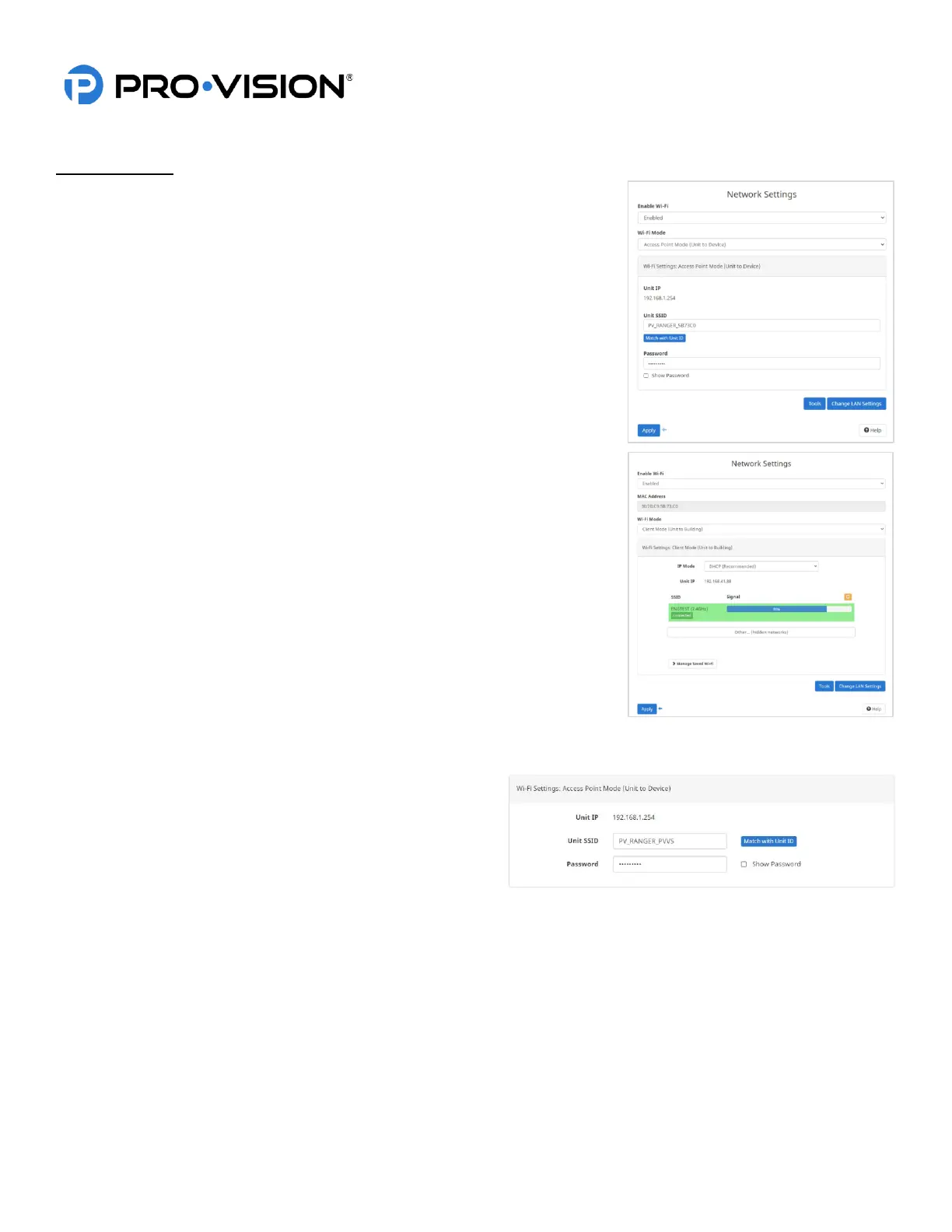
The network settings allow the user to configure the LAN and Wi-Fi functions of
the DVR unit. The default configuration is to have Wi-Fi enabled using Wi-Fi
Access Point Mode. There are two different Wi-Fi modes on the DVR unit that
can be set from the “Wi-Fi Mode” option at the top of the page. The device can
be set to one of the following modes:
1. Access Point Mode:
Enabled by default, this mode allows your smart device to connect
directly to the DVR unit via Wi-Fi for remote configuration and access to
view cameras and recorded video files.
2. Client Mode (Unit to Building):
This mode is used to allow your device to automatically connect to your
building’s Wi-Fi when it comes into range. Once connected to the network,
video files on the DVR can be accessed and transferred remotely either
manually or automatically using the SecuraMax, CloudConnect, or Connect
(ECB) software.
Note: If the device is set to Wi-Fi Client mode, it cannot be directly accessed
via Wi-Fi AP to change settings (since the AP mode is no longer enabled).
The Wi-Fi AP mode can be temporarily re-enabled by pressing and holding
the “STOP” button on the front of the DVR for 7 seconds and then releasing
once a single beep is heard. To return the DVR to Wi-Fi Client mode, press
and hold the “STOP” button on the front of the DVR for 7 seconds and then
release once a single beep is heard or connect to it via Wi-Fi AP mode and
change the Wi-Fi Mode setting through the web interface.
If you do not want to use the built-in Wi-Fi, set the “Wi-Fi” at the top of the page
to “Disabled”. Once applied, the only way to connect to the DVR unit is through
the LAN connection.
Wi-Fi Settings: Access Point Mode:
When enabled, the Wi-Fi AP mode broadcasts a Wi-Fi SSID to
allow devices to connect. The SSID is password protected
using WPA2 AES security mode
Unit IP:
This is the IP address of the DVR unit for communication to
your device once connected.
Unit SSID:
This is the name of the Wi-Fi AP that the DVR will broadcast. The default configuration is “PV_RANGER_xxxxx”. This
should be changed to a name that contains the unit number of the vehicle to allow identification among the other
vehicles around it. Clicking “Match with Unit ID” will automatically add the set Unit ID to the name of the Wi-Fi SSID.
Password:
Password security protects the Wi-Fi from undesired access. All DVR units are shipped using a default password of
“doesitall” which should be changed to something unique. In general, fleet Wi-Fi passwords are set to the same, unique
organization password.


 To Next Page
 Loading...