EasyManua.ls Logo

Procon A1M - Deadband Mode Operation

Procon A1M
96 pages
Print Icon
To Next Page IconTo Next Page
To Previous Page IconTo Previous Page
Loading...
4. Dea
d
The deadba
n
4.1. S
e
There are tw
o
changed via
The Cooling
will be assu
m
4.2. O
p
When enabl
e
air) Temper
a
While the ro
o
Whilst in HE
A
Whilst in FA
N
setpoint of 1
9
Whilst in CO
O
Whilst in FA
N
setpoint of 2
8
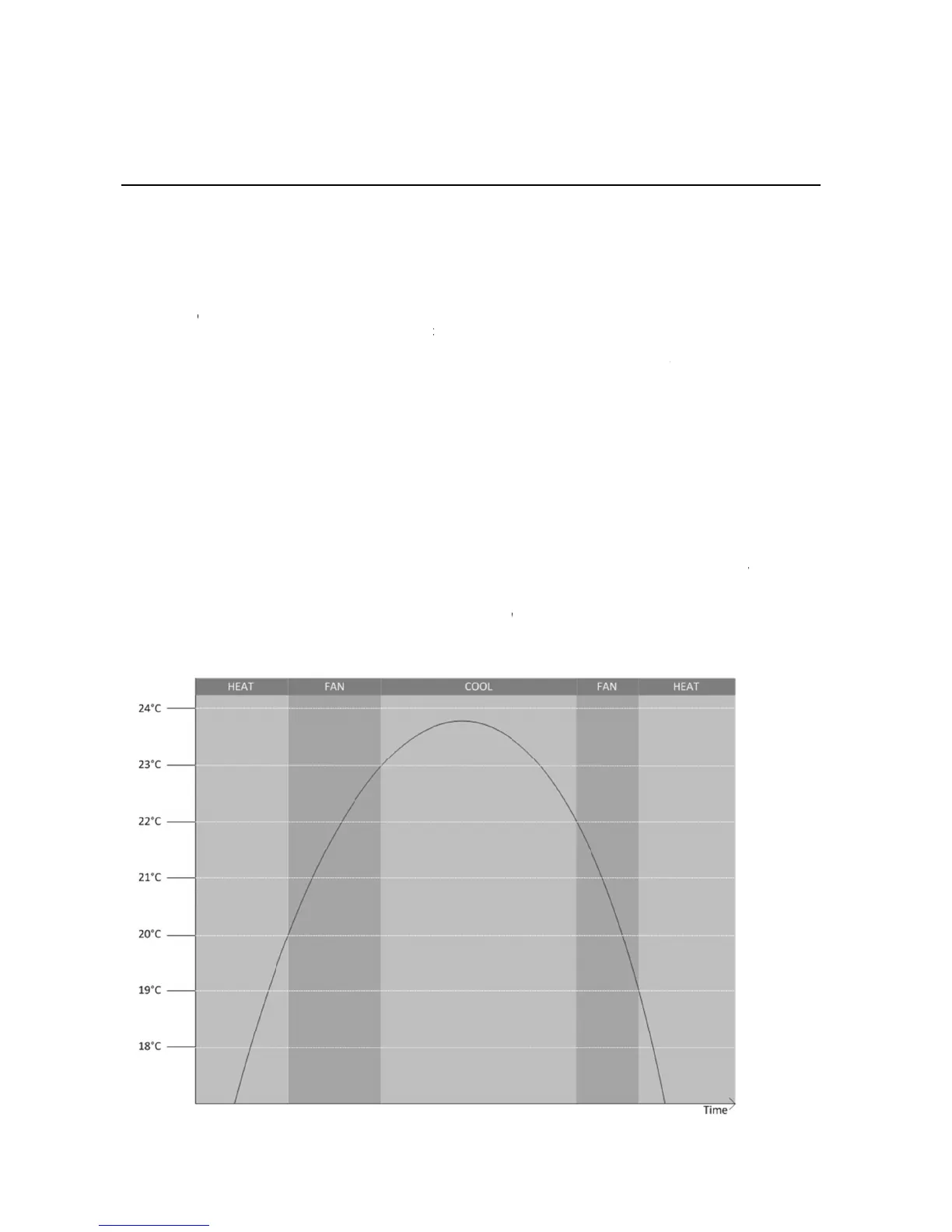
The followin
g
d
band M
o
n
d mode is en
e
ttings
o
settings, th
e
Modbus, refe
r
Setpoint mus
t
m
ed.
p
eration
e
d, the Melco
B
a
ture.
o
m temperatu
r
A
T mode, if th
N
mode, if the
9
ºC.
O
L mode, if t
h
N
mode, if the
8
ºC.
g
image show
s
o
de
abled by setti
n
e
Heating Set
p
r
to the Air-T
o
t
be at least 2
º
B
EMS MINI (
A
r
e is less tha
n
e room temp
e
temperature
r
h
e room temp
e
room temper
a
s
this graphic
a
n
g DIP switch
p
oint (default
1
-Air Modbus t
º
C greater th
a
A
1M) controls
the Heating
S
e
rature rises
a
r
ises above t
h
e
rature falls b
e
a
ture falls bel
o
a
lly (assumin
g
h
8 ON. It is o
n
1
9º) and Cool
t
ables for mor
e
a
n the Heatin
g
the Mode an
d
S
etpoint the u
a
bove the He
a
h
e Cooling Se
t
e
low the Coo
l
ow
the Heati
n
g
a Heating S
e
n
ly applicable
ing Setpoint (
d
e
information.
g
Setpoint, oth
d
Temperatur
e
nit will be set
a
ting Setpoint
t
poin
t
the unit
l
ing Setpoint
n
g Setpoin
t
th
e
e
tpoint of 19º
C
t
o Air-To-Air t
y
d
efault 23ºC).
erwise the de
f
e
Setpoint ba
s
t
o HEAT mod
+
C
the unit
will be set to
1ºC the unit
w
e
unit will be s
e
C
and a Cooli
n
t
ype units.
These value
s
e
fault values g
s
ed on the Ro
o
e with a setp
o
t
will be set to
COOL mode
w
will be set to
F
et to HEAT m
n
g Setpoint o
f
12
s
can be
iven above
o
m (return
int of 28ºC.
FAN mode.
w
ith a
F
AN mode.
ode with a
23ºC):

Related product manuals