24
9.4. Object list
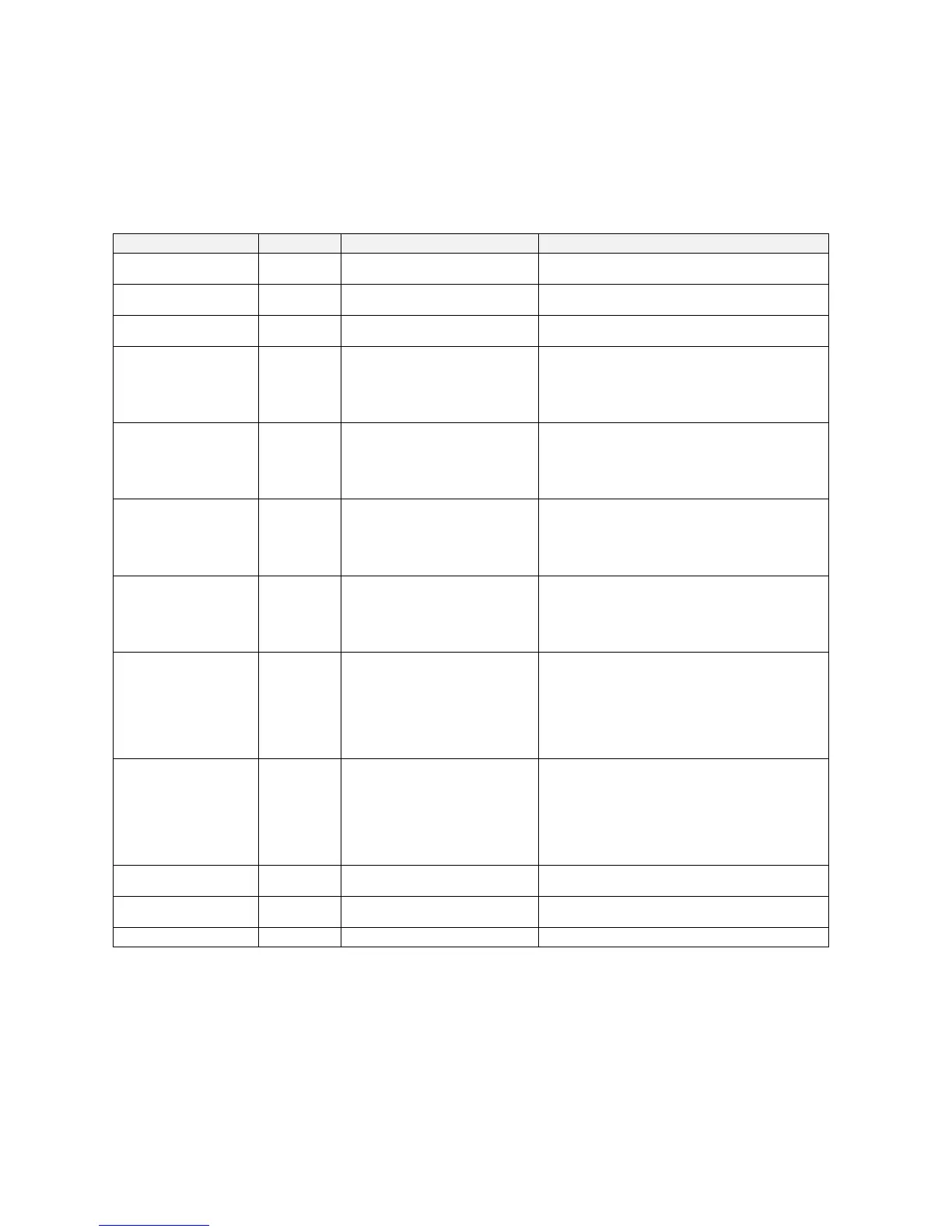
The MelcoBEMS MINI (A1M) currently has objects for certain ATA protocol data points, detailed in the following table.
Object type Object ID Object name Notes
Binary Output BO0 Drive OFF/ON Setup
0 = Drive OFF
1 = Drive ON
Binary Input BI1 Drive OFF/ON State
0 = Drive OFF
1 = Drive ON
Analog Value AV2 Setpoint
Value in either ºC or ºF, depending on the
Temperature Units setting
Multi-state Output MSO3
Mode Setup
1 = Heating
2 = Humidity reduction
3 = Cooling
4 = Ventilation, clean air operation
5 = Auto Operation
Multi-state Input MSI4
Mode State
1 = Heating
2 = Humidity reduction
3 = Cooling
4 = Ventilation, clean air operation
5 = Auto Operation
Multi-state Output MSO5
Fan Speed Setup
1 = Auto
2 = Quiet
3 = Weak
4 = Strong
5 = Very strong (SH i)
Multi-state Input MSI6
Fan Speed State
1 = Auto
2 = Quiet
3 = Weak
4 = Strong
5 = Very strong (SH i)
Multi-state Output MSO7
Air Direction Setup
1 = Auto
2 = Position 1
3 = Position 2
4 = Position 3
5 = Position 4
6 = Position 5
7 = Swing
Multi-state Input MSI8 Air Direction State
1 = Auto
2 = Position 1
3 = Position 2
4 = Position 3
5 = Position 4
6 = Position 5
7 = Swing
Multi-state Output MSO9* Temperature Units
1 = ºC
2 = ºF
Analog Input AI10 Inlet Temperature
Value in either ºC or ºF, depending on the
Temperature Units setting
Analog Input AI11 Fault Code
4-digit fault code
* Please power cycle the MelcoBEMS MINI after changing the Present Value property of this object.


 To Next Page