16
SETUP
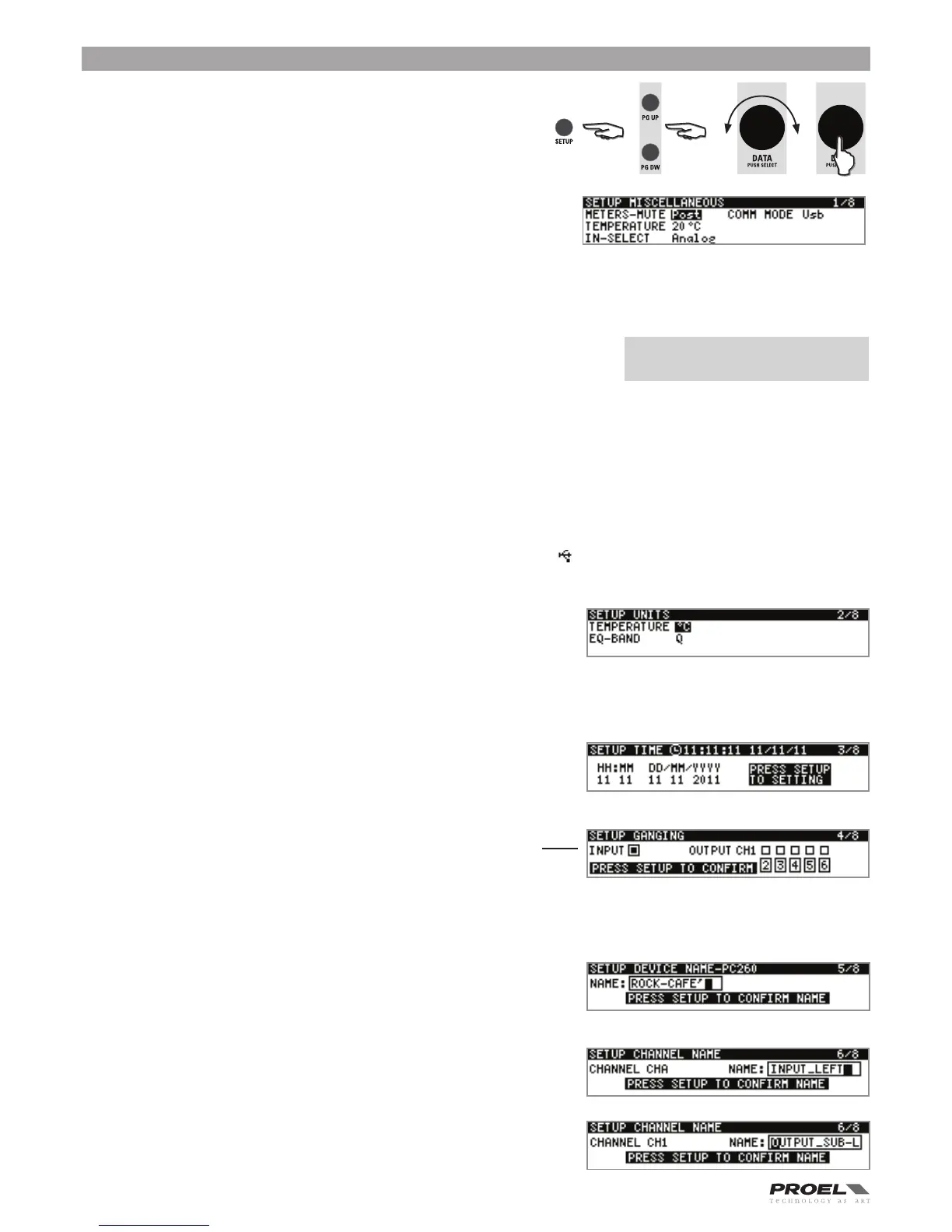
The Setup menu allows access PC260’s global parametersThis is where
preferences for many functions can be set or adjusted. Use page up (PG UP)
and page down (PG DW) to scroll between setup pages. Rotate the DATA knob
for selecting the values/data and push it to enter them.
MISCELLANEOUS
METERS-MUTE
Here you can set if the output meters show the signal before (PRE) or after
(POST) the mutes button.
TEMPERATURE
Here you can set the ambient temperature, in order to calculate the speed of
sound for converting delay times into distance. As default the temperature is set in celsius units scale, in the following page you can
set the unit as Fahrenheit.
INFORMATION NOTE: Speed of sound
Sound travels at different speeds depending on the density of the surrounding air it is
traveling through. Cold air is denser than warm air thus, travels slower than it would if
the air was warmer. Temperature can have a major influence with greater distances,
particularly with respect to widely separated speaker arrays surrounding the audience
for example. Temperatures might vary wildly between an indoor environment and an outdoor evening environment for example.
The speed of sound at room temperature of 20 °C is 343 meters per second. At freezing temperatures sound travels at 331 meters
per second. V is the speed of sound and T is the temperature of the air. This formula finds the average speed of sound for any given
temperature (celcius). The speed of sound is also affected by other factors such as humidity and air pressure.
IN-SELECT
Here is where you can select the type of input between Analog and Digital AES/EBU).
COMM MODE
Here is where the communication port is set. You can choose between USB and Pronet Network port. The communication status
is :showed in the first line of the Run time mode display: if appears this symbol the communication is set as USB, if appears this
symbol the communication is set as NETWORK.
UNITS
TEMPERATURE
Here is where the temperature units can be chosen between in Celsius or
Fahrenheit.
EQ-BAND
Here is where the bandwidth for parametric filters can be set as quality factor (Q) or as octave width (OCT).
TIME
This page is where the internal real time clock is set.
GANGING
This page is where the channel ganging is set. When GANGING is
activated all the channels parameters are linked toghether, if you
change a parameter in one of these channels also the same parameter
of the channels ganged with it changes. Ganging links only the
paramaters, no the audio signal.
DEVICE NAME
This page is where the PC260 name is set. Push the DATA knob to navigate then
rotate the DATA knob to scroll the value, confirm all data pressing SETUP.
CHANNEL NAME
This page is where a name can be assigned to each chann.
PC260:
V
m/s
= 331 + (0.6 * T)


 To Next Page