23
TYPE (PC260) TYPE (PRONET) FREQ GAIN SHAPE SLOPE
Peak Param. Eq. 15.6 Hz - 22.627 KHz +/- 15 dB Q = 28.5 - 0.4 / oct = 0.05 - 3.0 -
Notch Notch 15.6 Hz - 22.627 KHz - Q = 28.5 - 0.4 / oct = 0.05 - 3.0 -
LoSh6 Low Sh. 6dB/oct 15.6 Hz - 22.627 KHz +/- 15 dB - -
LoSh12 Low Sh. 12dB/oct 15.6 Hz - 22.627 KHz +/- 15 dB - -
LoShV Low Sh. var. 15.6 Hz - 22.627 KHz +/- 15 dB - 6.0 - 12 dB
HiSh6 High Sh. 6dB/oct 15.6 Hz - 22.627 KHz +/- 15 dB - -
HiSh12 High Sh. 12dB/oct 15.6 Hz - 22.627 KHz +/- 15 dB - -
HiShV High Sh. var. 15.6 Hz - 22.627 KHz +/- 15 dB - 6.0 - 12 dB
ResLp Res. Lowpass 15.6 Hz - 22.627 KHz - Q = 3.30 - 0.35 -
Bandpass Bandpass 15.6 Hz - 22.627 KHz - Q = 28.5 - 0.4 / oct = 0.05 - 3.0 -
ResHp Res. Highpass 15.6 Hz - 22.627 KHz - Q = 3.30 - 0.35 -
Allp1 Allpass 1st ord. 15.6 Hz - 22.627 KHz - degrees = -3° to -179° -
Allp2 Allpass 2nd ord. 15.6 Hz - 22.627 KHz - Q = 3.30 - 0.35 -
TYPE (PC260) TYPE (PRONET) FREQ GAIN SHAPE SLOPE
DEQ - dynamic equalizer
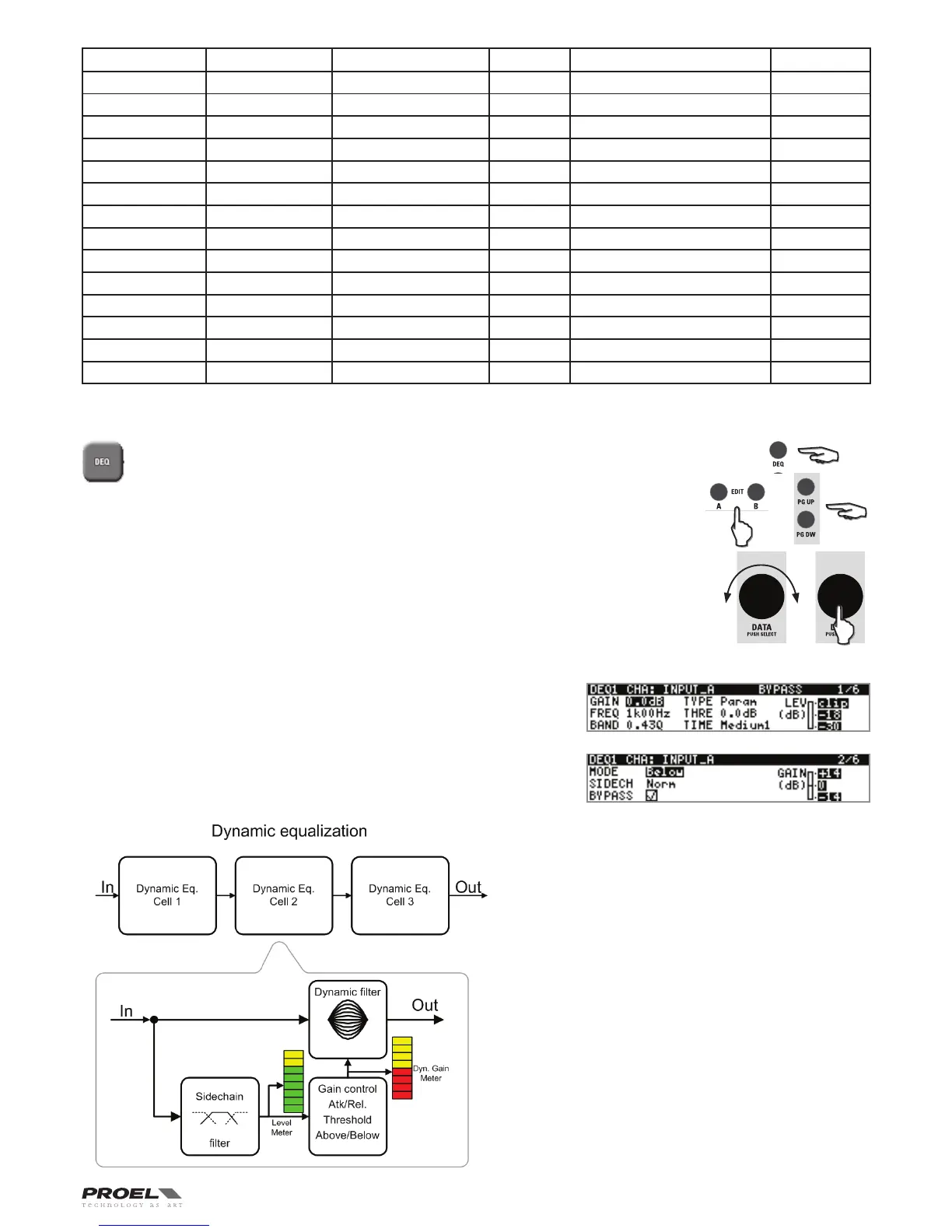
To access the first page of the dynamic EQ section, press the DEQ button and then the EDIT
button of the input you want to edit. Push the DATA knob to select the parameter to edit and
rotate the knob to adjust it. Use PG UP and PG DW buttons for scrolling the pages of the
three dynamic EQ filters available for each input.
The first line of the display shows the EQ filter number (DEQ1, DEQ2, DEQ3). For each EQ filter you
can set many parameters: GAIN, FREQ, BAND, TYPE, THRESHOLD and TIME are in the first page
of the filter, MODE, SIDECHAIN and BYPASS are in the second page. The first page shows also the
input LEVEL meter and the second page the GAIN meter.
When Input A and Input B channels are linked (see SETUP GANGING section), the display first line
shows CHA&B and the DEQ parameters are modified in the same way in both inputs A and B.
IN A DEQ, EACH CELL IS AN EQ FILTER WHERE THE GAIN PARAMETER IS DYNAMICALLY
CONTROLLED BY THE LEVEL OF THE INPUT SIGNAL.
All parameters can be adjusted separately for each cell, these are:
GAIN
Sets the gain parameter for the filter.
FREQ
Sets the reference frequency for the filter.
BAND
Controls the filter bandwidth (available only for parametric type
and not for shelving types).
TYPE
Selects the type of filter. Note that when changing the filter type
the GAIN is set to zero.
EQ filter types available are:
"Param"asParametriclter,
"LoSh"asLowShelf6dB/oct.lter,
"HiSh"asHighShelf6dB/oct.lter.
THRE
Threshold sets which the level of the input signal that congrols
the gain of the dynamic EQ filter. According to the MODE setting
(ABOVE / BELOW), when the input signal reaches the threshold,
the gain increase or reduction of the dynamic filter is activated
or deactivated.
The amount of gain increase or reduction is shown by the GAIN
METER (see also MODE parameter). The threshold level is
referred to 0 dB: if the input has no attenuation, it corresponds
to 0 dBu (775 mV) of the input signal, so Threshold = +21 dB (max
signal) means no detection of input signal.


 To Next Page