DESCRIPTION OF THE CONSOLE
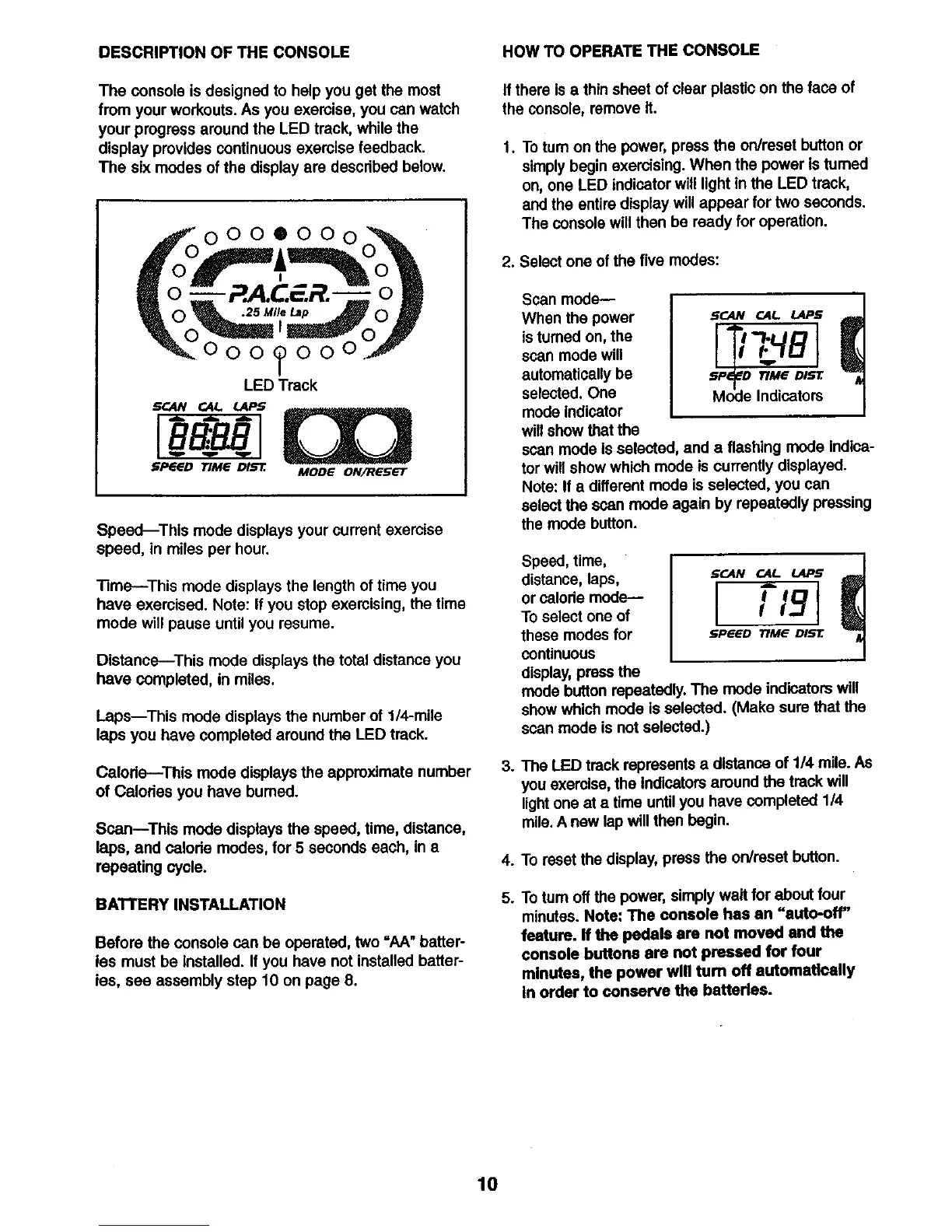
The console is designed to help you get the most
from your workouts. As you exemise, you can watch
your progress around the LED track, while the
display provides continuous exemise feedback.
The six modes of the display are described below.
000®000
P.A.CF.R.-
000_000
LEDTreck
5CAN CAI,. i_
S_GD _ME Dl_-r. MODE ON/RESe'T
Speed--This mode displays your current exemise
speed, in miles per hour.
Time--This mode displays the length of time you
have exercised. Note: If you stop exemising, the time
mode will pause until you resume.
Distance--This mode displays the total distance you
have completed, in miles.
Laps--This mode displays the number of 1/4-mile
laps you have completed around the LED track.
Calorie---This mode displays the approximate number
of Calodes you have burned.
Scan--This mode displays the speed, time, distance,
laps, and calode modes, for 5 seconds each, in a
repeating cycle.
BATTERY INSTALLATION
Before the console can be operated, two "AA" batter-
ies must be Installed. If you have not installed batter-
ies, see assembly step 10 on page 8.
HOW TO OPERATE THE CONSOLE
If there isa thin sheet of clear plastic on the face of
the console, remove It.
1. To turnon the power, press the on/reset button or
simplybegin exercising. When the power is tumed
on, one LED indicator will light in the LED track,
and the entire display willappear for two seconds.
The console will then be ready for operation.
2. Select one of the five modes:
Scan mode--
When the power
istumed on, the
scan mode will
automatically be
selected. One
mode indicator
will show that the
.__-AN OIL LAPS
SP_ TIMe BIEZ
Mode Indicators
scan mode is selected, and a flashing mode Indica-
tor will show which mode is currently displayed.
Note: If a different mode is selected, you can
select the scan mode again by repeatedly pressing
the mode button.
Speed, time,
distance, laps,
or calode mode--
To select one of
these modes for
continuous
display,press the
/
SCAN __..AI LAPS ,_
I ,ol
I L.3
_,PEffD TIME DIS'E
mode button repeatedly. The mode indicators will
show which mode is selected. (Make sure that the
scan mode is not selected.)
3. The LED track represents a distance of 114mile. As
you exercise,the Indicators around the track will
lightone at a time untilyou have completed 114
mile.A new lap will then begin.
4. To reset the display, press the on/reset button.
5. To tum offthe power, simply wait for about four
minutes. Note: The console has an "auto-off"
feature, ff the pedals are not moved and the
console buttons are not pressed for four
minutes, the power will turn off automatically
in order to conserve the batteries.
10





 To Next Page