HOWTOCONNECTYOURVCR
Note:IfyourVCRhasanunusedAUDIOOUTjack,
seeInstructionAbelow.IftheAUDIOOUTjackIs
beingused,seeinstructionB.IfyouhaveeTV
witha built-InVCR,seeInstructionB.IfyourVCR
Is connected to your home stereo, see HOW TO
CONNECT YOUR HOME STEREO on page 14.
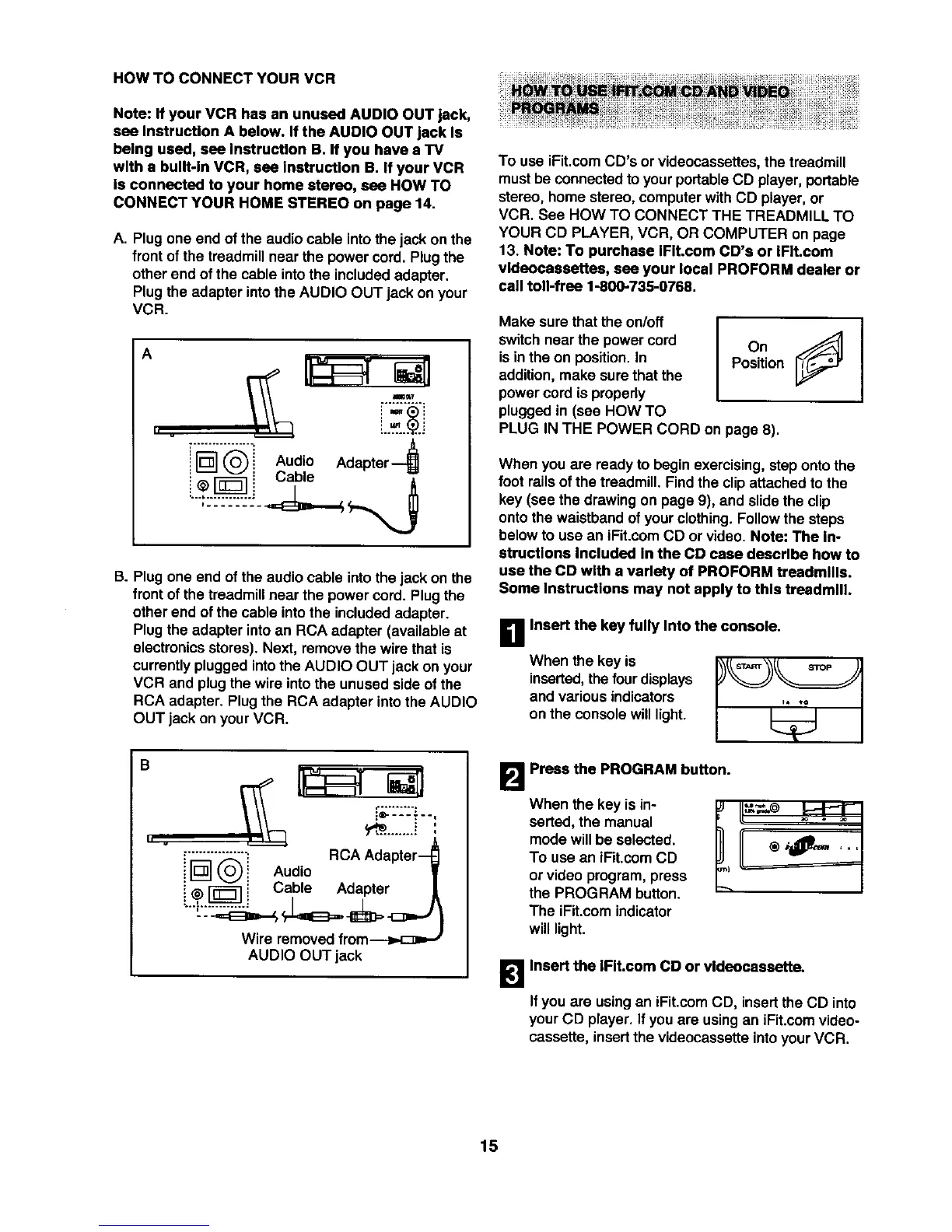
A. Plug one end of the audio cable into the jackon the
frontofthe treadmillnear the powercord. Plug the
otherend of the cable intothe includedadapter,
Plug theadapter intothe AUDIO OUT jack on your
VCR.
A
h
i_-I _'_i Audio Adapter
B. Plug one end of the audio cable intothe jack on the
frontofthe treadmillnear the power cord. Plugthe
other end of the cable intothe includedadapter.
Plugthe adapter intoan RCA adapter (available at
electronicsstores). Next, remove the wire that is
currentlyplugged intothe AUDIO OUT jack on your
VCR and plug the wire intothe unused sideof the
RCA adapter. Plug the RCA adapter intothe AUDIO
OUT jack onyour VCR.
B
• . v
_e----'--,
_........+.!
_'_3],'"_" _ RCA Adapter-
i L_J (_! Audio
i @ _ i Cable Adapter
Wire removedfrom-----=,,.[::_=_
AUDIO OUT jack
To use iFit.comCD's or videocassettes,the treadmill
mustbe connectedto yourportableCD player,portable
stereo, home stereo, computerwith CD player, or
VCR. See ROW TO CONNECT THE TREADMILL TO
YOUR CD PLAYER, VCR, OR COMPUTER on page
13. Note: To purchase IFIt.com CD's or IFIt.com
vldeocassettes, see your local PROFORM dealer or
call toll-free 1-800735-0768.
Make surethat the on/off
switchnear the powercord
isin the on position.In
addition,make sure thatthe
powercord isproperly
pluggedin (see HOW TO
IOn l
Position
PLUG IN THE POWER CORD on page 8).
When you are ready to beginexercising,step onto the
foot railsof the treadmill. Findthe clipattached to the
key (see the drawingon page 9), and slidethe clip
ontothe waistbandof yourclothing.Followthe steps
belowto use an iFit.comCD or video. Note: The In-
structions Included In the CD case describe how to
use the CD with a variety of PROFORM treadmills.
Some Instructions may not apply to this treadmill.
When the key is
inserted,the four displays
and variousindicators
on the console will light.
B Insert the key fully Into the console.
B Prees the PROGRAM button.
When the key is in-
serted, the manual
mode will be selected.
To use an iFit.com CD
or video program,press
the PROGRAM button.
The iFit.comindicator
will light.
[]Insert the IFIt.com CD or vldeecassette.
If you are usingan iFit.comCD, insertthe CD into
yourCD player. Ifyou are usingan iFit.comvideo-
cassette, insertthe videocassetteintoyour VCR.
15







 To Next Page