Home
Profound
Measuring Instruments
VIBRA+
Page 43
Profound VIBRA+ - Page 43
79 pages
Manual
Save Page as PDF
To Next Page
To Next Page
To Previous Page
To Previous Page
Loading...
Manual Profound
VIBRA
-series, version 2.00
43
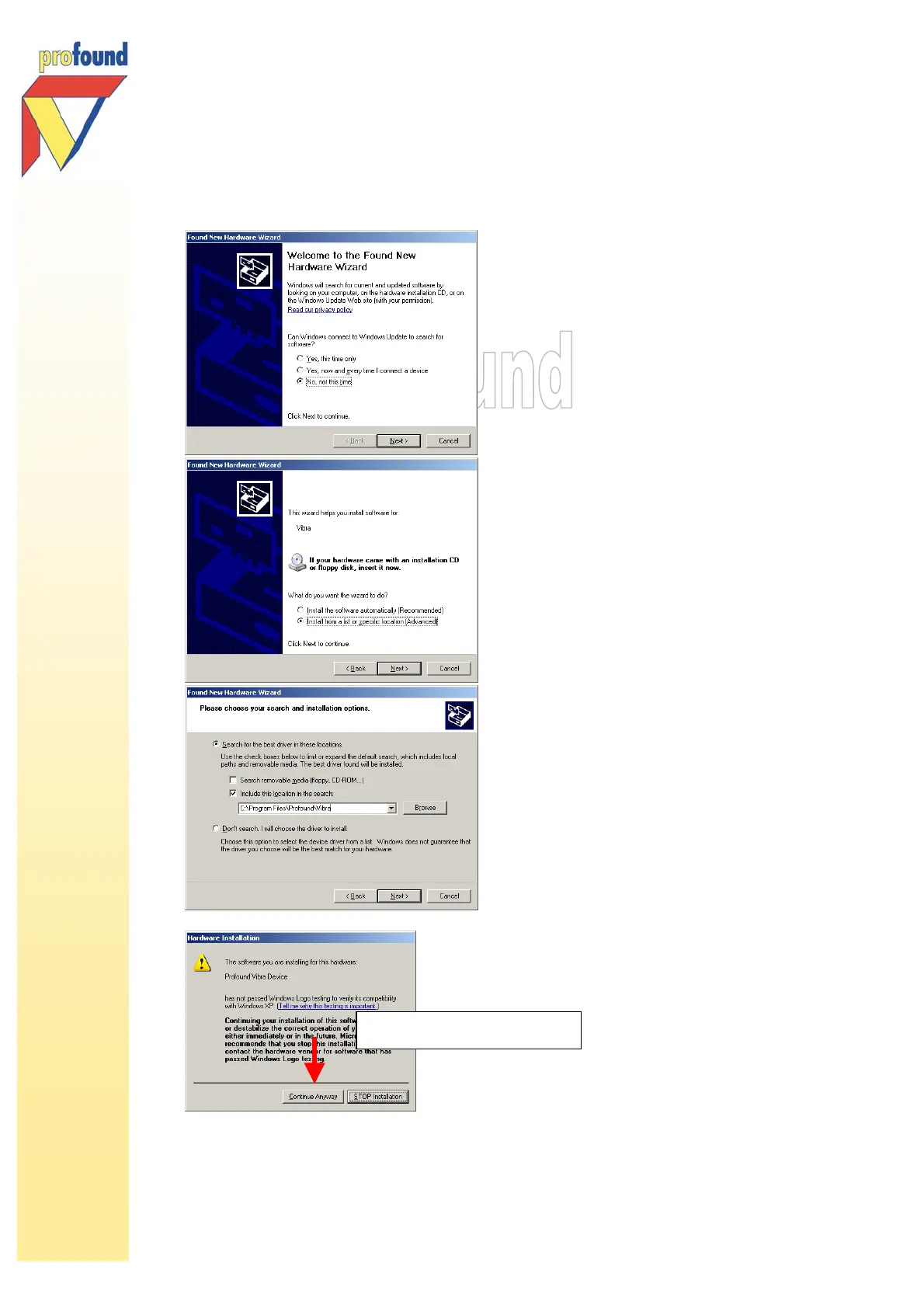
Choose:
No, not this time
Choose:
Install from a list or specific location
Choose:
Include this location in the search:
C:\Program
Files\Profound\Vibra
Choose:
Continue Anyway
42
44
Table of Contents
Main Page
Table of Contents
2
Warranty, Liability and Service Agreement
4
Introduction
5
Getting Started
7
The VIBRA Equipment
9
Introduction
9
Connector Ports of the VIBRA
9
Maintenance of the VIBRA
10
Replacing the Batteries
10
Cleaning
10
Calibration
11
Vibration Monitoring with the VIBRA
11
Preparation of the VIBRA
11
Positioning the Geophone
11
Positioning the VIBRA
13
Connecting Geophone to the VIBRA
14
4.1.4 Geophone Detection and Error Messages
14
Measuring with the VIBRA
15
Switching on the VIBRA
15
Measuring with the VIBRA
16
Measurement Duration
16
Switching off the VIBRA
17
Unmanned Measurements with the VIBRA - Wakeup Enabled
17
Frequency Measurements with the VIBRA-Series
18
Level and Calibration Check (VIBRA + Only)
19
Intelligent Data-Reduction Facilities
19
Description of the Menu Options
22
Option Vibra Info
22
Option Start Measurement
22
Available Measurement Information While Measuring
23
Actual Measuring Values
23
Maxima
24
Measuring Values in Accordance with the Governing Code
25
Options While Measuring
26
Option Change Settings
27
Interval
28
Save Level
28
Peak Type
29
Code (VIBRA + -Option)
30
Alarm Level
31
Smart Alarm (VIBRA Only)
32
Traces
33
On/Off
34
Days (VIBRA + -Option)
35
Project
36
Exiting the Change Settings Menu
36
Option Date and Time
37
Option Display Contrast
37
Option Erase Data
38
Option Test Alarm
38
Option Send E Mail (VIBRA + -Option)
39
Switching off
39
Memory and Battery
39
VIBRA PC Software
40
Unique License File
41
Installation: PC Software, Licence File, Driver
41
Processing Measuring Data
44
Downloading Data
44
Viewing Data
45
Exporting Data (Graphically and Numerically)
49
Graphical Data Export
49
Numerical Data Export
49
Programming and Locking the VIBRA with the PC Software
52
Settings
54
Locking Functions
55
VIBRA User ID
55
Wireless Data Transfer and E-Mail Alarm Via GPRS (VIBRA + -Option)
57
Installation of the SIM Card in the VIBRA
57
Activating the Mobile Subscription: E-Mail and GPRS Settings
58
Status and Data Per E-Mail
61
Troubleshooting Concerning the E-Mail Function
64
E-Mail Alarm Function
66
Appendix I Technical Specifications
68
Appendix II Signal Flow Chart VIBRA-Series
69
Appendix III Schematic Overview E-Mail Alarm
77
Appendix IV
78
Schematic Overview VIBRA USB Plug (Alarm Connection)
78
Appendix V Recommended Vibration Criteria to Avoid Building Damage
79
Related product manuals
Profound VIBRA Series
79 pages



 To Next Page