Installation
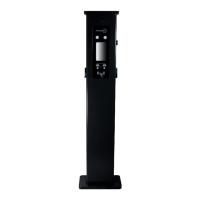
Pole Mounted
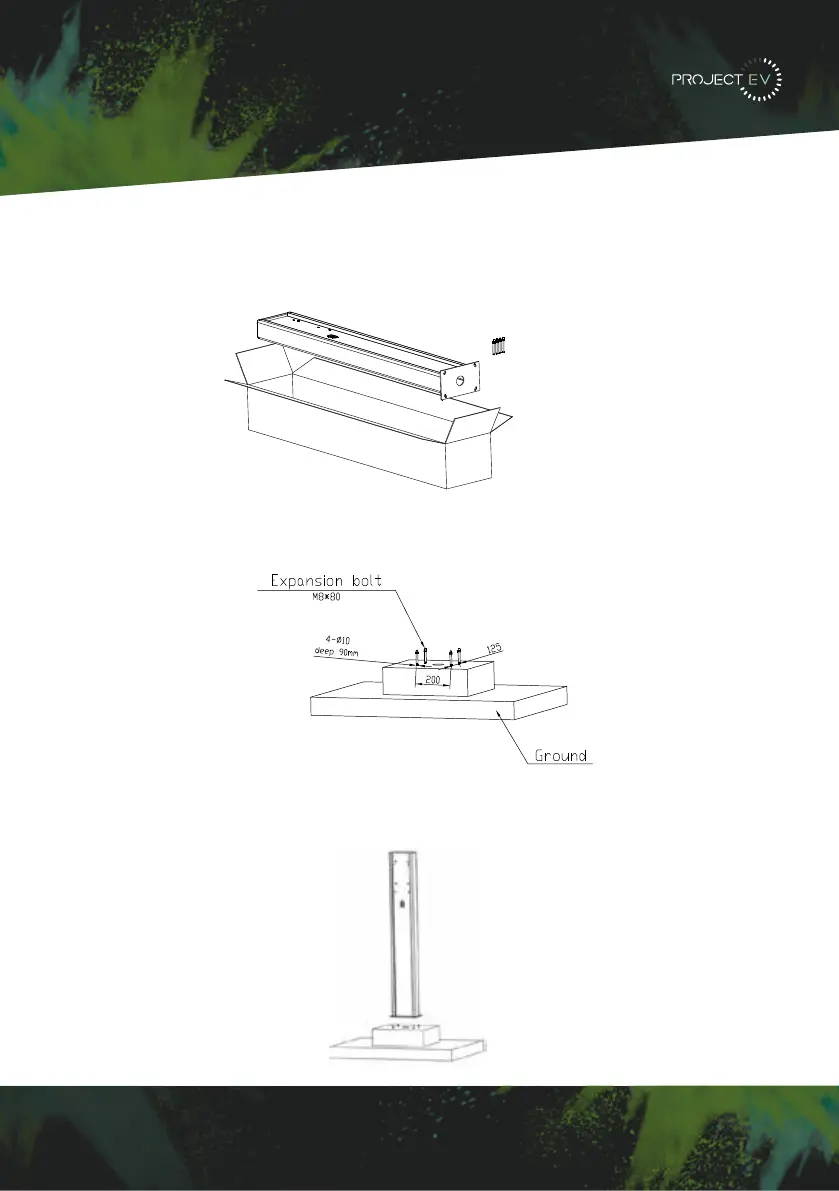
Mount on a Pole
1. Open the packaging of the pole, take out the pole and mounting accessories.
2. The pole must be installed on a hard surface (concrete surface is recommended or
ground mount for soft ground). It can also be mounted on a solid ground. Drill holes
according to the requirements marked on the illustration for fixing expansion bolts.
3. Fix the pole onto the holes with expansion bolts. The input cables go into the pole from
the centre at the bottom and will exit through the grommit provided below the charger.
3XWWKHFKDUJHSRLQWRQWRWKHEUDFNHWDQGIL[LWZLWKWKHVFUHZVDWWKHERWWRPRI
WKHFKDUJHSRLQW7KHLQVWDOODWLRQLVGRQH
&ULPSWKHEHORZVKRZQLQVXODWHGIHUUXOHRUULQJWHUPLQDOVRQWKHHQGRIWKH$&LQSXW
ZLUHV&RQQHFWWKHZLUHVLQWRWKHWHUPLQDOEORFNRIWKHFKDUJHSRLQWDVEHORZ&KHFNWKH
ZLULQJDQGWKHQFORVHWKH5&'LQWKHVLGHZLQGRZ&ORVHWKHVLGHZLQGRZZLWKWKHFRYHU
WKHQWKHZULQJLVGRQH
0RXQWRQDSROH
2SHQWKHSDFNDJLQJRIWKHSROHWDNHRXWWKHSROHDQGPRXQWLQJDFFHVVRULHV
7KHSROHPXVWEHLQVWDOOHGRQDKDUGVXUIDFHFRQFUHWHVXUIDFHLVUHFRPPHQGHGLW
FDQDOVREHPRXQWHGRQDVROLGJURXQG'ULOOKROHVDFFRUGLQJWRWKHUHTXLUHPHQWVPDUNHG
RQWKHLOOXVWUDWLRQIRUIL[LQJH[SDQVLRQEROWV
)L[WKHSROHRQWRWKHKROHVZLWKH[SDQVLRQEROWV7KHLQSXWFDEOHVVKDOOJRLQWRWKH
SROH IURP WKH ERWWRP PLGGOH DUHD DQG FRPH RXW RI LW IURP WKH DUHD EHORZ WKH FDEOH
KRRNHU
3.1.3 Put the charge point onto the bracket, and x it with the 2 screws at the bottom of
the charge point. The installation is done.
3.1.4 Crimp the insulated ferrule or ring terminals on the end of the AC input wires.
Connect the wires into the terminal block of the charge point as below. Check the
wiring and then close the RCD in the side window. Close the side window with the
cover, then the wiring is completed.
3.2.2 The pole must be installed on a hard surface, concrete surface is recommended,
it can also be mounted on a solid ground. Drill holes according to the requirements
marked on the illustration for xing expansion bolts.
3.2.3 Fix the pole onto the holes with expansion bolts. The input cables shall go
into the pole from the bottom middle area and come out of it from the area below the
cable hooker.
3.2 Mount on a pole
3.2.1 Open the packaging of the pole, take out the pole and mounting accessories.
8 9
3XWWKHFKDUJHSRLQWRQWRWKHEUDFNHWDQGIL[LWZLWKWKHVFUHZVDWWKHERWWRPRI
WKHFKDUJHSRLQW7KHLQVWDOODWLRQLVGRQH
&ULPSWKHEHORZVKRZQLQVXODWHGIHUUXOHRUULQJWHUPLQDOVRQWKHHQGRIWKH$&LQSXW
ZLUHV&RQQHFWWKHZLUHVLQWRWKHWHUPLQDOEORFNRIWKHFKDUJHSRLQWDVEHORZ&KHFNWKH
ZLULQJDQGWKHQFORVHWKH5&'LQWKHVLGHZLQGRZ&ORVHWKHVLGHZLQGRZZLWKWKHFRYHU
WKHQWKHZULQJLVGRQH
0RXQWRQDSROH
2SHQWKHSDFNDJLQJRIWKHSROHWDNHRXWWKHSROHDQGPRXQWLQJDFFHVVRULHV
7KHSROHPXVWEHLQVWDOOHGRQDKDUGVXUIDFHFRQFUHWHVXUIDFHLVUHFRPPHQGHGLW
FDQDOVREHPRXQWHGRQDVROLGJURXQG'ULOOKROHVDFFRUGLQJWRWKHUHTXLUHPHQWVPDUNHG
RQWKHLOOXVWUDWLRQIRUIL[LQJH[SDQVLRQEROWV
)L[WKHSROHRQWRWKHKROHVZLWKH[SDQVLRQEROWV7KHLQSXWFDEOHVVKDOOJRLQWRWKH
SROH IURP WKH ERWWRP PLGGOH DUHD DQG FRPH RXW RI LW IURP WKH DUHD EHORZ WKH FDEOH
KRRNHU
3.1.3 Put the charge point onto the bracket, and x it with the 2 screws at the bottom of
the charge point. The installation is done.
3.1.4 Crimp the insulated ferrule or ring terminals on the end of the AC input wires.
Connect the wires into the terminal block of the charge point as below. Check the
wiring and then close the RCD in the side window. Close the side window with the
cover, then the wiring is completed.
3.2.2 The pole must be installed on a hard surface, concrete surface is recommended,
it can also be mounted on a solid ground. Drill holes according to the requirements
marked on the illustration for xing expansion bolts.
3.2.3 Fix the pole onto the holes with expansion bolts. The input cables shall go
into the pole from the bottom middle area and come out of it from the area below the
cable hooker.
3.2 Mount on a pole
3.2.1 Open the packaging of the pole, take out the pole and mounting accessories.
8 9
3XWWKHFKDUJHSRLQWRQWRWKHEUDFNHWDQGIL[LWZLWKWKHVFUHZVDWWKHERWWRPRI
WKHFKDUJHSRLQW7KHLQVWDOODWLRQLVGRQH
&ULPSWKHEHORZVKRZQLQVXODWHGIHUUXOHRUULQJWHUPLQDOVRQWKHHQGRIWKH$&LQSXW
ZLUHV&RQQHFWWKHZLUHVLQWRWKHWHUPLQDOEORFNRIWKHFKDUJHSRLQWDVEHORZ&KHFNWKH
ZLULQJDQGWKHQFORVHWKH5&'LQWKHVLGHZLQGRZ&ORVHWKHVLGHZLQGRZZLWKWKHFRYHU
WKHQWKHZULQJLVGRQH
0RXQWRQDSROH
2SHQWKHSDFNDJLQJRIWKHSROHWDNHRXWWKHSROHDQGPRXQWLQJDFFHVVRULHV
7KHSROHPXVWEHLQVWDOOHGRQDKDUGVXUIDFHFRQFUHWHVXUIDFHLVUHFRPPHQGHGLW
FDQDOVREHPRXQWHGRQDVROLGJURXQG'ULOOKROHVDFFRUGLQJWRWKHUHTXLUHPHQWVPDUNHG
RQWKHLOOXVWUDWLRQIRUIL[LQJH[SDQVLRQEROWV
)L[WKHSROHRQWRWKHKROHVZLWKH[SDQVLRQEROWV7KHLQSXWFDEOHVVKDOOJRLQWRWKH
SROH IURP WKH ERWWRP PLGGOH DUHD DQG FRPH RXW RI LW IURP WKH DUHD EHORZ WKH FDEOH
KRRNHU
3.1.3 Put the charge point onto the bracket, and x it with the 2 screws at the bottom of
the charge point. The installation is done.
3.1.4 Crimp the insulated ferrule or ring terminals on the end of the AC input wires.
Connect the wires into the terminal block of the charge point as below. Check the
wiring and then close the RCD in the side window. Close the side window with the
cover, then the wiring is completed.
3.2.2 The pole must be installed on a hard surface, concrete surface is recommended,
it can also be mounted on a solid ground. Drill holes according to the requirements
marked on the illustration for xing expansion bolts.
3.2.3 Fix the pole onto the holes with expansion bolts. The input cables shall go
into the pole from the bottom middle area and come out of it from the area below the
cable hooker.
3.2 Mount on a pole
3.2.1 Open the packaging of the pole, take out the pole and mounting accessories.
8 9
12
G 6RPH URXWHUV KDYH :L)L RQH LV *+] WKH RWKHU LV *+] 0RVW KRPHV MXVW XVH WKH
*+]:L)LDVWKHLUGHIDXOW:L)L%XWWKHFKDUJHUFDQRQO\FRQQHFWWRWKH*+]:L)L6RLI
WKH FKDUJHU FDQ FRQQHFW WR \RXUPRELOH SKRQH KRWVSRWEXW FDQQRW FRQQHFW WRWKH KRPH
:L)L3OHDVHFKHFNZLWKWKHKRPHRZQHURUFKHFNRQWKHLUURXWHUWRVHHLI\RXDUHXVLQJWKH
*+]:L)L3OHDVHGRXVHWKH*+]:L)LIRUFKDUJHUFRQQHFWLRQ
H &KHFNLI WKH FKDUJHU LV VWLOO FRQQHFWHG WR WKH FRPSXWHU 3OHDVH XQSOXJ LW IURPFRPSXWHU
RWKHUZLVHWKHFKDUJHUZRQªWFRQQHFWWRWKHEDFNRIILFHVHUYHU
I &KHFN LI VHUYHU DGGUHVV LV FRUUHFW LQ WKH§6HUYHU 85/¨ ILHOG 7KH FRUUHFW VHWWLQJ LV
ZVFKDUJHJURZDWWFRPRFSSZV
&DQQRWDFFHVVSDUDPHWHUVHWWLQJSDJH
&OLFN 6WDUW 0HQX!&RQWURO 3DQHO!1HWZRUN DQG 6KDULQJ &HQWHU )RU :LQGRZV DQG
KLJKHUVHDUFKIRUDQGRSHQ&RQWURO3DQHODQGVHOHFW1HWZRUNDQG,QWHUQHW
7RVHWDVWDWLF,3RQ\RXU:LQGRZVFRPSXWHU
A &KHFNLI\RXKDYHFRQQHFWHGWKHFKDUJHUWR\RXUFRPSXWHU
B &KHFNLI\RXKDYHFKDQJHWKHFRPSXWHUªV,3WR[[FDQEHDQ\YDOXHEHWZHHQ
DQGH[FHSW
&OLFN&KDQJHDGDSWHUVHWWLQJV
d. Some routers have 2 WiFi signals, one is 2.4GHz, the other is 5GHz. Most homes
use the 5GHz WiFi as their default WiFi but the charger can only connect to the 2.4GHz
WiFi. So if the charger can connect to your mobile phone hotspot, but cannot connect
to the home WiFi please check the router to see if you are using the 5GHz WiFi. Use the
2.4GHz WiFi for charger connection.
e. Check if the charger is still connected to the computer. Please unplug it from
computer otherwise the charger won’t connect to the back-oce server.
f. Check if server address is correct in the“Server URL” eld. The correct setting is :
ws://ess-charge.atesspower.com:80/ocpp/ws
7.4 Cannot access parameter setting page
a. Check if you have connected the charger to your computer,
b. Check if you have changed the computer’s IP to 192.168.1.x (x can be any value
between 1 and 255 except 5).
To set a static IP on your Windows computer:
(1). Click Start Menu>Control Panel>Network and Sharing Center. (For Windows 8 and
higher, search for and open Control Panel and select Network and Internet).
(2). Click Change adapter settings.
30 31


 To Next Page
 Loading...