English - 27 -
AV Modes
By pressing the “
AV
” button you can switch your TV
to AV modes (except being in teletext). Pressing this
button consecutively will switch the TV in one of the
optional AV modes:
TV, EXT1, EXT2, EXT2S, FAV, S-
VIDEO, HDMI, YPBPR or PC.
Picture Mode Selection
By pressing “PP” button, you maychange Picture
Mode settings.
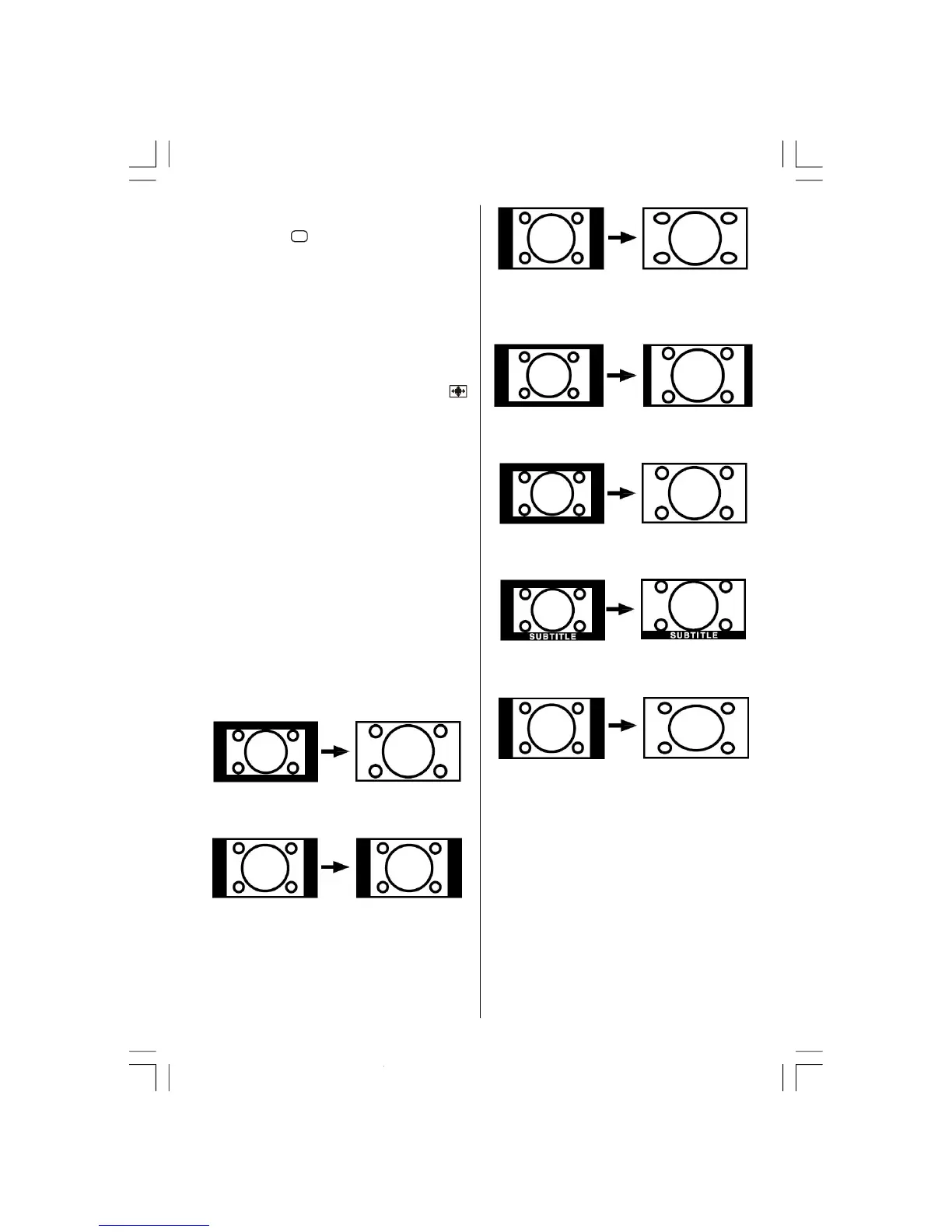
Zoom Modes
Zoom mode can be changed by pressing the “ /
WIDE” button. You can change the screen size ac-
cording to the picture aspect ratio. Select the optimum
one from the following
ZOOM modes.
Note:
• In YPBPR and HDMI modes, while in 720p-1080i
resolutions, only FULL mode is available.
• In PC mode, only 4:3 and 16:9 modes are available.
Auto:
When a WSS (Wide Screen Signalling) signal,
which shows the aspect ratio of the picture, is in-
cluded in the broadcast signal or the signal from an
external device, the TV automatically changes the
ZOOM mode according to the WSS signal.
• When the
AUTO mode does not function correctly
due to poor
WSS signal quality or when you want to
change the
ZOOM mode, change to another ZOOM
mode manually.
16:9 :
This zooms up the wide picture (16:9 aspect ratio) to
the full screen.
4:3
Use to view a normal picture (4:3 aspect ratio) as this
is its original shape.
Panoramic:
This stretches the left and right sides of a normal picture
(4:3 aspect ratio) to fill the screen, without making the
picture appear unnatural.
The top and bottom of the picture are slightly cut off.
14:9 Zoom:
This zooms up the wide picture (14:9 aspect ratio) to
the upper and lower limits of the screen.
Cinema:
This zooms up the wide picture (16:9 aspect ratio) to
the full screen.
Subtitle:
This zooms up the wide picture (16:9 aspect ratio)
with subtitles to the full screen.
Zoom:
This uniformly stretches the left and right sides of a nor-
mal picture (4:3 aspect ratio) to fill the wide TV screen.
• For 16:9 aspect ratio pictures that have been
squeezed into a normal picture (4:3 aspect ratio),
use the
Full mode to restore the picture to its original
shape.
Freeze Picture
You can freeze the picture on the screen by pressing
the “
OK” button.
NOTE: This feature will be unavailable to be used
while watching
PC, YPBPr and HDMI
sources.
02-ENG-32735W-1055UK-32 INCH MB32-(WO PIP)(SUBW)-50116142.p65 14.09.2007, 09:5527


 To Next Page