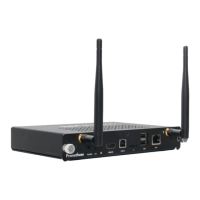
Your ClassFlow Connect is designed and tested to meet the
latest standards of safety for information technology equipment.
However, to ensure your safety, it is important that you read the
following safety instructions.
Setting up your system
•
Read and follow all instructions in the documentation before
you operate your system.
•
Do not use this product near water or a heat source such as
a radiator.
•
Openingsonthechassisareforventilation.Donotblockor
covertheseopenings.Makesureyouleaveplentyofspace
around the system for ventilation. Never insert objects of any
kindintotheventilationopenings.
•
Use this product in environments with ambient temperatures
between0°Cand40°C(32°Fand104°F).
IF YOU USE AN EXTENSION CORD, PLEASE USE THE UL LISTED
CORD AND MAKE SURE THAT THE TOTAL AMPERE RATING OF
THE DEVICES PLUGGED INTO THE EXTENSION CORD DOES NOT
EXCEED ITS AMPERE RATING.
Care during use
•
Donotwalkonthepowercordorallowanythingtorestonit.
•
Do not spill water or any other liquids on your system.
•
When the system is turned off, a small amount of electrical
currentstillows.Alwaysunplugallpower,modem,and
networkcablesfromthepoweroutletsbeforecleaningthe
system.
Safety Information
4 ClassFlow Connect Installation & User Guide


 To Next Page