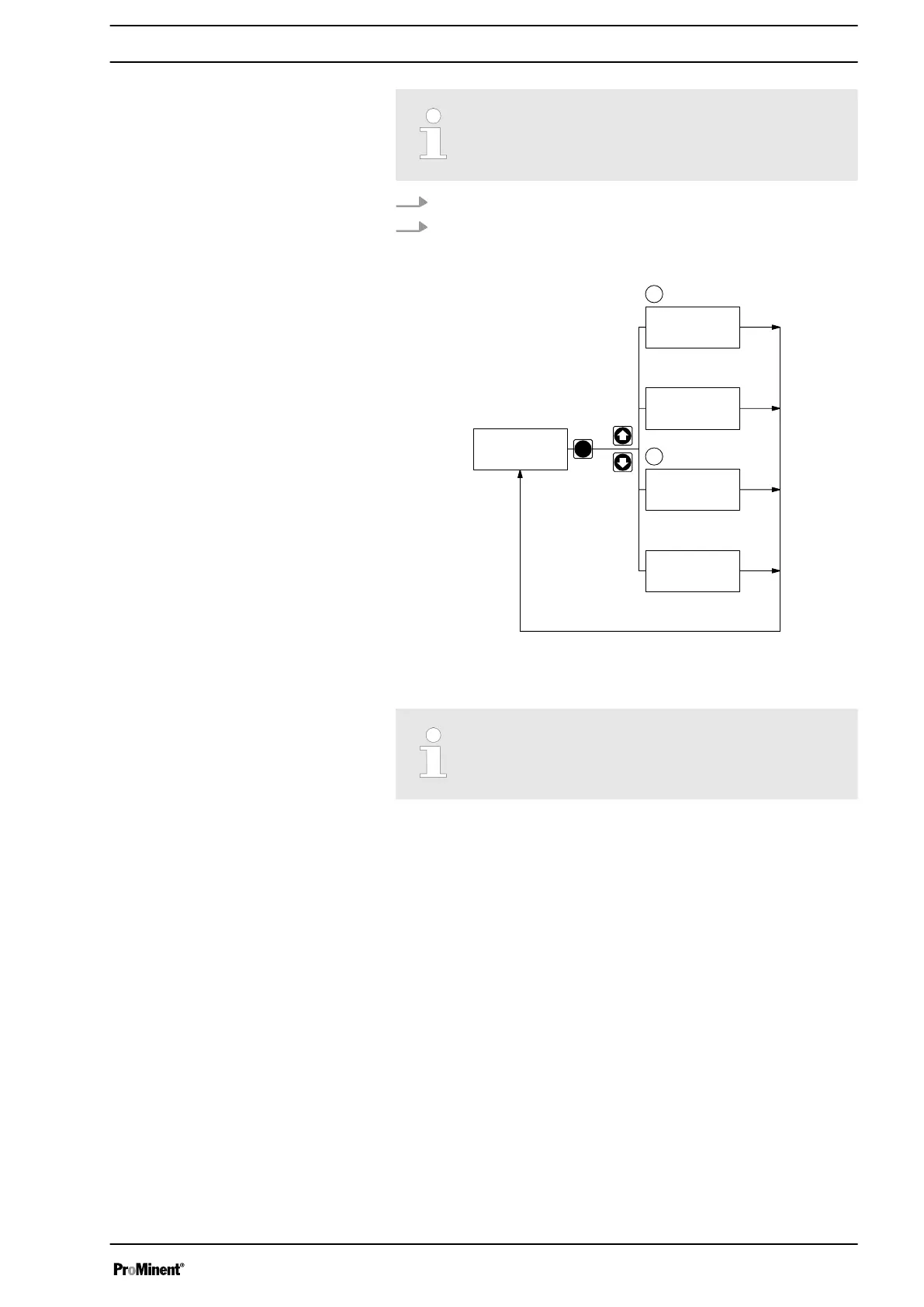
To match the pump to your process requirements, you must
observe the following procedure:
1. In the
“MODE”
menu select the operating mode.
2. If necessary make the settings for this operating mode in the
“SET”
menu.
P
2 s
Continuous
display
MODEMODE
menu
SETSET
menu
CODECODE
menu
CLEARCLEAR
window
1.
2.
B0084
Fig. 28
Exceptions: Timer and PROFIBUS
®
.
Note the diagram.
8.4 Operating mode selection (MODE menu)
In the
“MODE”
menu (dependent on the identity code, some operating
modes may not be present):
n
“Manual”
: for manual operation (identity code control variant:
"Manual", available as standard)
n
“Analog”
: for current control (identity code control variant: "Analog
current")
n
“Contact”
: for contact operation (identity code control variant:
"External 1:1" / "External with pulse control")
n
“Batch”
: for batch operation (identity code control variant: "External
with pulse control")
Adjustment
39



 To Next Page