The PROOF FR400 is a 4G GPS Travel Documentary Camera designed to provide continuous vehicle security and peace of mind. It features a minimalistic design that aims to avoid disrupting the driver's field of vision. The system records continuously while driving and can also monitor the vehicle when parked, identifying damage and providing real-time warnings to a dedicated smartphone app.
Function Description:
The PROOF FR400 system is intended for constant filming during road trips and selective photography when parked, particularly if damage to the vehicle is detected. It incorporates two cameras: a primary frontal camera for filming the roadway ahead and a secondary camera for filming what occurs behind the vehicle. A special G Sensor (Accelerometer) is integrated into the camera to document and lock film clips in the event of vehicle damage, preventing their erasure. This sensor is also active when the vehicle is struck while parked.
Equipped with a cellular modem and GPS receiver, the PROOF FR400 allows for live video viewing in real-time from the vehicle, displaying its geo-position from anywhere worldwide. Additionally, a Wi-Fi receiver enables direct connection between the camera and a cell phone, facilitating quick transfer of film footage without requiring internet connectivity.
The camera records at a high filming quality of 1080p, ensuring optimal identification of incidents. Users can review saved footage and geo-tracking history for approximately 40 full hours of recording (equivalent to 40 hours of travel). The system also supports 24 hours of continuous recording when the vehicle is parked.
Geofence zones can be designated within the system, allowing users to receive real-time alerts whenever the vehicle enters or exits these predefined areas. The system generates detailed reports summarizing all trips, including the point of origin, final destination, average speed, and overall duration.
Important Technical Specifications:
- Cameras: Front FHD and Rear cameras. The front camera has an angle orientation compatible with installation in any vehicle, while the rear camera can also be installed for an interior view. Both cameras feature a 1.4 mm lens.
- Photo Developer: Front 140° and Rear 130°.
- Platform: Android 9.0.
- Processor: Cortex A7 1.3 GHz, Mediatek MT6582.
- Internal Memory: 8GB (for OS use).
- External Memory Card: 64GB (expandable up to 128GB).
- Communications Supplier: Per region, under a communications agreement with Proof USA.
- Cellular Internet: 4G Network, supporting GPRS, EDGE, HSDPA, HSPA.
- GPS: Integrated GPS.
- Working Temperature: 68° - 149° F.
- Entry Voltage: 9-34 v DC.
- Dimensions: 4.33/2.36/1.73 in.
- Weight: 5.64 ounces.
- Recording Quality: 1080p.
- Recording Duration: Approximately 40 hours of travel recording, 24 hours of continuous parking recording.
- Frame Rate: 24 frames per second (for high-speed filming).
- Memory Card Requirement: Compatible type, at least Class 10, up to 128GB.
Usage Features:
- Application Control: The device is managed via a smartphone application available on Google Play and the App Store.
- Device Pairing: Can be paired via WIFI (searching for "Proof####" hotspot with password 12345678) or SIM (scanning/typing IMEI number).
- Real-time Video Display: Allows live viewing from the vehicle.
- Home Video Page: Accesses recorded videos and displays functions via icons.
- Video History: Provides two options for viewing recorded videos: remotely via cellular network (requires system's WIFI connection) or by removing the SD card and inserting it into a computer/smartphone.
- Remote Viewing (Cellular Network): Displays film clips with time and date stamps. Clips can be watched or downloaded to a smartphone. A progress bar indicates download status, and the user must remain on the page until completion.
- Watching in WIFI: Film clips appear with a preliminary photo and start playing upon selection. Clips can be downloaded to the smartphone, with download progress visible in the "Files" tab.
- Files Saved in Smartphone: Users can watch downloaded film clips and view photos without a camera connection.
- Geo-Tracking History: Displays the vehicle's travel history, number of trips, and start/finish times. Users can generate a graphic display of all trips ("Display Travel Geo-tracking") or a detailed report of distances ("Display Travel Distances").
- Current Location: Shows the vehicle's exact location, condition, motor status, speed, and satellite connection status on a map. Real-time video/photographs can be received and saved to the smartphone.
- Geofence Alert Settings: Allows users to define geographic zones and receive alerts when the vehicle enters or exits them. The geofence can be named, and notifications for entry/exit can be configured.
- User Settings: Accessible via the "me" tab, these settings include:
- Preview Sound: Enables listening to what's happening in the vehicle during a remote connection.
- Automatic Recording: When connected remotely, the device's recorder enters standby; upon disconnection, it automatically records the direct view.
- Connecting Sound: The system emits voice messages for remote connection/disconnection.
- Map Type: Selection between Google and Leaflet maps.
- Video File Size (WIFI/Remote): Choice between low or default video transfer rates.
- Vibration Level: Turns vibration alerts on/off and sets sensitivity (0 being most sensitive).
- Volume: Adjusts the device's audio alert intensity.
- WIFI: Toggles direct connection between the system and phone for high-speed downloads.
- Device Information: Displays GPS info, IMEI, and device version.
- Audio Recorder: Allows audio recordings from inside the vehicle.
- Time-Lapse Parking Recording: Records video clips (3 frames/second) for a predefined duration (4-24 hours) when the vehicle is shut down and parked. The recording duration resets each time the vehicle is turned on/off.
- Icon Explanations: The manual provides a detailed explanation of all application icons, including:
- Locking/Opening: Locks/unlocks video clips to prevent erasure.
- Turning On/Off Recording: Starts/stops specific recordings, indicated by a flashing icon.
- Transitioning Cameras: Switches between front and rear camera displays.
- Video Record Button: Saves film clips to the smartphone.
- Still Photo Button: Saves current photographs to the smartphone.
- Preliminary Display Stop Button: Stops real-time preliminary display.
- Full-screen Switch: Transitions to full-screen mode.
- Information Button: Displays connection quality and rate.
- Device: Navigates to the home page for device management, geofence definition, remote viewing, and geo-tracking history.
- Notice: Displays vibration alerts and geographic zone entry/exit warnings.
- Files: Shows locally saved files on the smartphone.
- Me: Accesses account details, general settings, password change, help, and application upgrades.
Maintenance Features:
- SD/Micro SD Card Formatting: Option to format the memory card.
- WIFI Password Change: Allows changing the default password of the hotspot.
- Restore Factory Settings: Resets the device to its original factory settings.
- System Built-in Self-Test (BIST): A self-testing mechanism to check the device's working condition, including SIM card identification, cellular network signal strength, cloud connection, ACC (ignition) status, and SD card identification.
- GPS Connection Check: Verifies connection to active satellites. (Note: GPS does not connect when the vehicle is shut down, but saves the last active geo-position).
Safety Instructions and Privacy:
- Compliance with instructions is crucial for optimal product use.
- The camera uses a Micro SIM card for cellular communications.
- Installation and repair must be performed by authorized company installers to maintain warranty validity.
- Any use contradicting operating instructions is prohibited and voids warranties.
- Users must be aware that the product enables geo-tracking of the vehicle. Authorizing additional users exposes them to the vehicle's geo-position and related information. Drivers must be informed about the camera's geo-tracking capabilities.
- Geo-tracking an individual's vehicle without consent may infringe privacy laws and lead to legal charges.
- Confidentiality of the application's password must be maintained to prevent unauthorized use.
- Geo-tracking information will only be conveyed via the application, not directly to the vehicle owner or others on their behalf.
- The company is not responsible for damages resulting from instruction violations.
- Continuous 24-hour parking recording is an optional feature that consumes power and may affect the vehicle's battery. Users are responsible for activating and defining this option.

 Need help?
 General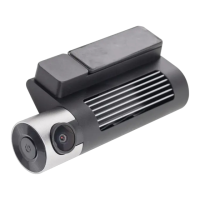

 To Next Page