Product Operation
Note:
a. During time scheduling, press “ON/OFF” on remote to set hour and minute;
press “Schedule” to enter/quit schedule setting.
Cleaning Modes
Four cleaning modes to meet your different needs.
1. Auto cleaning
For example: If current time is 8:00am, and remote setting number is 01:00. If it has
been successfully saved, the robot will start working in1 hour. It means 9:00am has
been scheduled as working time and the robot will start cleaning at 9:00am everyday.
Note:
The numbers show on remote is delay time during scheduling.
B. Cancel the scheduling
Press“Schedule”on remote to enter scheduling mode , then press
“ON/OFF” button one more time.(Display screen on main body will
show 00:00 when the scheduling has been cancelled. If not, press
“ON/OFF” one more time.
b. The “ON/OFF” on remote has the same function as “ ”on main body.
Press “Clean” on robot or “Clean” on
remote control to start auto cleaning. Robot
enters auto cleaning mode.
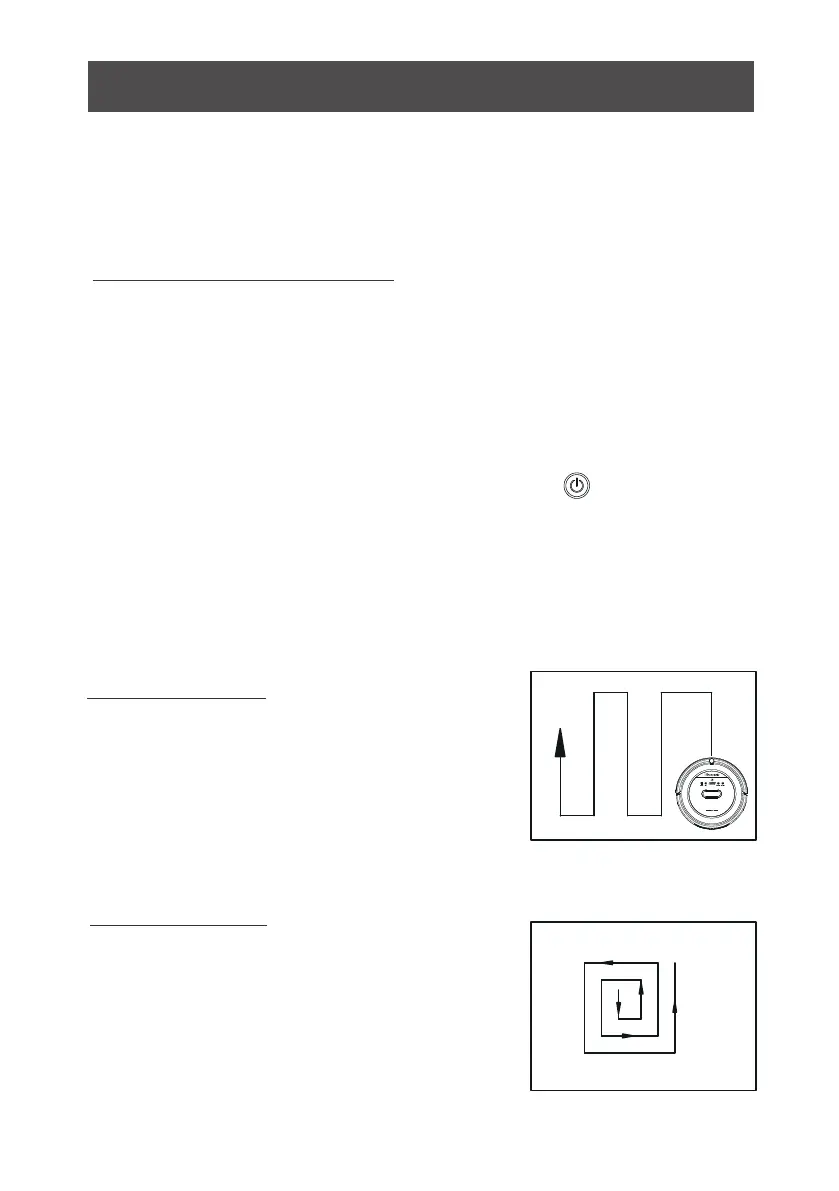
2. Area cleaning
Press ”MODE” on remote to enter area
cleaning.
a. Choose area cleaning “mode 1”, the
screen on remote will show “MODE 1”
and the robot will clean about 1*1m
square area line by line.
18



 To Next Page