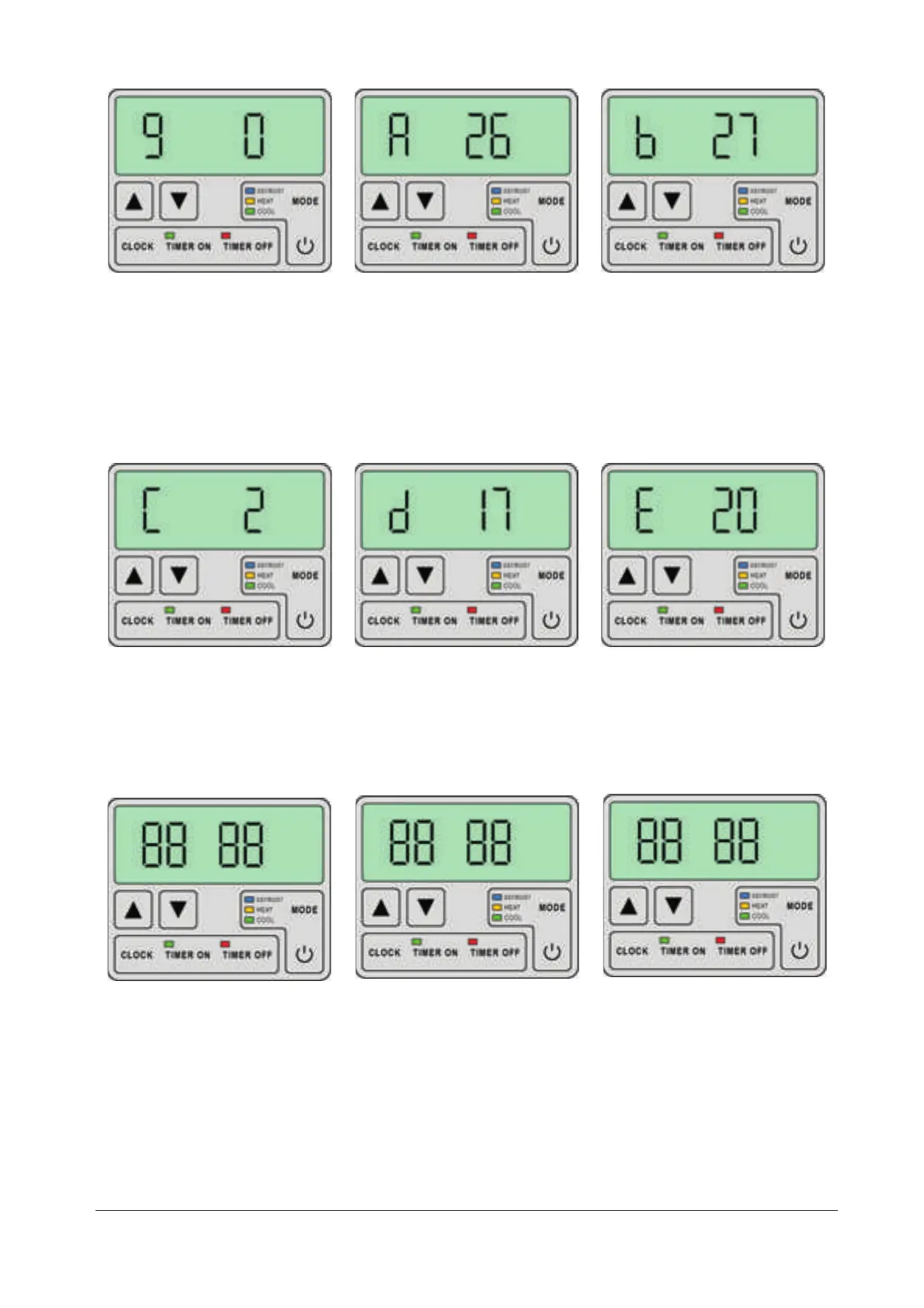
Pump
0 - always running (e.g.
because of filtering...)
1-Thepumpstarts60
seconds before the com-
pressor starts, and stops 30
seconds after the compressor
stops.
Current temperature of the
in-coming water from the
pool.
Temperature on the
Evaporator 1
Current temperature of the
out-going water to the pool.
Ambient air temperature
Temperature on the
Evaporator 2
If the evaporator is not
installed then 17 is displayed
Note:
.
16
Setting time
1. Switch the unit OFF.
▲▼
▲▼
2. Press CLOCK.
3. Press / to set hour.
4. Press CLOCK.
5. Press / to set minutes.
6. Press CLOCK to store.
Settin Time for
ON/OFFTIMER
The timer is set by pressing
TIMER ON (or TIMER OFF)
and subsequent setting the
time by . By pressing
TIMER ON (or TIMER OFF)
the timer setting is stored.
▲▼/
Cancelling the TIMER
The TIMER ON/OFF settings
can be cancelled by pressing
TIMER ON/OFF and CLOCK,
while the pump is ON or OFF.


 To Next Page