W W W . P R O T O P A I N T B A L L . C O M
24
AIRPORT
ASSEMBLY AND MAINTENANCE
ON/OFF AIRPORT DISASSEMBLY AND
ASSEMBLY
REMOVE PIN HOUSING ASSEMBLY
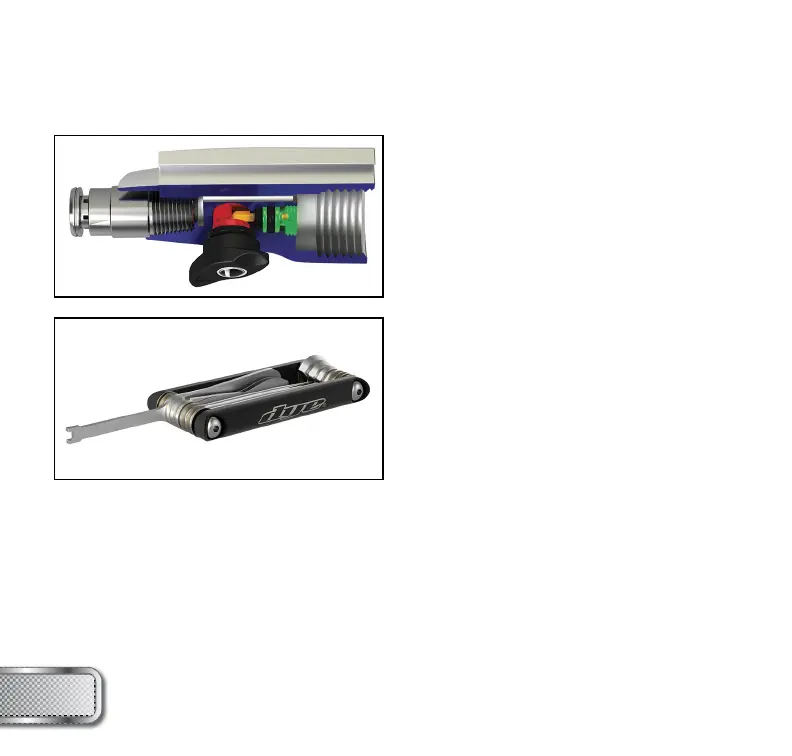
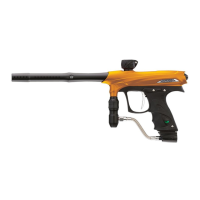
To disassemble the UL™ airport use the airport
tool included on the DYE Multi-Tool (available
separately).
• Insert the airport tool into the Pin Housing and
turn counterclockwise 3-4 revolutions. Note
that the airport lever must be in the OFF
position for the tool to grab the housing.
Remove housing out of the airport body.
• The pin and 005 O-ring may or may not come
out with the housing, if necessary use a pair
of needle-nosed pliers to pull the pin out and a
dental pick to remove the 005 O-ring.
INSTALL PIN HOUSING ASSEMBLY
• Coat the 005 O-ring in lube and drop it into the airport body. Use a 1/4” Allen wrench to fully
seat the O-ring in place by pushing gently on it.
• Insert the Pin into the Pin Housing from the backside.
• Place the housing onto the airport tool and insert the housing into the airport body.
• Turn clockwise until the Pin Housing fi ts snugly into the airport body.
* If the airport tool is not available, a pair of needle-nose pliers can be used to unscrew the
Pin Housing. Just take care to not scratch or damage the threads or Pin Housing.
NOTE: For exploded view of airport and parts list see page 28 .



 To Next Page