CONFIGURATION PRO-VISION® Video Systems
DVR-906M SYSTEM GUIDE
58 provisionusa.com
Network Settings
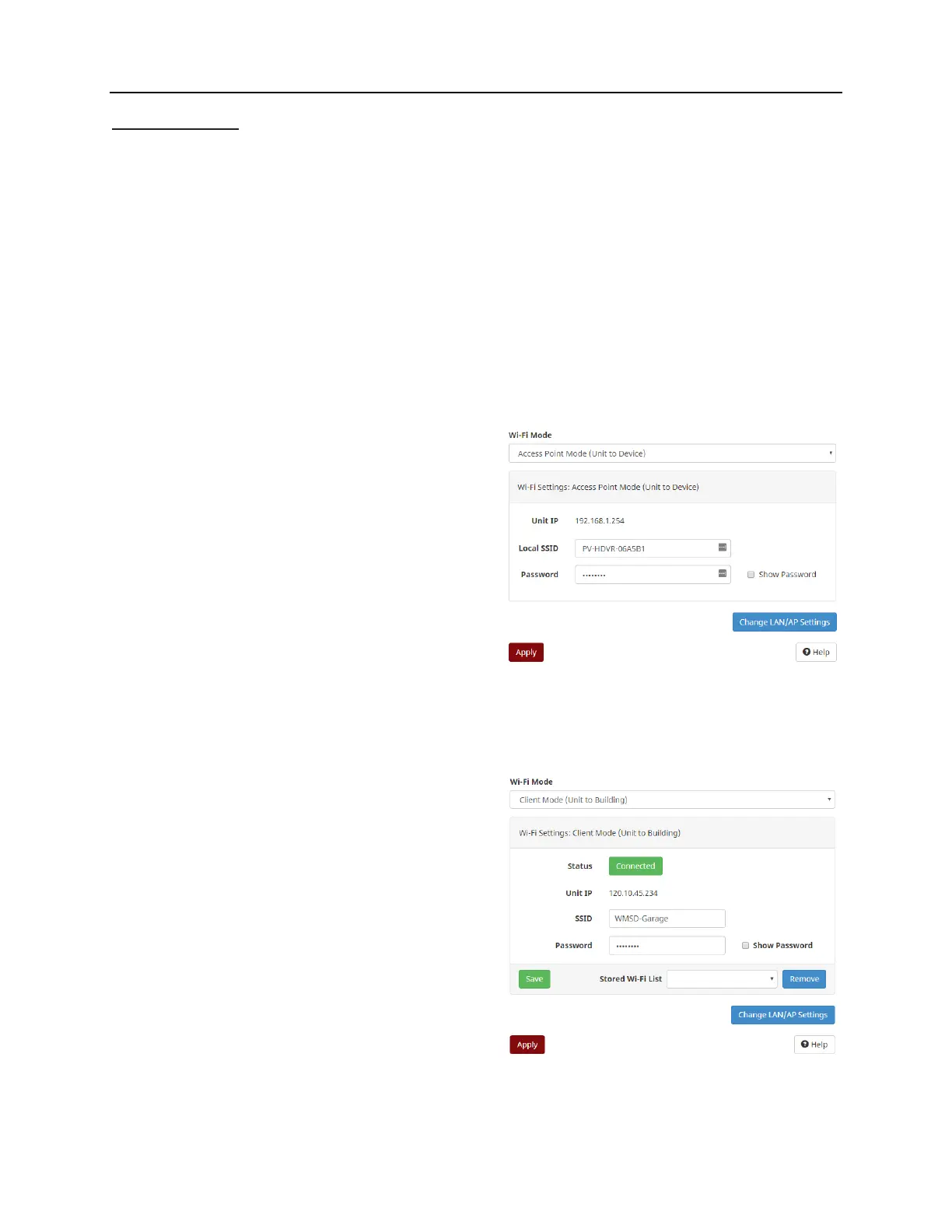
The network settings allow the user to configure the LAN and Wi-Fi functions of the DVR unit. The default
configuration is to have Wi-Fi enabled using Wi-Fi Access Point Mode. There are two different Wi-Fi
modes on the DVR unit that can be set from the “Wi-Fi Mode” option at the top of the page:
1. Access Point Mode:
Enabled by default, this mode allows your smart device to connect directly to the DVR unit for
remote configuration and access to view cameras and recorded video files.
2. Client Mode (Unit to Building:
This mode is used to allow your device to automatically connect to your building’s Wi-Fi when it
comes into range; this allows the video files on the DVR to be accessed and transferred remotely
either manually or automatically using the DVR-928 Automatic File Transfer software.
If you do not want use the built-in Wi-Fi, set the “Wi-Fi” at the top of the page to “Disabled”. Once applied,
the only way to connect to the DVR unit is through the LAN connection.
Wi-Fi Settings: Access Point Mode:
Unit IP:
This is the IP address of the DVR unit for
communication to your device once connected.
Local SSID:
This is the name of the Wi-Fi AP that the DVR will
broadcast, typically it should contain the vehicles
unit ID number. The default configuration is to use
“PV-HDVR-xxxxxx” where xxxxxx is the last
characters of the DVR’s internal MAC address
assigned at the factory.
Password:
The password is the security method used to protect the Wi-Fi from undesired access. All DVR units
are shipped using a default password of “doesitall” and it is recommended that this is changed to
something unique. Typically, the Wi-Fi passwords for all the vehicles in the fleet are set to the same
unique password.
Wi-Fi Settings: Client Mode:
Status:
This field displays the current Wi-Fi client
connectivity status (Connected/Disconnected).
Unit IP:
If connected, the IP address of the DVR unit will
display.
SSID:
This is the name of the Wi-Fi AP on your building
that you wish to connect to, ensure that it is typed
correctly with capitalization.
Password:
This is the password of the Wi-Fi AP on your building that you wish to connect to, ensure that it is typed
correctly with capitalization.



 To Next Page