PS Engineering
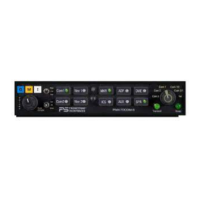
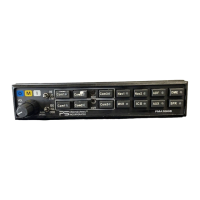
PMA7000B Audio Selector Panel and Intercom System
Installation and Operator’s Manual
200-780-0004 Page 3-6 Feb. 2004
proved airborne telecommunications system, the PMA7000B can serve as a audio control and distribution
center. Each intercom position has a "hook switch." The pilot's hook switch is the "Com 3" button on the
audio panel, the others are discrete switches mounted adjacent to the headset jacks. When Com 3 is active
in the duplex mode, the TX button will blink about twice as fast as the normal transmit rate.
When the intercom is in ALL mode, the pilot can speak on the phone only
if the Com 3 is selected for
transmit (Com 3 Xmt button activated). If any passenger places his or her switch into the “off-hook”
position all passengers will also be heard on the phone. All will hear selected audio. Com 1 audio is auto-
matically heard in the headsets. The pilot and copilot will have transmit capability on the other selected
transceiver Com 1 or 2, simply by using their respective PTT switch.
In CREW mode, the pilot and copilot are may use the telephone, with their respective hook switch (the
pilot selects Com 3 on the Xmt selector). Any passenger who places their switch into the off-hook position
will also have access to the phone, and all four passengers will hear the conversation.
In ISO intercom mode, when the PMA7000B is in the Com 3 mode, the pilot position is in the "Phone
Booth." Only the pilot will hear the telephone, and only he will be heard. He will also have access to Com
1 or 2, and will transmit on that radio using the PTT. All selected audio is provided. If any other passenger
goes “off hook” they will hear the phone.
Note: Because the cellphone uses an intercom circuit, all stations on that circuit will lose
intercom capability when the cellphone is in use.
3.8 Marker Beacon Operation (If present)
The optional Marker Beacon Receiver uses visual and audio indicators to alert you when the aircraft passes
over a 75 MHz transmitter.
The Blue lamp, labeled "O," is the Outer Marker lamp and has an associated 400 Hertz 'dash' tone. The
lamp and tone will be keyed at a rate of two tones/flashes per second when the aircraft is in the range of the
Outer Marker Beacon.
The Amber lamp, labeled "M," is the Middle Marker lamp and is coupled with a 1300 Hertz tone. It is
keyed alternately with short 'dot' and long 'dash' bursts at 95 combinations per minute.
The White lamp, labeled "I," is the Inner marker and has a 3000 Hertz 'dot' tone. The lamp and tone will be
keyed at a rate of six times per second.
The audio from the Marker Beacon Receiver can be heard by selecting the "MKR" push-button switch. To
adjust the volume level, there is a service adjustment located on the top of the unit.
A three-position switch is used to set the receiver sensitivity and to test the indicator lamps. Use "HI" sen-
sitivity initially. This allows you to hear the outer marker beacon about a mile out. Then select the “LO”
sensitivity to give you a more accurate location of the Outer Marker. The momentary down switch position
is marker test, labeled "T/M" and illuminates all three lamps simultaneously to assure the lamps (internal
and external) are in working order. TST does not activate MM sense output.
Pressing the marker mode select down (to “T/M”) will cause the marker audio to mute for that beacon. The
next beacon received will re-activate the audio.
3.9 Internal Recorder System (Option 1, 7)
The Intercom Recording System is a digital recording system allowing automatic storage and playback of
aircraft radio traffic.
Operating as a continuous loop recorder, (first message received will be the last heard), the recorder has
one minute of recording time or up to 16 messages. With its own built in VOX circuit, there are no buttons
to press to start recording. The system automatically begins to record the instant the radio becomes active.
Only aircraft radio audio in pilots headset is recorded and only the pilot will hear the playback audio.
3.9.1 Operation
Recording is automatic; there is no action required by the pilot. To play back the last recorded message,
simply press the momentary switch associated with the IRS. Each additional press of the button will play


 To Next Page