DRS4 Evaluation Board User’s Manual
Page 13 of 43
2.3. Upgrading from software
Prior to software version 5.0, a different USB driver has been used. If one wants to install the
current version over a pre-5.0 software version, one has to tell Windows to update the USB
driver after the 5.0 software has been installed as shown in the previous chapter. This is done
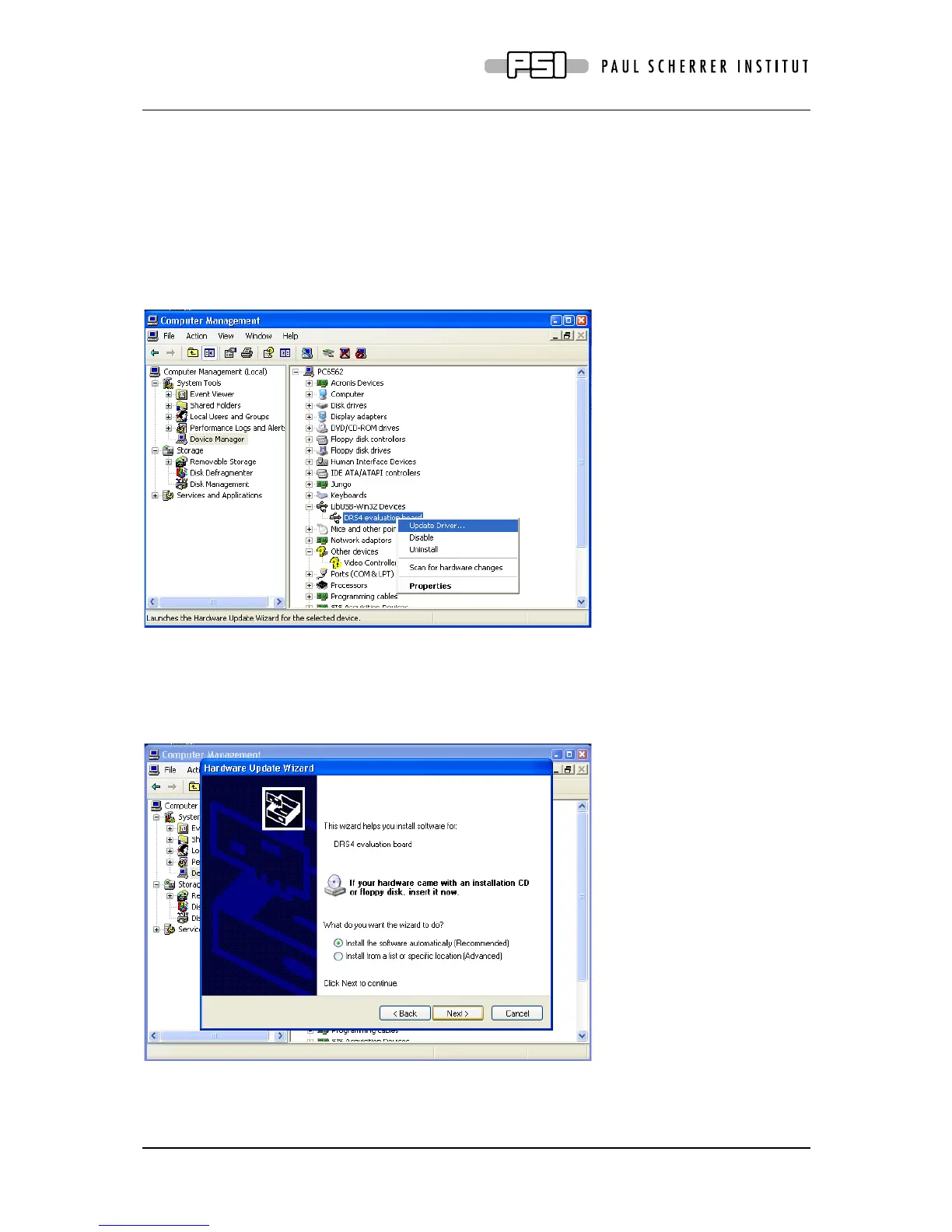
via the Device Manager, which can be accessed through Computer Management. If an old
driver is installed, there will be an entry “DRS4 evaluation board” under the group “LibUSB-
Win32 Devices”. To update the driver, do a right mouse click on the board and select
“Update Driver…” from the context menu:
Click “No” on the next page asking to connect to Windows Update, then select “Install the
software automamtically”:
This will update the USB driver for the DRS4 board correctly. The board will now be listed
under “libusb (WinUSB) devices” instead of “LibUSB-Win32 Devices”.



 To Next Page