-36-
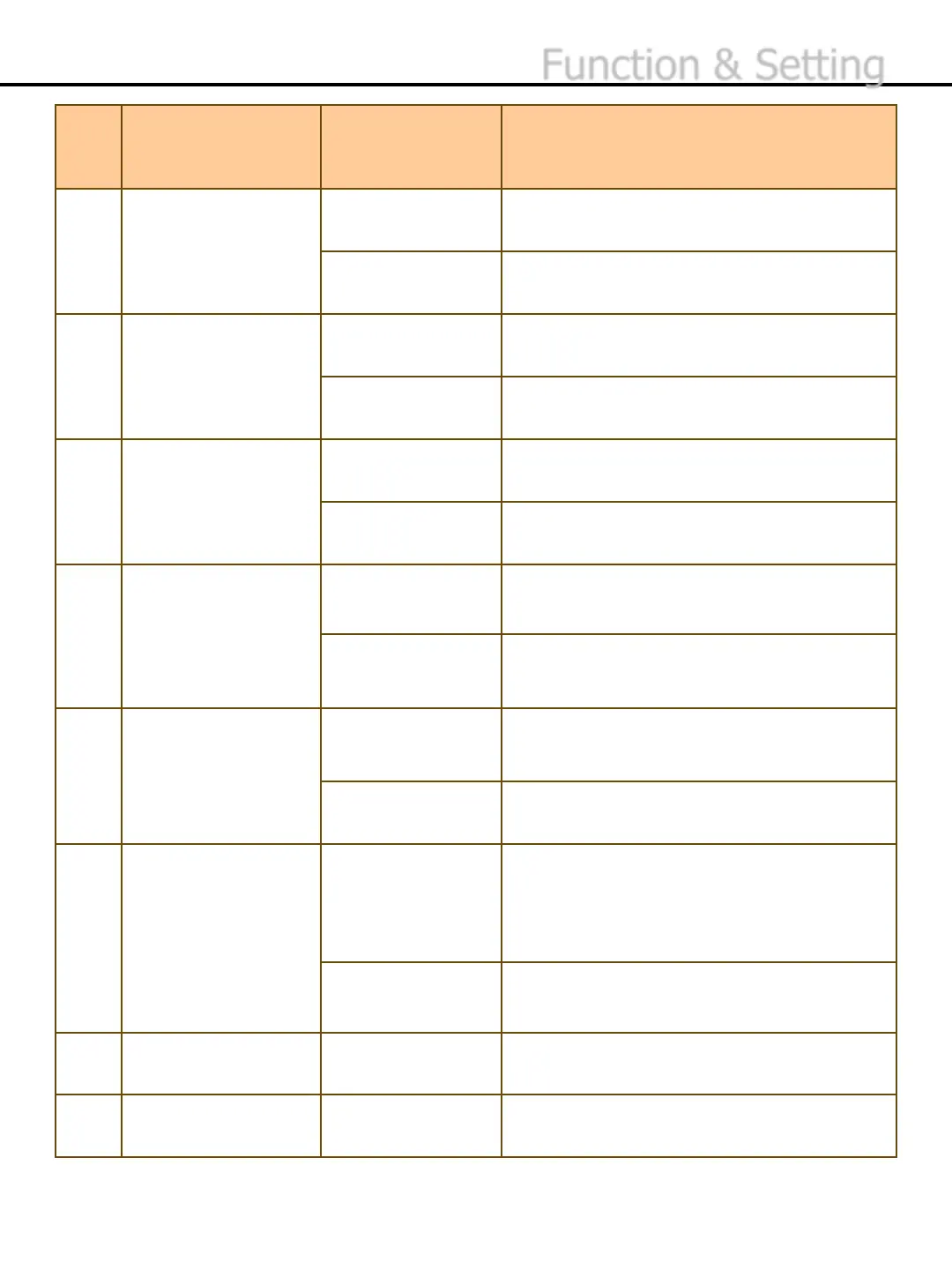
No. Setting Menu Sub Menu
10 Touch Button Only Set to work with buttons only.
Touch+ Button Set it to work with touch keys and buttons.
11 2’nd Fitness On Turn on the 2’nd fitness function of the
fitness sort mode.
Off Turn off the 2’nd fitness function of the
fitness sort mode.
12 Batch Plus On Accumulate the counting results until the
setting value of batch is full.
Off Turn off the batch plus function.
13 CF Run/Stop Run If
a counterfeit banknote is detected, send it
to Reject Pocket and keep counting.
Stop Stop running when a counterfeit banknote is
detected.
14 BL Run/Stop Run If a banknote in Black List is detected, send
it to Reject Pocket and keep counting.
Stop Stop running when a banknote in Black List
is detected.
15 Save SN Img On Save the serial number capture image when
using Multi Auto, Value, Serial Number
functions.
You can check the stored capture images in
function – Display – Serial No Info.
Off Turn off the function of serial number image
capture.
16 Print Setting To set the options for printer.
17 Default Set Return to the initial setting value.
Function & Setting


 To Next Page