20
Listening to Internet Radio and more Siesta Flow Owner’s Manual v1.0
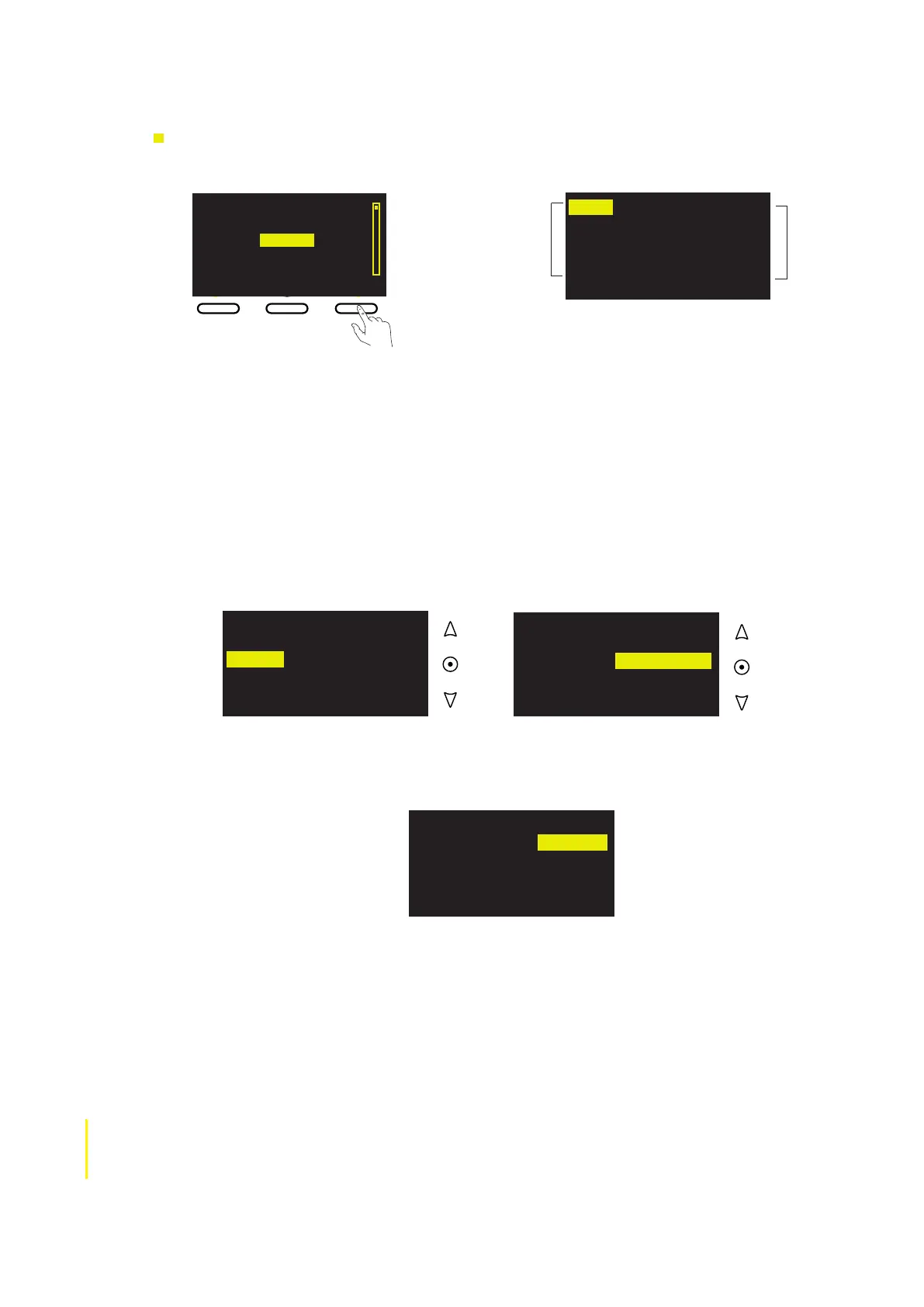
2 Highlight and select a search category and then use the navigation buttons to browse and
select search terms. You can search by any combination of these search categories:
Name Search by all or part of the name of a station, podcast, programme.
Genre Choose to display only content from a certain genre, eg, Jazz.
Country Choose to display only content broadcasting from a particular country.
Language Choose to display only content broadcasting in a particular language.
Quality Choose to display only content that matches your desired audio quality. Quality
ratings are from 1 to 5, where 1 is low quality, 3 is medium and 5 is excellent.
For example, change the Country category to The Netherlands (highlight and select ‘Country’,
then scroll through options until ‘Netherlands’ is displayed and tap select).
You can select and change as many search categories as you like before you search for
matching content, eg, you can also change the genre to ‘Classical’ (highlight and select
‘Genre’, use the navigation buttons until ‘Classical’ is displayed and then tap Select).
Search for a station, listen again programme, podcast or PURE sound
1 Tap Search from the content list of the current Lounge source to display the Search screen.
Displaying the
Search screen
from the station
list
Name [All]
Genre [All]
Country [All]
Language [All]
Quality [All]
Clear ClearGo Home
Zuidoost Brabant
Zupanijski Radio Sibenik
+ Radio
+2 Radio
1 Click FM
Add ♥
Search
Name [All]
Genre [All]
Country [Netherlands]
Language [All]
Quality [All]
Name [All]
Genre [All]
Country [Sp[All]
Language [All]
Quality [All]
Clear all ClearGo Lounge
Name [All]
Genre [Classical]
Country [Netherlands]
Language [All]
Quality [All]
Clear all ClearGo Lounge
Search
terms
Search
categories
3 When you’ve selected your chosen search terms, tap Go to search for all the stations, listen
again programmes or podcasts that match your selections. If you want to reset the Search
categories to ‘[All]’ tap Clear all.



 To Next Page