21
Listening to Internet Radio and more Siesta Flow Owner’s Manual v1.0
4 A list of stations, listen again programmes or podcasts that match your criteria is
displayed. Highlight and select an item from the list to begin playing.
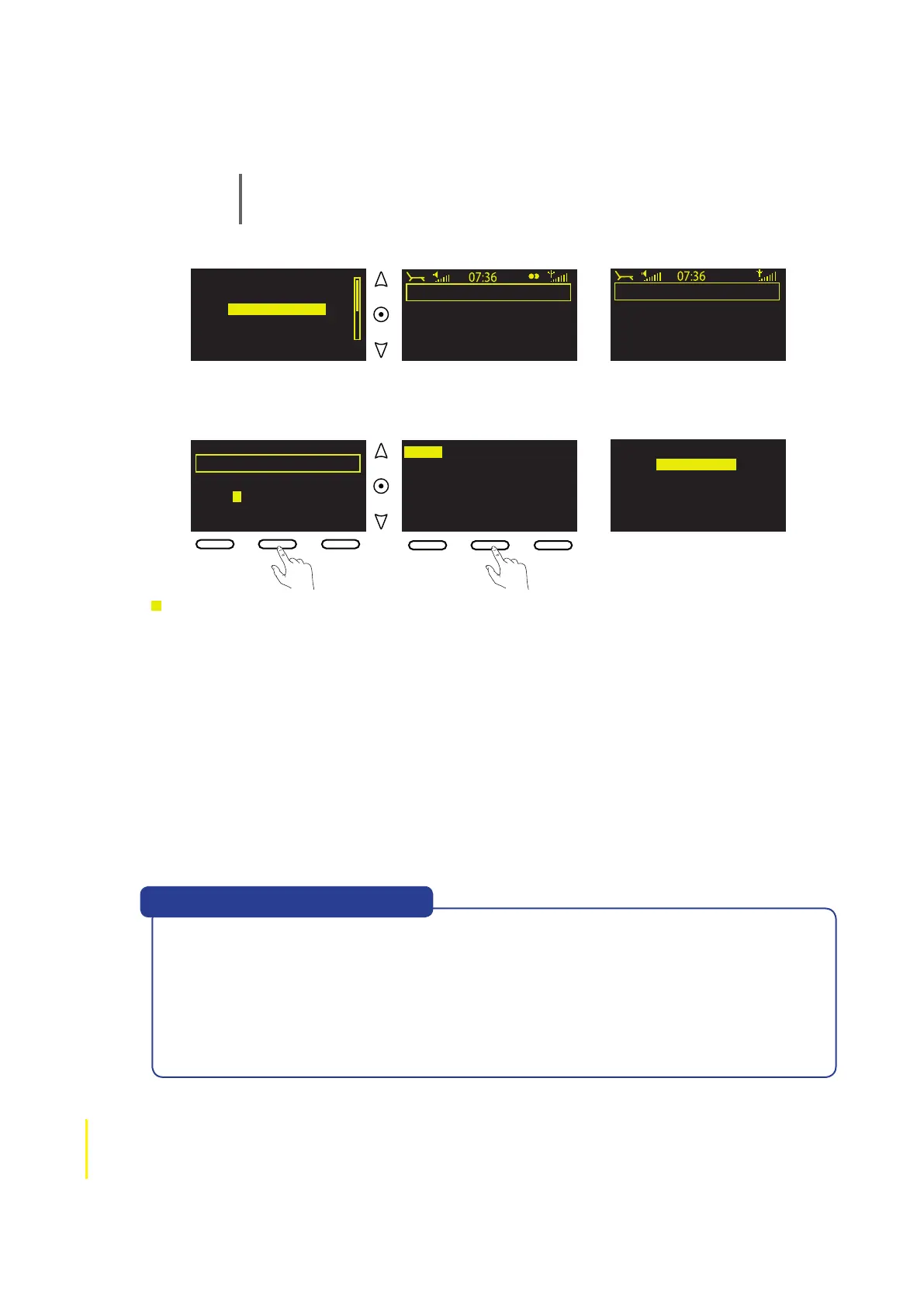
Note If you select ‘Name’ you can enter the name of a station, programme or podcast,
which is handy if you know exactly what you’re looking for. Just select ‘Name’, use the
navigation buttons and Select to enter all or part of the name you’re looking for and tap
OK.
abc defghijklm
nop qrstuvwxyz
sp0123456789
Enter name
DeleteOK Clear
kexp
KEXP 90.3FM
Search
Add
♥
Entering a
station name
Radio Omproep Schouwe
Raudio Special 9 Beet
AVRO Klassiek 2
AVRO Klassiek 3
AVRO Klassiek 4
Search
Add ♥
Now tuning...
Description not available
Add fav Options
AVRO Klassiek 2
For a broader picture
Options
Add
♥
Name [kexp]
Genre [All]
Country [All]
Language [All]
Quality [All]
Clear all ClearGo Lounge
If you see the message ‘Station not available’ the radio station may be temporarily off air, or
you may be attempting to tune in to a station that has closed for the day or night depending
on the time in the country of broadcast.
If the ‘Station not available’ message persists with a particular station then it’s possible that
the station has closed down or there is a technical problem with the audio stream. Please
let us know by using the ‘Contact Us’ page at connect.pure.com and we’ll investigate the
problem and fix it if possible.
Help! I see ‘Station not available’
To select another station, programme or podcast
1 When listening to the station, programme or podcast, use the navigation buttons to display
your most recent search results, which are remembered until you perform a new search.
2 When your most recent search results are displayed, either highlight and select another
item or do one of the following:
• To perform a new search within the same content category (eg, Stations) tap Search to
display the Search screen. Modify or clear your search terms and tap Go to do a new
search.
• To Search within a different content category (either Stations, Listen again or Podcasts)
tap Back go back to the Lounge Home screen and highlight and select a new content
category.



 To Next Page