USR-DR13X User Manual
4. Operation mode
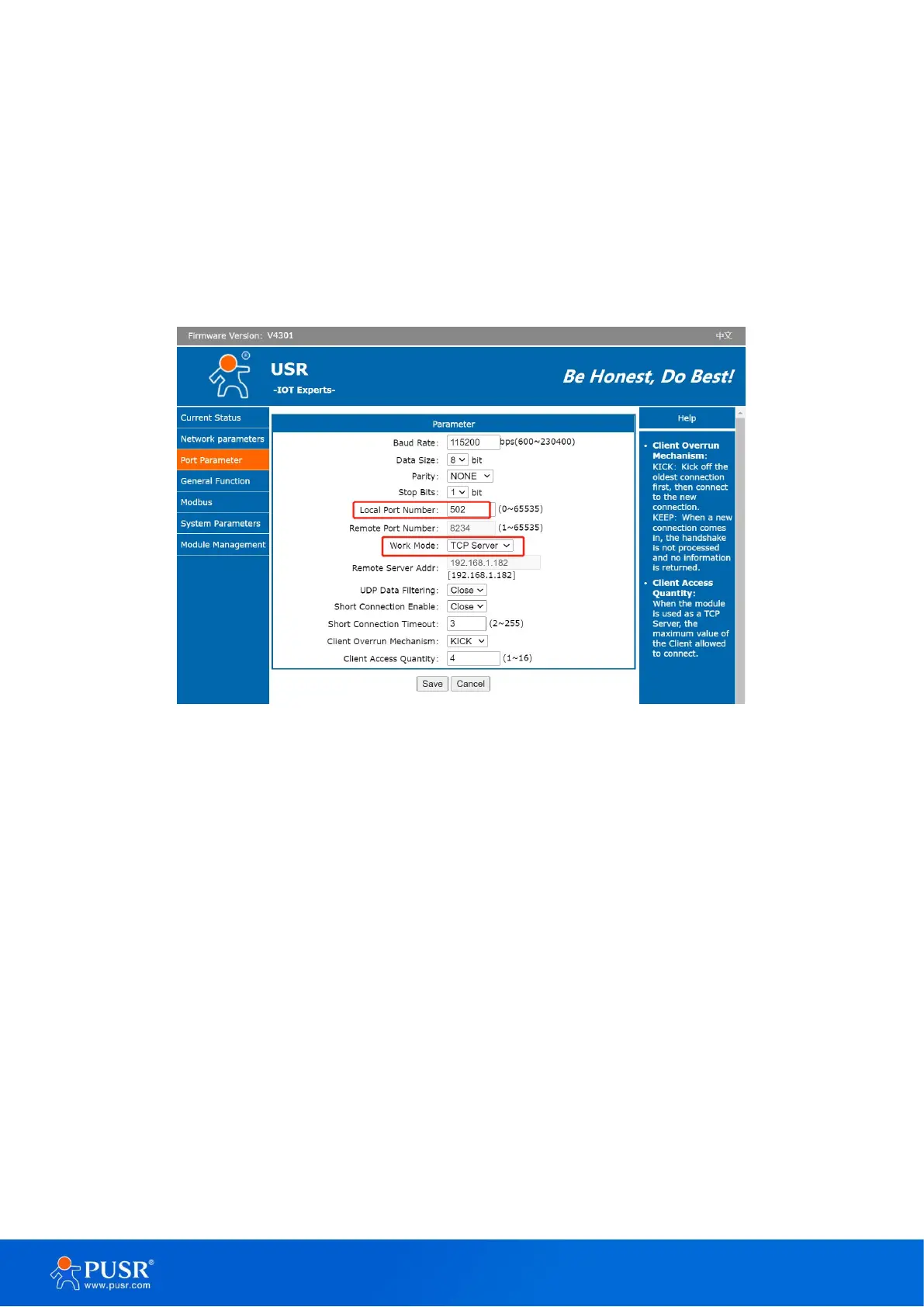
4.1. TCP server
In TCP server mode, the TCP connection is initiated from the host (TCP client) to the USR-DR13X Series device server.
This operation mode supports a maximum of 16 simultaneous connections. Once the connection is established between the
DR13X series and the remote host computer (remote TCP client), data can be transmitted in both directions. The work mode
can be set in “serial port” tab.
Figure 24. TCP server mode
When the device work as TCP server, it allows up to 16 clients to access. The default is 4. We can test it with test
software. Setting of the software is shown in the following picture. Once the TCP connection is established, the
link indicator will turn on.
Protocol: TCP Client
Remote Host Address: 192.168.1.184 (the IP of USR-DR134)
Remote Host Port: 503 (the local port of USR-DR134)
The data transmission is shown in Figure 25.


 To Next Page