USR-DR13X User Manual
reception for a long time, and the serial server automatically restarts. If the restart
time is set between 0 - 59 seconds, this function does not take effect. Only when the
time is ≥ 60 seconds, the restart function of the device without data will take effect.
3.2. Configuration software
The parameters are also can be configured by config software. The parameter function is already introduced in
Chapter 3.1. In this chapter, we how to config the parameters via config software.
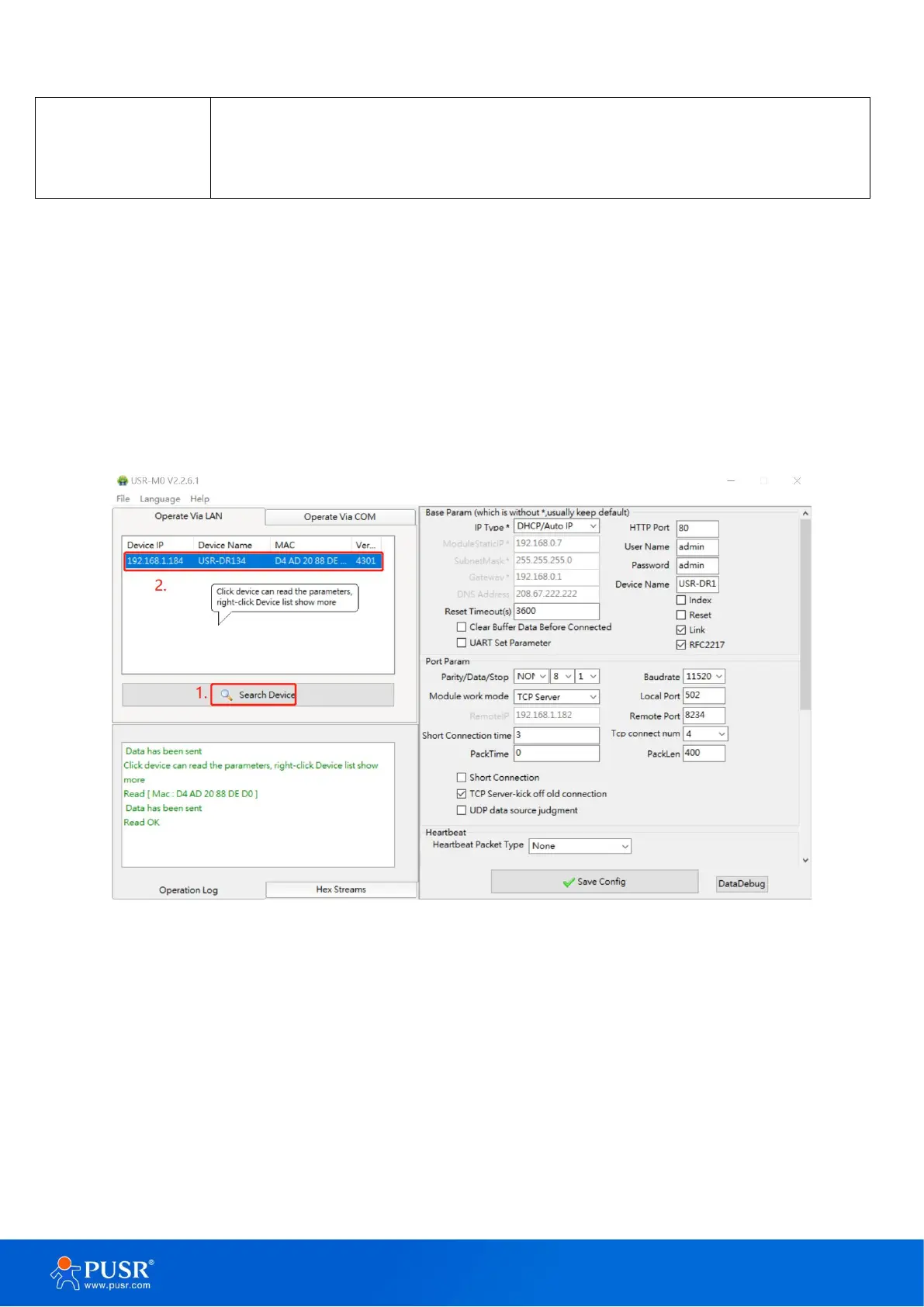
3.2.1. Search device
Run the config software, if the USR-DR13X Serial Device Server is already connected to the same gateway as
your PC, the device can be accessed via broadcast packets. Users can search all the DR13X Series device servers
on the network and show them on the Serial Device Server List Area of the utility.
Figure 18. Search device
3.2.2. Parameter settings
Users can modify the parameters as needed, and the click “Save Config” to make the parameters take effect.
More parameters can be checked by scrolling down or up.


 To Next Page