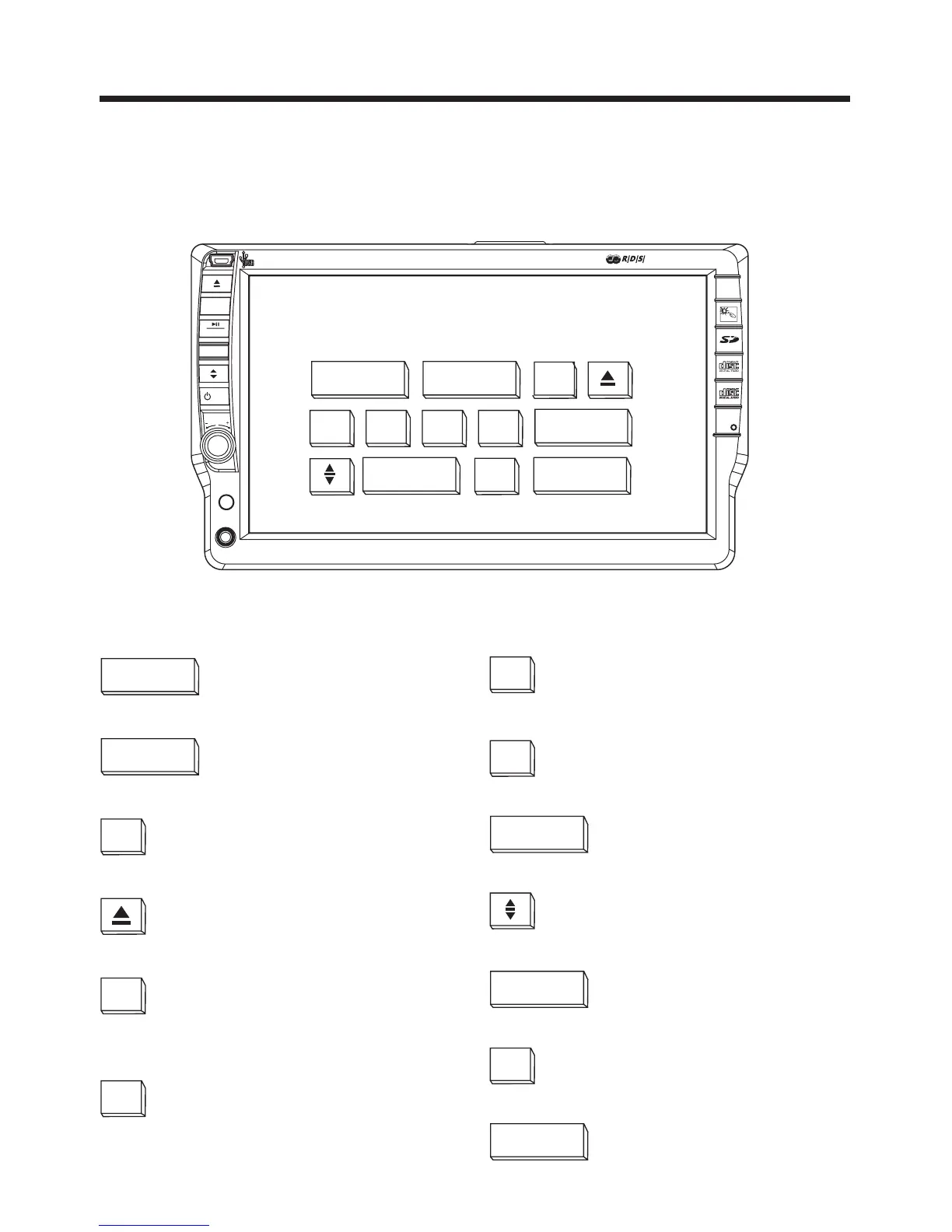
Control Panel
Touch Panel
Key Functions
-13-
Touch Screen Key :
MODE
Operating mode selection
MUTE ON
To switch of the sound
Loading and ejecting the
DVD/CD
VOLUME-
Decrease the volume level
Changing the viewing angle
of the operating unit
SEL
Select the menu of the
Picture/Sound
VOLUME+
Increase the volume level
DSP
Select EQ function
TA
Turning pre-switching for
traffic announcements ON
and OFF . (Only for RDS)
AF
Switch ON and OFF and
alternative frequency .
(Only for RDS)
S-WOOFER
Subwoofer Function
CLK
Touch briefly show/hide
clock, touch longer to set
theclock.
LUD
Loudness Function
VOLUME+VOLUME-
MODE MUTE ON
SEL
DSP
S-WOOFERLUDCLKAFTA
RES
SEL
CH1-6
REL
MOD
VOL
IR
AUX IN
CAR DVD/VCD/CD/MP3 PLAYER WITH MPEG4
TOUCHSCREEN



 To Next Page