EasyManua.ls Logo

Pyle PLD71MU - User Manual

Pyle PLD71MU
38 pages
Print Icon
To Next Page IconTo Next Page
Loading...
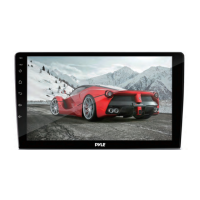
PLD71MU
Motorized Slide Down and Detachable Panel
7-Inch Wide TFT Touch Screen Monitor
Car DVD/VCD/MP4/CD/MP3 Player
Built in AM/FM Tuner and RDS
SD Card Slot in the panel
Front panel USB port and AUX input

Questions and Answers

  • M
    Mr. Thomas SparksAug 20, 2025
    What to do if my Pyle PLD71MU Car Video System has no power?
    • O
      omar18Aug 20, 2025
      If your Pyle Car Video System isn't powering on, there are a couple of things to check. First, ensure your car ignition switch is in the "ACC" position if the power supply is connected to the car accessory terminal. Also, check the fuse; if it's blown, you'll need to replace it.
  • J
    Jean ColeAug 22, 2025
    Why does my Pyle Car Video System have no television/video image?
    • J
      Joshua FranklinAug 22, 2025
      If you're not seeing any television or video image on your Pyle Car Video System, it could be due to a couple of reasons. Check that the unit is properly connected to the parking brake detection switch according to the wiring instructions. Also, remember that for safety, video images won't display while the vehicle is moving unless the parking brake is engaged.
  • J
    Jennifer RodriguezAug 25, 2025
    What to do if my Pyle PLD71MU Car Video System disc can't be loaded or ejected?
    • K
      Karen ThompsonAug 25, 2025
      If your Pyle Car Video System is having trouble loading or ejecting discs, consider these possibilities: 1. If there is a disc inside the player, remove it before inserting a new one. 2. Make sure you're inserting the disc correctly, with the label facing upward. 3. The disc might be dirty or defective; try cleaning it or using a different disc. 4. If the car's interior is too hot, wait for the temperature to return to normal.
  • J
    Julian EstradaAug 26, 2025
    Why does my Pyle PLD71MU Car Video System radio not work?
    • M
      Melissa ByrdAug 26, 2025
      If the radio in your Pyle Car Video System isn't working, first ensure the antenna cable is firmly connected. If it is, the signals might be too weak, in which case you should try selecting a station manually.
  • R
    Robin HallAug 28, 2025
    How to fix a black and white television/video image on my Pyle PLD71MU Car Video System?
    • J
      jessica89Aug 28, 2025
      If the television or video image on your Pyle Car Video System appears in black and white, the color system setting is likely incorrect. Please switch to the correct color system from the menu.
  • W
    William RiveraAug 30, 2025
    Why is there no color in the picture on my Pyle PLD71MU Car Video System?
    • S
      Suzanne JohnsonAug 30, 2025
      If you're not seeing color in the picture on your Pyle Car Video System, the disc format might not be compatible with your TV-set (PAL/NTSC). Please adjust the television mode accordingly.
  • A
    Anna JamesSep 1, 2025
    What to do if the operation keys on my Pyle PLD71MU Car Video System do not work?
    • R
      rachel41Sep 1, 2025
      If the operation keys on your Pyle Car Video System aren't responding, it might be due to the built-in microcomputer malfunctioning because of noise. Try pressing the RESET button. Also, ensure the front panel is properly fixed in place.
  • M
    Mike FreemanSep 3, 2025
    What to do if my Pyle PLD71MU can't play back a JPEG disc?
    • C
      charles90Sep 3, 2025
      If your Pyle Car Video System is unable to play back a JPEG disc, it could be due to a couple of reasons. First, check that the disc actually has JPEG files recorded on it. If it does, the JPEG files might not be recorded in a compliant format. In either case, try changing the disc and, if necessary, record JPEG files using a compliant application.
  • J
    Johnny MoranSep 5, 2025
    What to do if no television/video image appears on my Pyle Car Video System?
    • J
      Jennifer HarveySep 5, 2025
      For safety, the Pyle Car Video System will not show television or video images while the vehicle is moving. Engage the parking brake to display images. Also, ensure the unit is properly connected to the parking brake detection switch according to the wiring instructions.
  • J
    Jeremy FryeSep 7, 2025
    Why does the television/video image appear black-white on my Pyle Car Video System?
    • M
      Mason MitchellSep 7, 2025
      If your Pyle Car Video System shows a black and white television/video image, the color system is likely set incorrectly. Please switch to the correct color system from the menu settings.

Summary

Precautions

Safety Information

Product Warnings and Compliance

Covers laser, electrical safety, copyright, and region management.

Installation Procedures

Mounting and Unit Removal

Guidelines for installation location, DIN mounting, and detaching the unit.

Electric Connection

Remote Control Operation

Control Panel Interface

Basic Operations

Power, Volume, and Source Selection

Core functions like power, mute, volume, and switching input sources.

Display and Audio Adjustments

Fine-tuning picture and sound settings for optimal experience.

Audio Modes and External Inputs

Selecting sound profiles and connecting external audio/video devices.

Radio Operation

DISC Operation

Playback Controls and Navigation

Basic playback, skipping tracks, and using special functions like zoom.

Disc Search and External Inputs

Finding content by time/track and connecting auxiliary devices.

On-Screen Information

Understanding the displayed playback details.

System Setup and Configuration

Troubleshooting Guide

Identifying and Resolving Common Issues

A table detailing symptoms, causes, and solutions for device malfunctions.

Pyle PLD71MU Specifications

General IconGeneral
Resolution800 x 480 Pixels
BluetoothYes
Rear View Camera InputYes
Aspect Ratio16:9
USB/SD Card InputYes
Maximum SD Card Size32GB
Audio File CompatibilityMP3, WMA
Power Supply12V DC
TouchscreenYes
USB PortYes
SD Card SlotYes
AM/FM RadioYes
Video PlaybackYes
Audio PlaybackYes
Screen Size7 inches
Media Formats SupportedMP3, WMA
Video SystemNTSC/PAL
Video File CompatibilityMPG
Image File CompatibilityJPEG
OutputsRCA

Related product manuals