EasyManua.ls Logo

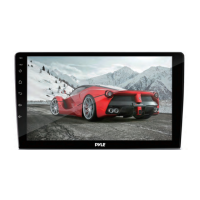
Pyle PLD71MU - User Manual

Pyle PLD71MU
38 pages
Print Icon
To Next Page IconTo Next Page
Loading...
PLD71MU
Motorized Slide Down and Detachable Panel
7-Inch Wide TFT Touch Screen Monitor
Car DVD/VCD/MP4/CD/MP3 Player
Built in AM/FM Tuner and RDS
SD Card Slot in the panel
Front panel USB port and AUX input

Questions and Answers

  • K
    Kimberly PhillipsSep 9, 2025
    Why does the radio not work on my Pyle PLD71MU Car Video System?
    • L
      Laura CarterSep 9, 2025
      If the radio on your Pyle Car Video System isn't working, first ensure the antenna cable is firmly connected. If it is, the signals might be too weak. Try selecting a station manually.
  • J
    Joshua JonesSep 12, 2025
    How to fix no power on Pyle PLD71MU?
    • M
      manuel70Sep 12, 2025
      If your Pyle Car Video System has no power, check if the car ignition switch is on. If the power supply is correctly connected to the car accessory terminal, switch the ignition key to "ACC". Also, check the fuse and replace it if it's blown.
  • S
    steelejaniceSep 13, 2025
    What to do if the operation keys do not work on my Pyle PLD71MU Car Video System?
    • D
      David HartmanSep 13, 2025
      If the operation keys on your Pyle Car Video System aren't working, the built-in microcomputer might not be operating correctly due to noise. Try pressing the RESET button.
  • B
    barbarahoustonSep 15, 2025
    What to do if disc can not be loaded or ejected in Pyle PLD71MU?
    • M
      Matthew TaylorSep 15, 2025
      If your Pyle Car Video System can't load or eject a disc, consider these possibilities: 1. There might already be a disc inside the player. Remove it before inserting another. 2. You might be inserting the disc in the wrong direction. Ensure the label faces upward. 3. The disc could be extremely dirty or defective. Clean it or try a new one. 4. The temperature inside the car might be too high. Allow the car to cool down.
  • J
    Jacqueline HaleSep 18, 2025
    Why JPEG disc can not be played back on Pyle PLD71MU?
    • C
      Courtney HughesSep 18, 2025
      If your Pyle Car Video System won't play back a JPEG disc, it could be due to the following reasons: * No JPEG files are recorded on the disc. Try a different disc. * JPEG files are not recorded in a compliant format. Record JPEG files using a compliant application and change the disc.

Summary

Precautions

Safety Information

Product Warnings and Compliance

Covers laser, electrical safety, copyright, and region management.

Installation Procedures

Mounting and Unit Removal

Guidelines for installation location, DIN mounting, and detaching the unit.

Electric Connection

Remote Control Operation

Control Panel Interface

Basic Operations

Power, Volume, and Source Selection

Core functions like power, mute, volume, and switching input sources.

Display and Audio Adjustments

Fine-tuning picture and sound settings for optimal experience.

Audio Modes and External Inputs

Selecting sound profiles and connecting external audio/video devices.

Radio Operation

DISC Operation

Playback Controls and Navigation

Basic playback, skipping tracks, and using special functions like zoom.

Disc Search and External Inputs

Finding content by time/track and connecting auxiliary devices.

On-Screen Information

Understanding the displayed playback details.

System Setup and Configuration

Troubleshooting Guide

Identifying and Resolving Common Issues

A table detailing symptoms, causes, and solutions for device malfunctions.

Pyle PLD71MU Specifications

General IconGeneral
Resolution800 x 480 Pixels
BluetoothYes
Rear View Camera InputYes
Aspect Ratio16:9
USB/SD Card InputYes
Maximum SD Card Size32GB
Audio File CompatibilityMP3, WMA
Power Supply12V DC
TouchscreenYes
USB PortYes
SD Card SlotYes
AM/FM RadioYes
Video PlaybackYes
Audio PlaybackYes
Screen Size7 inches
Media Formats SupportedMP3, WMA
Video SystemNTSC/PAL
Video File CompatibilityMPG
Image File CompatibilityJPEG
OutputsRCA

Related product manuals